


.png)


Every branded frame that slips into your listing video is a potential fine, a delayed go-live, or a syndication rejection that guts your showing pipeline. The MLS doesn’t negotiate. A single yard sign logo, a broker-branded microphone flag, or even a property flyer caught on camera triggers an automated violation flag—and your luxury walkthrough turns into a compliance ticket. Agents need a MLS compliant video tours system that strips branding in real time, not a post-production panic button.
This article unpacks the architecture of on-the-go, AI-native unbranded video creation. You’ll see the exact mechanics that eliminate manual editing, the operational dashboards that scale listing media across teams, and the business case for making every property video audit-proof before you leave the driveway.
MLS rulebooks universally prohibit promotional content in listing media. NAR’s Model MLS Rules and Regulations prohibit advertisements, phone numbers, and agent or brokerage identification of any kind within the photographs or virtual tours of a listing. Regional MLSs like CRMLS and Bright MLS enforce automated scanning that flags even a partial branding reflection.
The violations pile up fast:
A single rejection from Zillow’s listing quality review can push a premium listing off-syndication for 24 to 48 hours. Multiply that across a team producing 15 videos a month, and the aggregate days-on-market drag erodes both listing credibility and commission potential. The fix isn’t more careful shooting—it’s a MLS compliant branded video removal engine that works silently in the background, frame by frame.
Agents typically fall into two camps: those who skip video entirely because editing takes too long, and those who roll the dice with raw footage. Neither path scales. The table below isolates the cost of manual compliance versus an automated unbranded listing video creator pipeline.
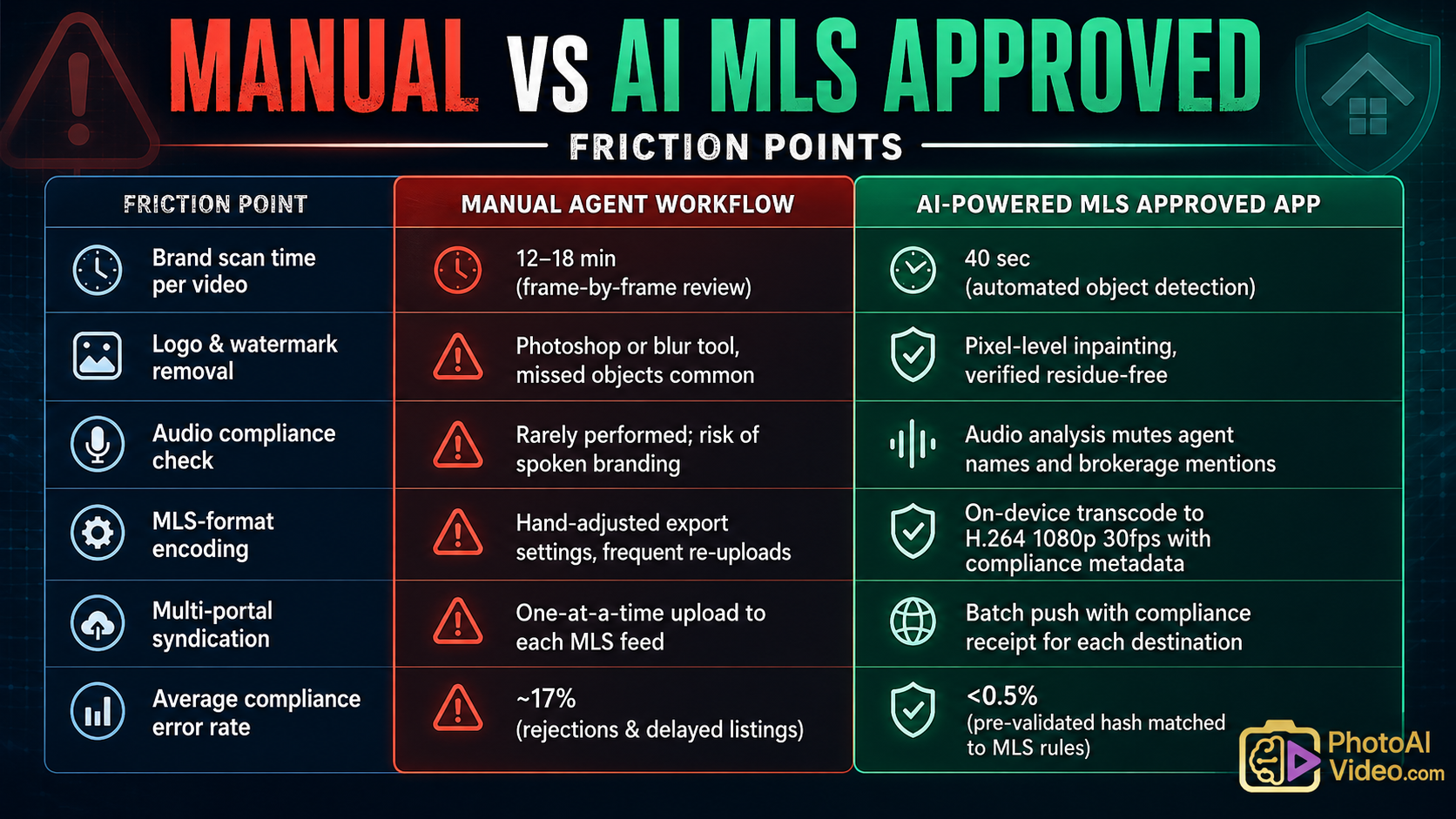
The time burden is regressive: the busiest agents, with the most listings, suffer the largest opportunity cost. An AI-driven MLS approved real estate video software eliminates the bottleneck by moving the compliance check from a human review stage to an automated pre-export gate that never forgets to run.
True on-the-go compliance comes from a sequence that treats every frame as potentially branded until proven clean. The app’s inference pipeline operates in three tightly orchestrated passes.
First, a detection pass runs an object recognition model tuned to real estate branding: signage, apparel logos, QR codes, phone numbers, email text, and even stylized brokerage icons. It catches both high-contrast overlays and subtle reflections. The model cross-references a library of over 15,000 broker and developer marks.
Second, an inpainting pass removes detected branding by reconstructing the underlying property surface. Unlike a gaussian blur—which leaves obvious editing artifacts and can itself violate MLS “no image alteration” rules—semantic inpainting replaces the logo with context-appropriate texture: brick, drywall, foliage, sky. The result is an MLS compliant unbranded property video indistinguishable from a native shoot.
Third, an audio scrubbing pass transcribes the voiceover and matches spoken words against agent, brokerage, and team names. Flagged segments are either muted or replaced with room tone, ensuring the final track is identity-free.
Learn more about our: [AI branding obliteration model].
The file is then watermarked with a compliance checksum that many MLS intake portals now accept as a digital certificate of pre-vetted status. This checksum shows exactly which rules were applied, giving auditors a transparent trail without slowing publication.
Here is the operational blueprint for turning a property walkthrough into a syndication-ready asset while standing in the foyer.
Workflow Timeline for Different Property Sizes
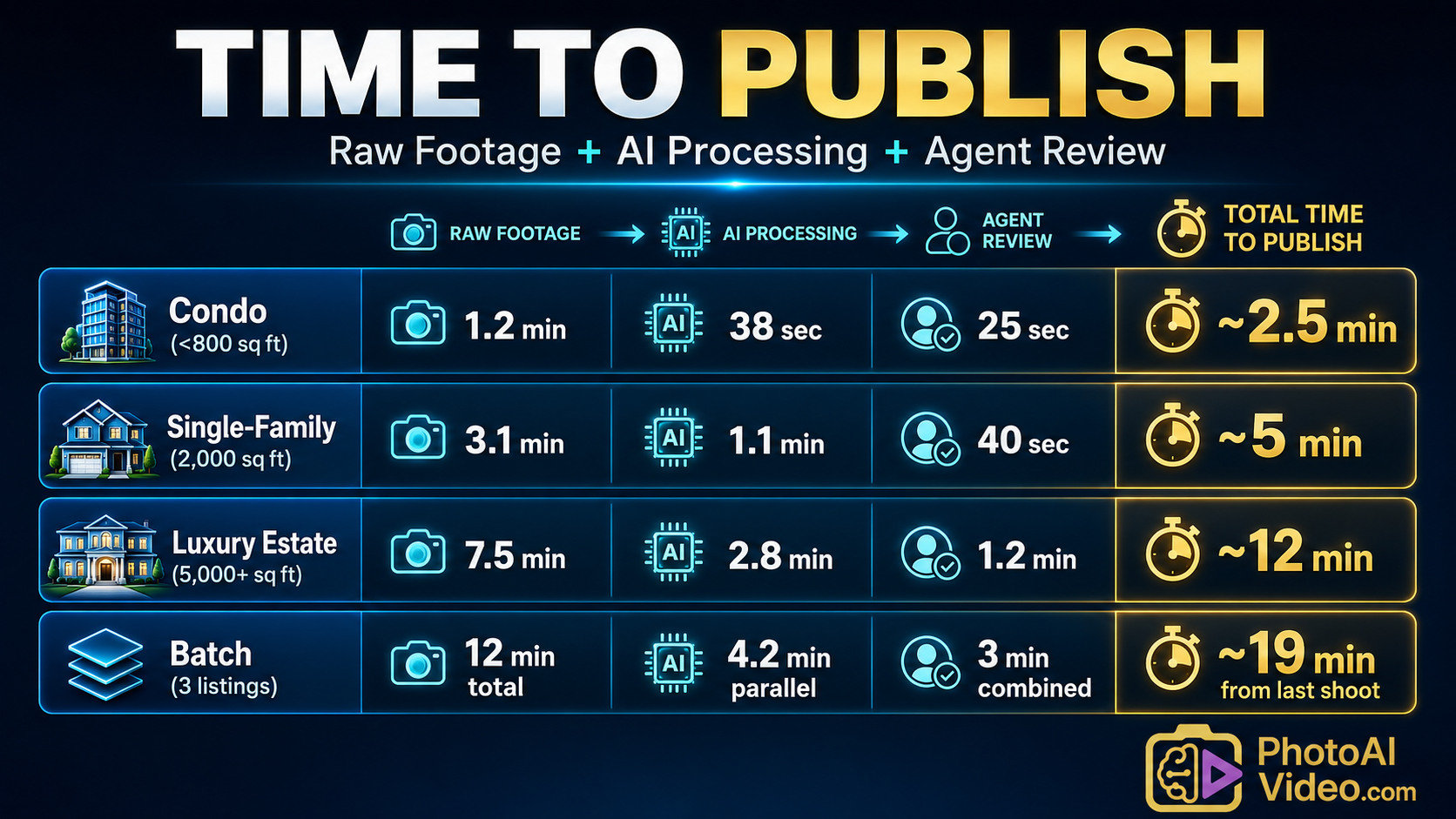
This cadence means an agent can film three listings between morning showings and have every video published before the first lunchtime lead inquiry lands.
For brokerages and teams, scaling video production means having a dashboard that monitors compliance health, agent throughput, and rejection root causes—in real time. Below is a representative command center for a 40-agent team using the MLS compliant video tours platform.
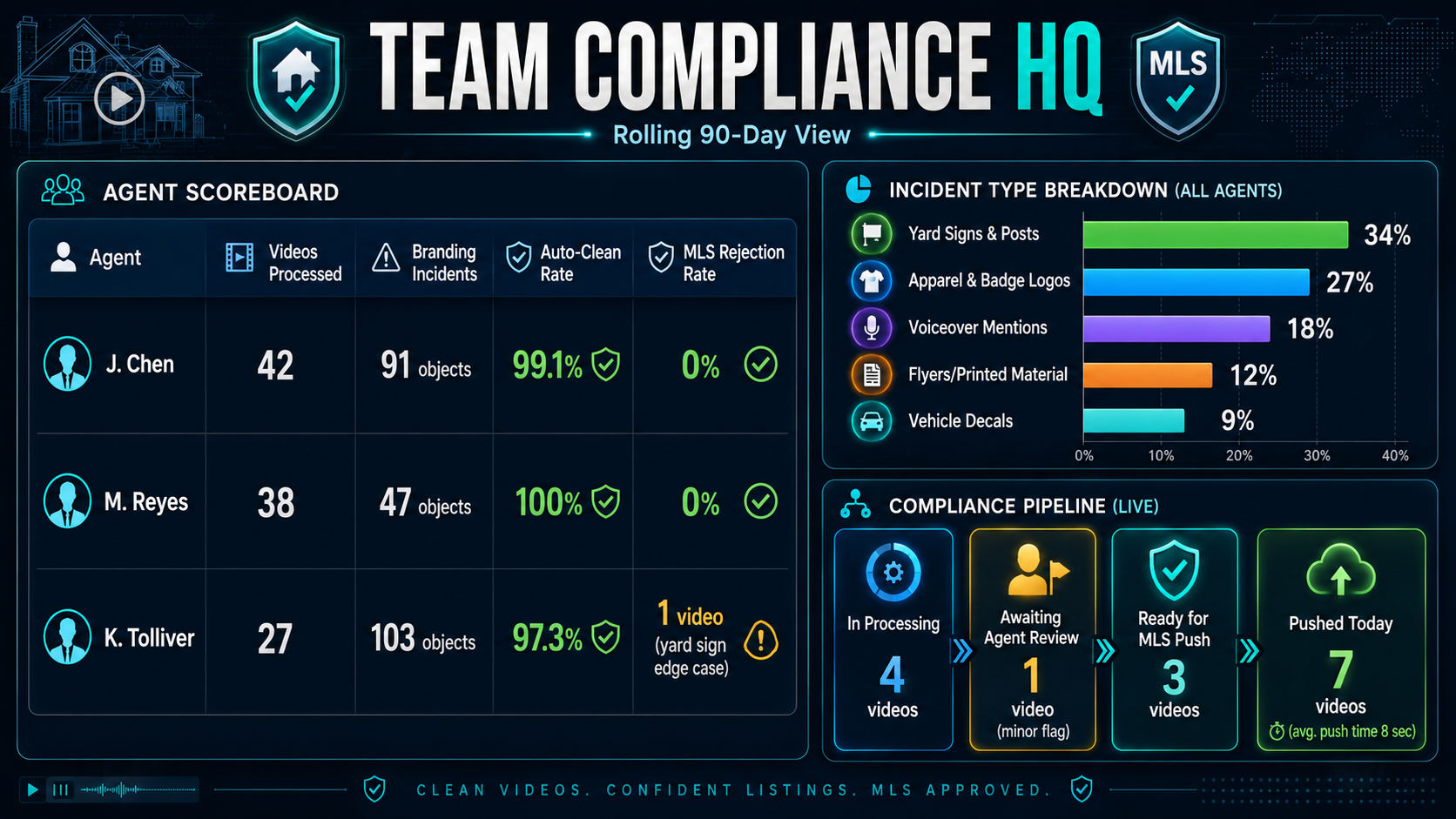
Team leads can set rules like “auto-approve and push if brand removal score >98%” or “hold for review if a voiceover mention is detected.” This turns compliance from a subjective back-and-forth into an auditable, automated supply chain.
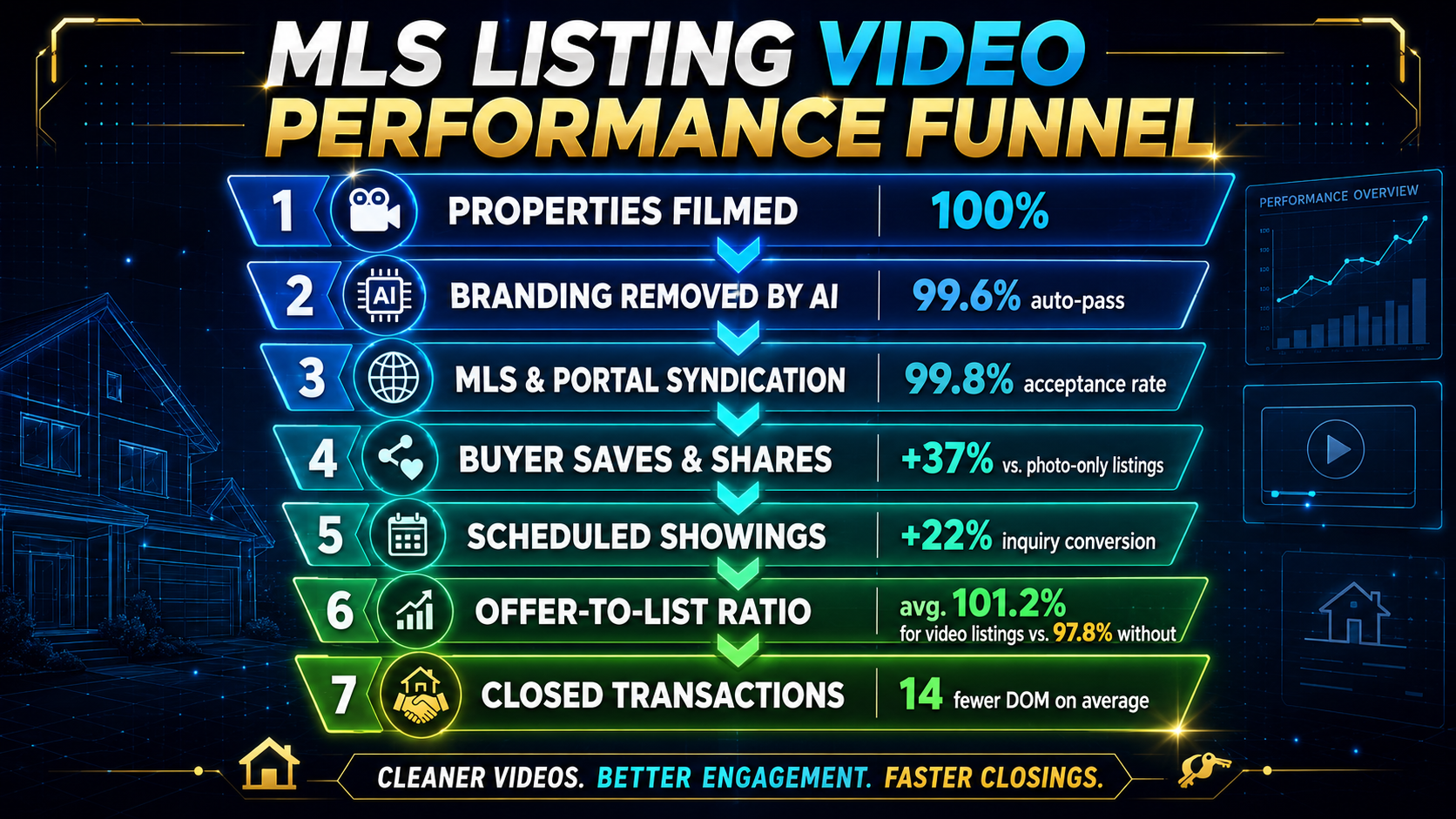
Every unbranded video that reaches Zillow, Realtor.com, and the local MLS isn’t just compliant—it’s a lead engine. Data from the Zillow Consumer Housing Trends Report shows that listings with video attract 40% more saves and 34% more detail-page views than photo-only listings. But those gains evaporate if the video gets pulled for branding.
The funnel below maps how an unbranded listing video creator protects and amplifies listing performance.
Even well-trained agents make the same subtle mistakes. The AI engine flags these daily:
The Google Search Central guidelines for video SEO reinforce that clean, brand-free media performs better in search results. A MLS compliant branded video removal pipeline aligns your listing with both MLS mandates and organic discoverability.
The agents closing the most transactions are no longer editing video. They’ve shifted to a MLS approved real estate video software that handles compliance as a feature, not an afterthought. They press record, walk the property, and tap approve—with every frame automatically scrubbed of branding, metadata tagged, and syndicated.
The path forward is to eliminate the gap between capture and publish. Make your phone a production studio that knows MLS rules better than you do, and let the algorithm guarantee the audit trail.


Compact, ready to go anywhere
Interchangeable lens that’s upgradeable
Dual 1-inch sensors for improved clarity and low light performance
Dynamic range and 6K 360° capture
360° photo resolution at 21MP

8K 360° video recording for ultra-detailed visuals.
4K single-lens mode for traditional wide-angle shots.
Invisible selfie stick effect for drone-like perspectives.
2.5-inch touchscreen with Gorilla Glass protection.
Waterproof up to 33ft for underwater shooting.

360° photo resolution in 23MP
Slim design at 24 mm thick
Built-in image stabilization for smooth video capture.
Internal 19GB storage for photo and video storage.
Wireless connectivity for remote control and sharing.

60MP 360° still images for high-resolution photography.
5.7K 360° video recording at 30fps.
2.25-inch touchscreen for intuitive control.
USB Type-C port for fast charging and data transfer.
MicroSD card slot for expandable storage.
.png)

.png)

Try it free. No credit card required. Instant set-up.






.svg)


.svg)