


.png)



Processing vehicle photography one image at a time works when a dealership has a small inventory. It becomes a serious operational problem when the volume reaches thousands—or tens of thousands—of images every month.
Dealer groups, automotive marketplaces, vehicle photography companies, auctions, and inventory software platforms all face the same challenge: getting large batches of vehicle photos processed quickly without sacrificing consistency.
That is where bulk car photo background removal can make a measurable difference.
Instead of asking an employee or outsourced editor to manually open, edit, export, and organize every image, automated workflows can process entire folders or batches through software or an API. The goal is not simply faster background removal. A strong workflow should also preserve file organization, keep vehicle images matched to the correct inventory record, identify failures, and maintain consistent quality at scale.
This guide walks through a practical bulk-processing workflow, including folder structures, API batching, processing limits, quality-control procedures, and the operational details that matter when handling thousands of automotive images.
At low volume, photo editing is straightforward.
A photographer captures 20 or 30 images of a vehicle, uploads them, and someone edits the photos.
At scale, the math changes quickly.
For example:
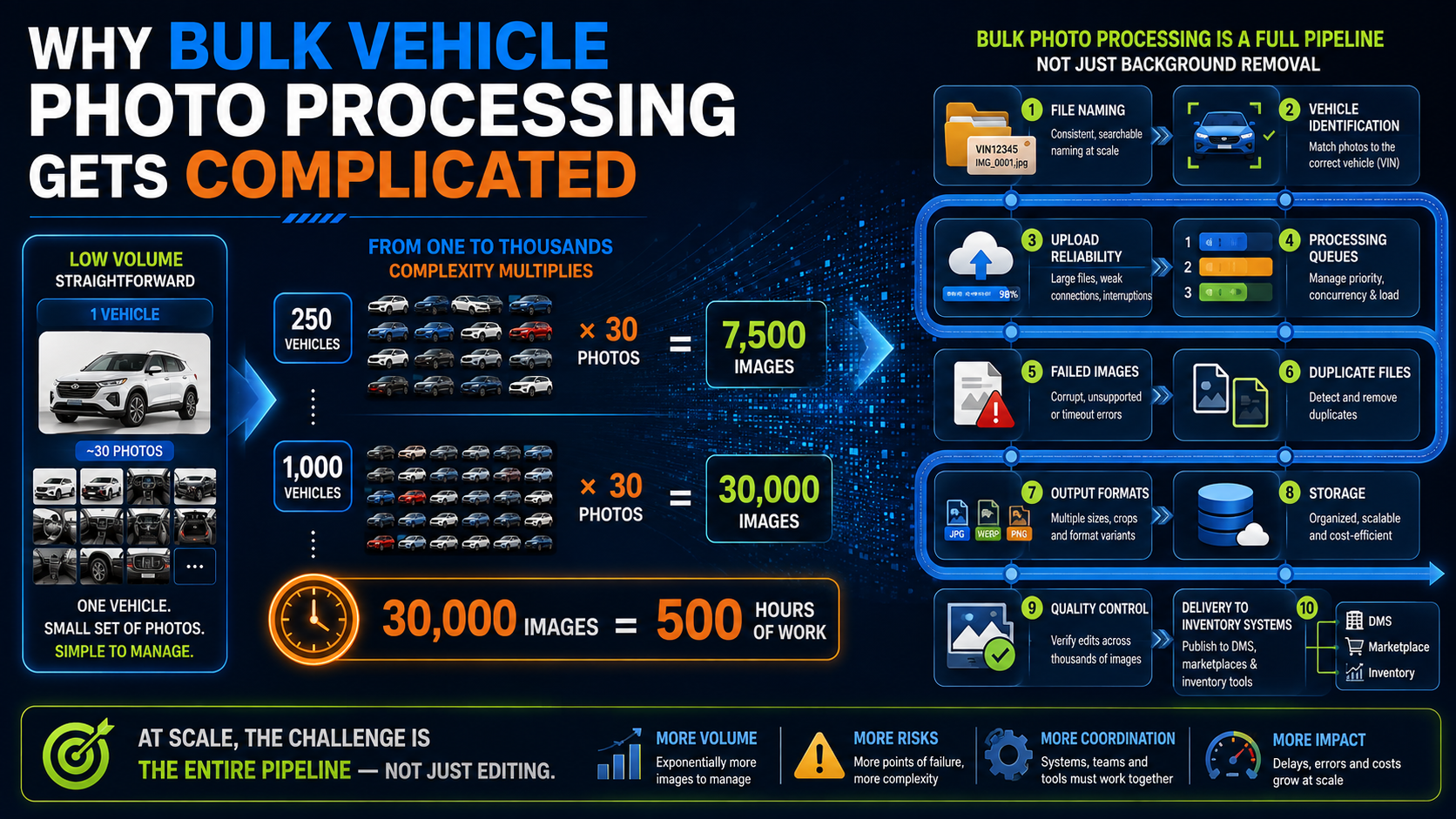
250 vehicles × 30 photos per vehicle = 7,500 images
If a dealer group processes 1,000 vehicles per month:
1,000 vehicles × 30 photos = 30,000 images
Even if a manual process requires only one minute of human involvement per photo, 30,000 images would represent 500 hours of work.
The difficulty is not limited to editing time.
Large-scale operations must also manage:
An effective bulk car photo background removal workflow addresses the entire pipeline rather than treating background removal as an isolated task.
Automation becomes much easier when incoming photos are organized consistently.
A messy folder structure creates problems downstream because the system has to determine which images belong to which vehicle.
A simple structure might look like:
/vehicle-photos
    /VIN-001
        01-front.jpg
        02-front-angle.jpg
        03-side.jpg
        04-rear.jpg
    /VIN-002
        01-front.jpg
        02-front-angle.jpg
        03-side.jpg
        04-rear.jpg
The folder identifier could be:
The most important rule is consistency.
If your existing dealership or inventory system already has a unique vehicle identifier, use that identifier throughout the photo workflow.
Image names should ideally indicate their sequence.
For example:
stock123-01.jpg
stock123-02.jpg
stock123-03.jpg
Predictable naming makes it easier to preserve photo order after processing.
This matters because dealerships often want the front three-quarter image to remain the primary listing image rather than allowing processed images to return in an unpredictable sequence.
Do not keep every image in one giant directory.
A better workflow uses clear stages.
For example:
/incoming
/processing
/completed
/failed
When photos arrive, they enter the incoming folder.
After being submitted for processing, they move to processing.
Successful images go to completed.
Images that fail validation or API processing move to failed.
This creates a simple operational audit trail.
If 10,000 files enter the system and only 9,984 appear in the completed folder, your team immediately knows that 16 images require attention.
Sending bad files to an API wastes processing time and may consume credits unnecessarily.
Before beginning bulk car photo background removal, validate basic file requirements.
Check for:
Some workflows also verify that the image actually contains a vehicle before sending it to the editing service.
Pre-validation becomes more valuable as volume increases.
Rejecting 10 bad files from a batch of 100 may not seem important. Rejecting thousands of unnecessary API calls over the course of a year can produce meaningful operational savings.
A common mistake is assuming that an API can accept unlimited images simultaneously.
Most providers have limits.
These might include:
Suppose an API supports batches of 100 images.
If you need to process 10,000 photos, your system will need to create 100 separate batches.
A well-designed workflow handles this automatically.
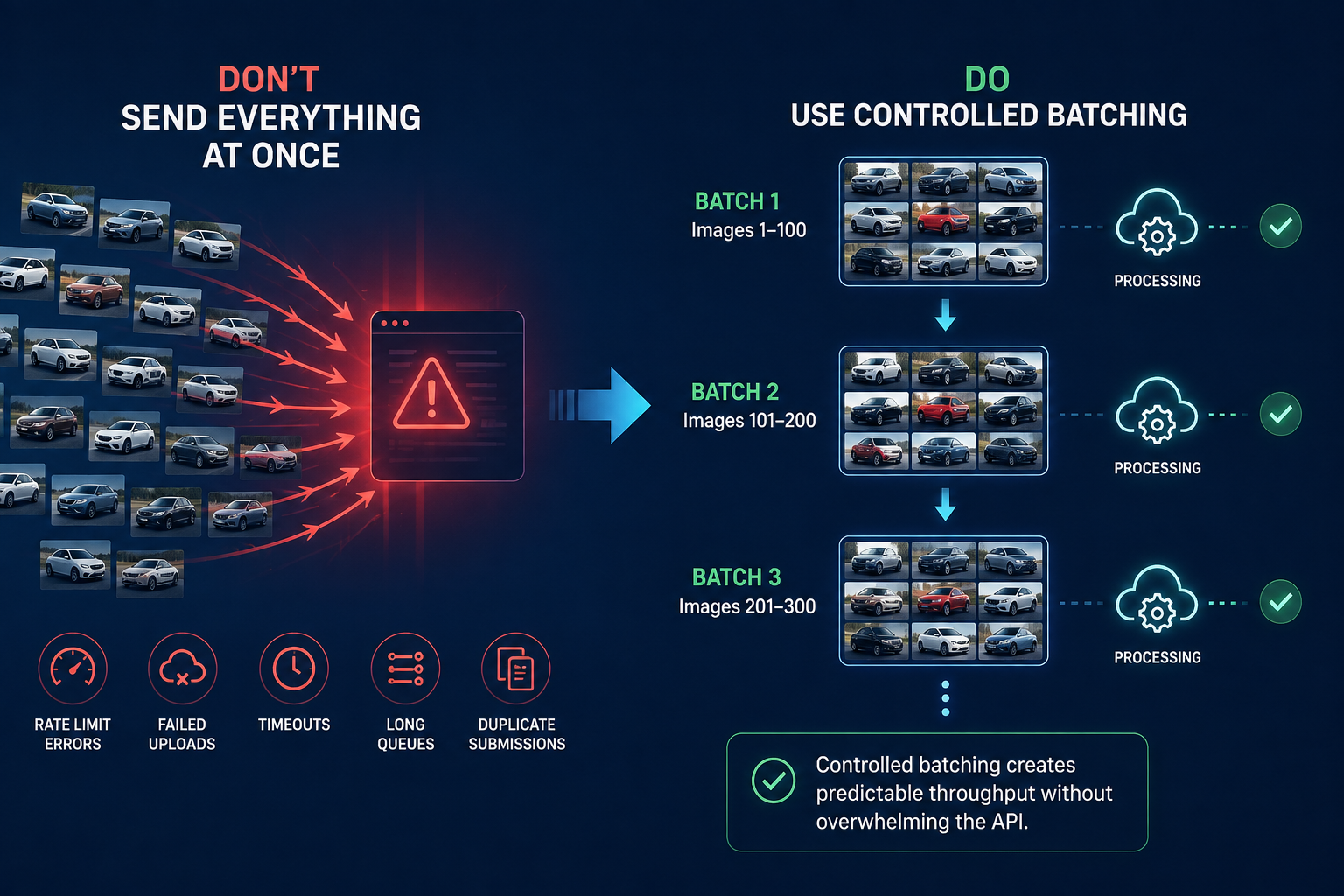
Trying to push thousands of requests simultaneously can create:
Instead, use controlled batching.
For example:
Batch 1: Images 1–100
Batch 2: Images 101–200
Batch 3: Images 201–300
Your software can submit additional batches as processing capacity becomes available.
This creates predictable throughput without overwhelming the API.
For one image, the application may upload the photo and wait for the processed result.
That approach becomes inefficient for thousands of files.
Large-scale systems typically use asynchronous processing.
A typical workflow looks like:
Upload → Receive Job ID → Process in Queue → Completion Notification → Download Result
The API may immediately return something like:
job_id: 784201
status: processing
Your system then waits for processing to complete.
The provider may notify your application through a webhook, or your application may periodically check the status.
This approach allows hundreds or thousands of jobs to move through the pipeline without keeping individual connections open.
Reliable automation requires tracking.
Each image should have a record showing:
This information becomes extremely useful when troubleshooting.
Imagine processing 25,000 images and discovering that 48 did not return correctly.
Without job tracking, finding those files can become a manual search.
With tracking, the system can immediately identify which vehicle records require reprocessing.
Not every failed API request means the image itself is bad.
Temporary failures can happen because of:
Your bulk car photo background removal workflow should automatically retry temporary errors.
A simple approach might be:
First failure → Retry after 30 seconds
Second failure → Retry after 2 minutes
Third failure → Move to manual review
This prevents employees from having to manually resubmit ordinary processing failures.
However, avoid infinite retries.
If an image repeatedly fails, route it to a review queue.
Never design the workflow around permanently replacing original images.
Keep the original vehicle photography stored separately.
Why?
Because you may later want to:
The processed image should be treated as an output rather than the only remaining copy.
A simple structure might be:
/originals
/processed-white
/processed-branded
/thumbnails
This gives your organization flexibility without requiring vehicles to be photographed again.
Automation does not eliminate quality control.
It changes how quality control should be performed.
Manually reviewing every single image defeats much of the efficiency gained through automation.
Instead, use structured spot-checking.
For example, a team processing 10,000 images could review:
The exact percentage depends on your tolerance for errors.
Random sampling alone may miss problem categories.
Specifically review images containing:
These images help reveal weaknesses in masking and edge detection.
Your reviewers should use a consistent checklist.
Check whether:
Consistent QA criteria are much more useful than asking reviewers whether an image simply "looks good."
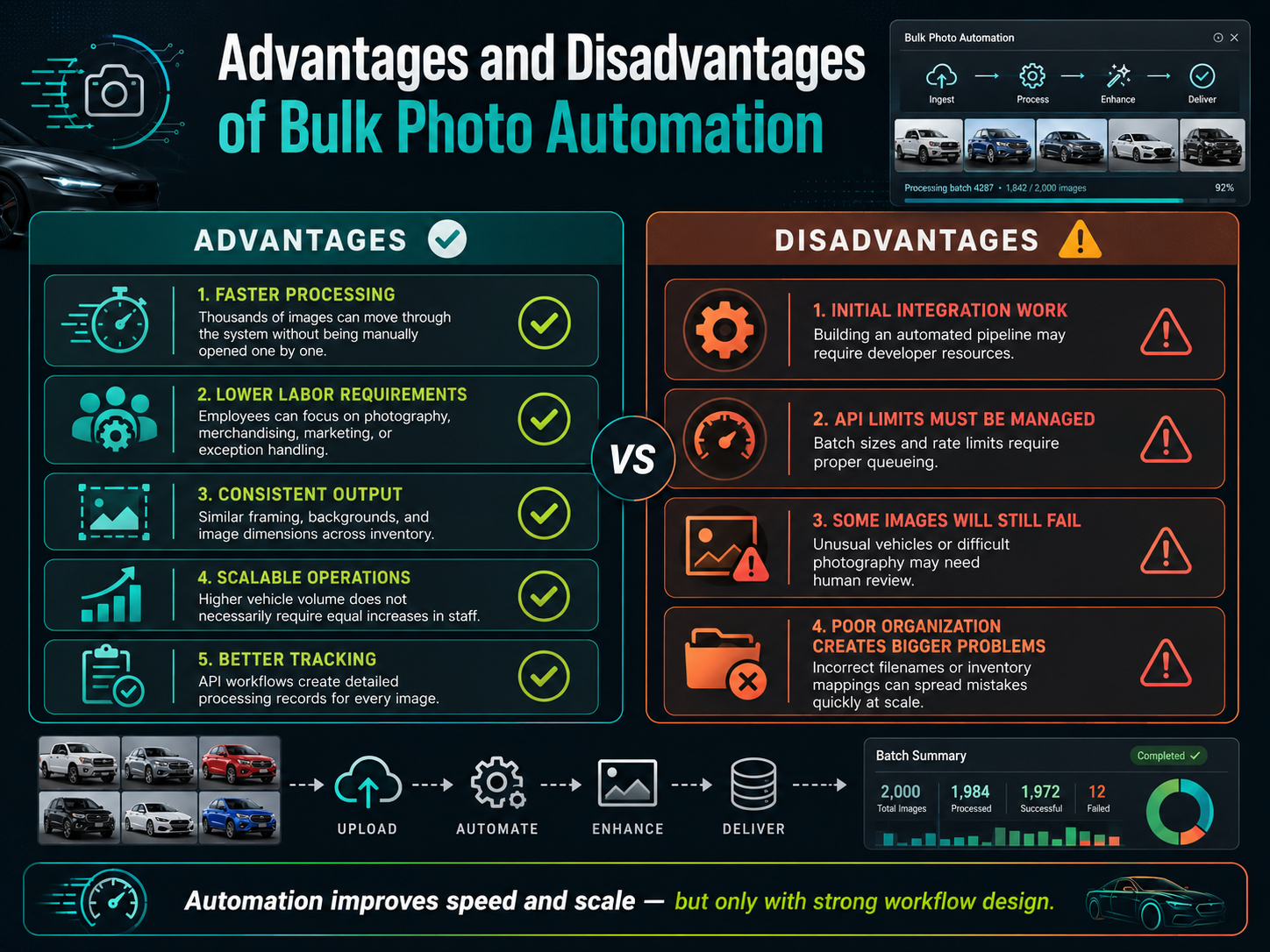
Faster processing
Thousands of images can move through the system without being manually opened one by one.
Lower labor requirements
Employees can focus on photography, merchandising, marketing, or exception handling.
Consistent output
Automated rules can produce similar framing, backgrounds, and image dimensions across an entire inventory.
Scalable operations
Higher vehicle volume does not necessarily require an equivalent increase in editing staff.
Better tracking
API workflows can create detailed processing records for every image.
Initial integration work
Building an automated pipeline may require developer resources.
API limits must be managed
Batch sizes and rate limits require proper queueing.
Some images will still fail
Unusual vehicles or difficult photography may need human review.
Poor organization creates bigger problems
Automation can process mistakes very quickly. Incorrect filenames or inventory mappings can spread through thousands of records if the workflow is not designed carefully.
Start small before running your entire inventory through a new workflow.
Process a test batch of perhaps 100–500 real dealership photos.
Measure:
Then increase the batch size gradually.
Also test realistic peak loads.
If your operation normally processes 5,000 photos on Monday mornings, testing 20 images on a quiet afternoon tells you very little about real-world performance.
Ask potential providers about concurrency and throughput before committing.
Finally, calculate the cost of exceptions.
If an API is inexpensive but 20% of images require manual correction, the total workflow may be more expensive than a slightly higher-priced service with a 2% correction rate.
It depends on the provider. Some APIs limit the number of files in a batch, while others control usage through rate limits or concurrent job limits.
Processing time depends on image size, API capacity, batch size, and current demand. Large jobs are typically handled through asynchronous queues.
Usually not. At scale, structured QA spot-checking is generally more practical than reviewing every image.
A robust system should automatically retry temporary failures and route repeated failures to a manual-review queue.
No. Independent dealerships can also benefit, particularly if photography volume is high or employees currently spend significant time on repetitive editing.
Successful bulk car photo background removal is not simply about sending thousands of images to an editing API.
The strongest workflows combine organized folders, consistent filenames, pre-upload validation, controlled batching, job tracking, automatic retries, preserved originals, and structured quality control.
When those pieces work together, a dealership or automotive platform can process dramatically more inventory without creating an equally large editing team.
The key is to design around your actual workflow.
Calculate how many vehicles you photograph each month, how many images each vehicle generates, when your upload peaks occur, and how many images currently require manual editing. Then test automation using real batches—not carefully selected demo photos.
If your dealership, automotive marketplace, photography company, or software platform regularly handles thousands of vehicle images, explore an automated bulk-processing workflow and compare it against your current editing process. The biggest savings often come not only from cheaper image processing, but from removing repetitive manual work throughout the entire photo pipeline.


Compact, ready to go anywhere
Interchangeable lens that’s upgradeable
Dual 1-inch sensors for improved clarity and low light performance
Dynamic range and 6K 360° capture
360° photo resolution at 21MP

8K 360° video recording for ultra-detailed visuals.
4K single-lens mode for traditional wide-angle shots.
Invisible selfie stick effect for drone-like perspectives.
2.5-inch touchscreen with Gorilla Glass protection.
Waterproof up to 33ft for underwater shooting.

360° photo resolution in 23MP
Slim design at 24 mm thick
Built-in image stabilization for smooth video capture.
Internal 19GB storage for photo and video storage.
Wireless connectivity for remote control and sharing.

60MP 360° still images for high-resolution photography.
5.7K 360° video recording at 30fps.
2.25-inch touchscreen for intuitive control.
USB Type-C port for fast charging and data transfer.
MicroSD card slot for expandable storage.
.png)

.png)

Try it free. No credit card required. Instant set-up.







.svg)


.svg)