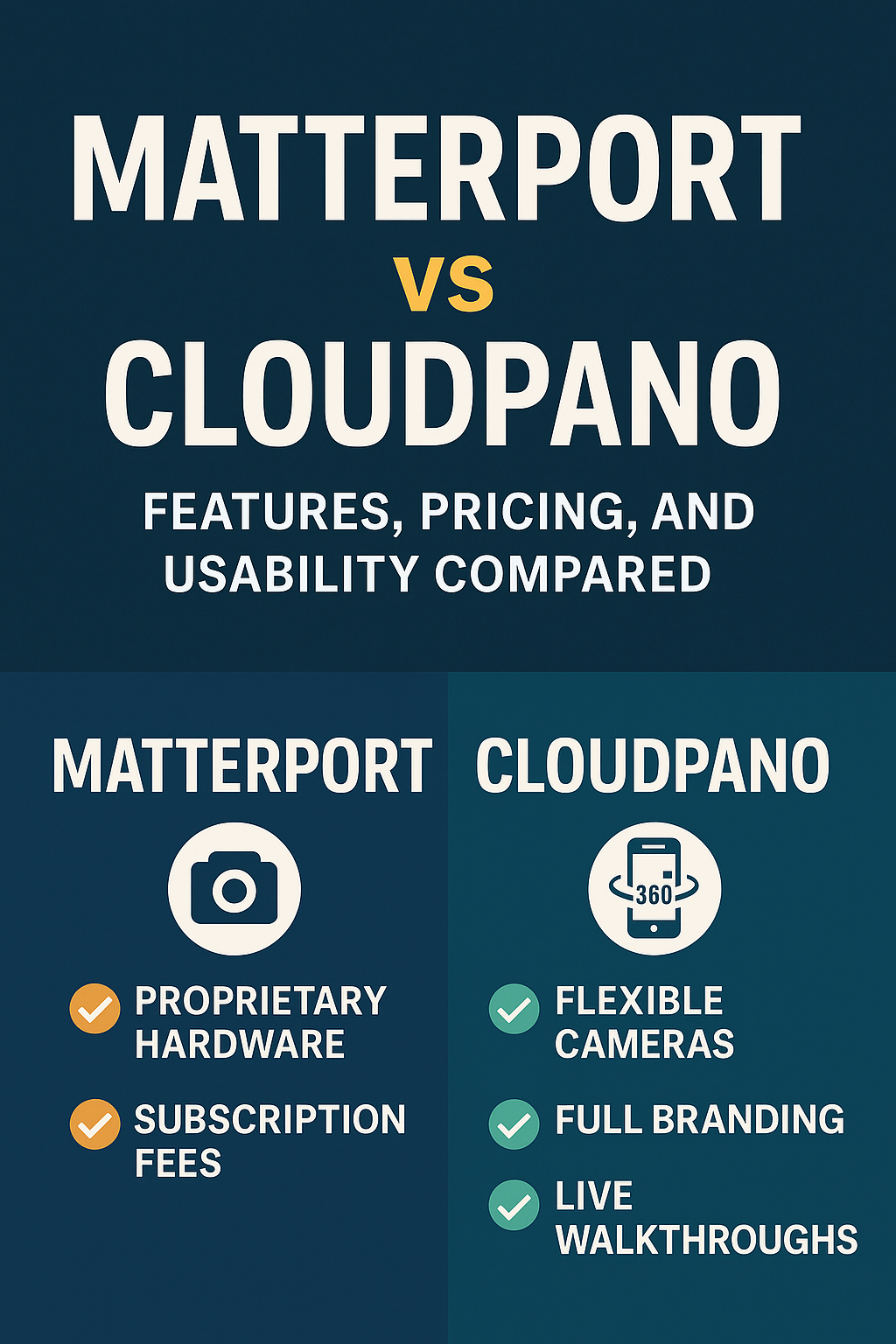
Matterport vs CloudPano 2025: Features, Pricing, and Usability Compared

Cloudpano
August 7, 2025
5 min read
Share this post

Matterport vs CloudPano 2025: Features, Pricing, and Usability Compared 🏡📸

If you're a real estate agent, property marketer, or media creator, you've probably asked:

“Should I use Matterport or CloudPano for virtual tours in 2025?” 🤔

Both platforms are powerful — but they serve very different needs. In this post, we’ll compare their features, pricing, and ease of use and explain why CloudPano is the clear winner for most professionals today 🚀

🔍 What Are Matterport and CloudPano?

Both Matterport and CloudPano are virtual tour platforms that let you create immersive, 360° walkthroughs of physical spaces. They're used for:
  • 🏠 Real estate showings
  • 🏗️ Construction documentation
  • 🏢 Commercial marketing
  • 🧑‍🎨 Architecture and interior design
  • 🔍 Insurance and property inspections

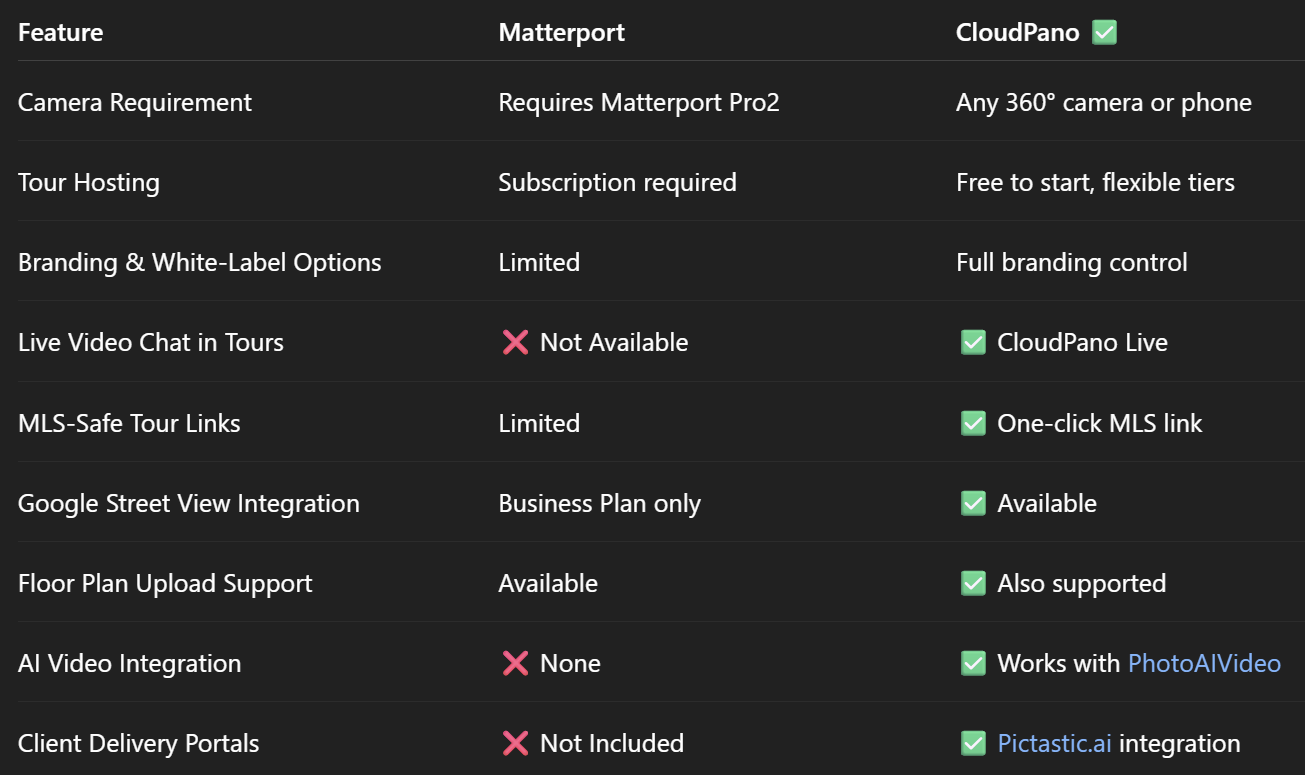
⚖️ Feature-by-Feature Comparison (2025)

👉 Related: CloudPano vs Matterport: The Best Virtual Tour Solution for Real Estate Agents

💸 Pricing Differences in 2025

🏷 Matterport Pricing:

  • $9.99 – $69.99+/mo
  • Requires proprietary hardware ($3,000+ for Pro2)
  • Charges hosting fees for each active tour
  • Limited plan flexibility

✅ CloudPano Pricing:

  • Free to start
  • Upgrade only when needed
  • One-time or monthly Pro+ plans
  • No required hardware investment

Result? CloudPano offers way more flexibility — and you keep more of your profit 💰

🎨 Branding & Client Control

With Matterport, your virtual tour lives in their ecosystem. Branding options are limited, and you're often forced to send buyers to a Matterport.com URL.

CloudPano changes that:

  • Custom domains
  • Your own logo and colors
  • Embed in your website
  • MLS-safe links with one click
  • Export and deliver with Pictastic

📞 CloudPano Live: Game-Changing for Agents

This is where CloudPano really shines 💥

CloudPano Live lets you host live video walkthroughs right inside the virtual tour. That means:

  • You can walk remote buyers through listings
  • Answer questions in real time
  • Close deals faster
  • Run virtual open houses

Matterport? ❌ No live chat feature.

👉 Related: Why CloudPano Is the #1 Matterport Alternative for Real Estate Agents in 2025

📲 Use Any 360° Camera (Or Just Your Phone)

Matterport locks you into its proprietary hardware. Want full features? You’ll need to spend thousands on their Pro2 camera 😬

CloudPano supports:

  • 📷 Ricoh Theta
  • 📷 Insta360
  • 📷 GoPro Max
  • 📱 Smartphone panoramas

You already have the tools — CloudPano helps you use them.

🛠️ Bonus: Use CloudPano with These Tools

🎥 PhotoAIVideo.com

Turn listing photos into AI-generated cinematic videos for:

  • Social media
  • YouTube
  • Listing pages
  • Client updates

👉 Related: How to Generate Real Estate Videos From Just Photos

📁 Pictastic.ai

Deliver full project sites with:

  • CloudPano tours
  • Listing videos
  • Downloadable assets
  • White-label branding
  • Client collaboration tools

💬 What Agents Say About CloudPano

“CloudPano gives me full control over my tours and branding. It’s faster and more affordable than Matterport.”
— Jenna B., Realtor in Tampa

“I closed three remote buyer deals using CloudPano Live. Game-changer.”
— Luis R., Houston Agent

🧩 Who Should Use CloudPano?

✅ Solo agents and real estate teams
✅ Virtual tour photographers
✅ Property managers and leasing pros
✅ Restoration and insurance documentation experts
✅ Designers and architects

👉 Related: Best Matterport Alternative for Architecture and Design Firms

✅ Call to Action: Try CloudPano Today — It’s Free to Start!

🚀 Want a virtual tour platform that’s faster, more affordable, and built for modern real estate marketing?

Here’s where to begin:

Share this post
Cloudpano

Choose The Right 360° Camera

Insta360 ONE RS 1-Inch 360 Edition

  • Compact, ready to go anywhere

  • Interchangeable lens that’s upgradeable

  • Dual 1-inch sensors for improved clarity and low light performance

  • Dynamic range and 6K 360° capture

  • 360° photo resolution at 21MP

Learn More

Insta360 X4

  • 8K 360° video recording for ultra-detailed visuals.

  • 4K single-lens mode for traditional wide-angle shots.

  • Invisible selfie stick effect for drone-like perspectives.

  • 2.5-inch touchscreen with Gorilla Glass protection.

  • Waterproof up to 33ft for underwater shooting.

Learn More

Ricoh Theta Z1

  • 360° photo resolution in 23MP

  • Slim design at 24 mm thick

  • Built-in image stabilization for smooth video capture.

  • Internal 19GB storage for photo and video storage.

  • Wireless connectivity for remote control and sharing.

Learn More

Ricoh Theta X

  • 60MP 360° still images for high-resolution photography.

  • 5.7K 360° video recording at 30fps.

  • 2.25-inch touchscreen for intuitive control.

  • USB Type-C port for fast charging and data transfer.

  • MicroSD card slot for expandable storage.

Learn More
Property Marketing
Allows potential buyers to explore properties in detail from anywhere, enhancing the real estate marketing process.
Automotive Spins
Create an interactive virtual showroom and engage affluent digital buyers with live 360º video calls, all through the CloudPano mobile app for a complete automotive sales solution.
Interactive Floor Plans
Create 2D and 3D floor plans with measurements in 4 minutes or less, all from your phone. Download the Floor Plan Scanner app and get your first scan free.

360 Virtual Tours With CloudPano.com. Get Started Today.

Try it free. No credit card required. Instant set-up.

Try it free
Latest posts

See our other posts

Interviews, tips, guides, industry best practices, and news.

Best File Formats for Dealership Inventory Images (JPEG vs PNG)

This comprehensive guide explains the best image format for dealership inventory by comparing JPEG vs PNG for car photos. Learn how file format impacts website speed, image quality, SEO performance, and CRM compatibility. Discover why most dealerships should use optimized JPEG images for daily inventory listings, when PNG makes sense, and how AI-generated studio images can be exported efficiently for faster sales and better online presentation.
Read post

How AI Automatically Adds Realistic Shadows to Vehicle Images

This in-depth guide explains how AI car photo shadow generation automatically adds realistic shadows to vehicle images. Learn how AI detects vehicle angles, lighting direction, and ground contact points to create studio-quality shadows without manual editing. Discover how dealerships can use automated shadow generation to improve image consistency, increase perceived value, and create high-converting inventory photos at scale.
Read post

How to Create a Clean White Studio Background for Car Photos Using AI

This comprehensive guide explains how to create a white studio background for car photos using AI. Learn how AI automotive background removal detects vehicles, removes distracting lot backgrounds, and generates clean white studio environments with realistic shadows and lighting. Discover how saved background presets, bulk processing, and high-resolution exports help dealerships produce consistent inventory photos that increase trust, boost click-through rates, and drive faster vehicle sales.
Read post

