


.png)



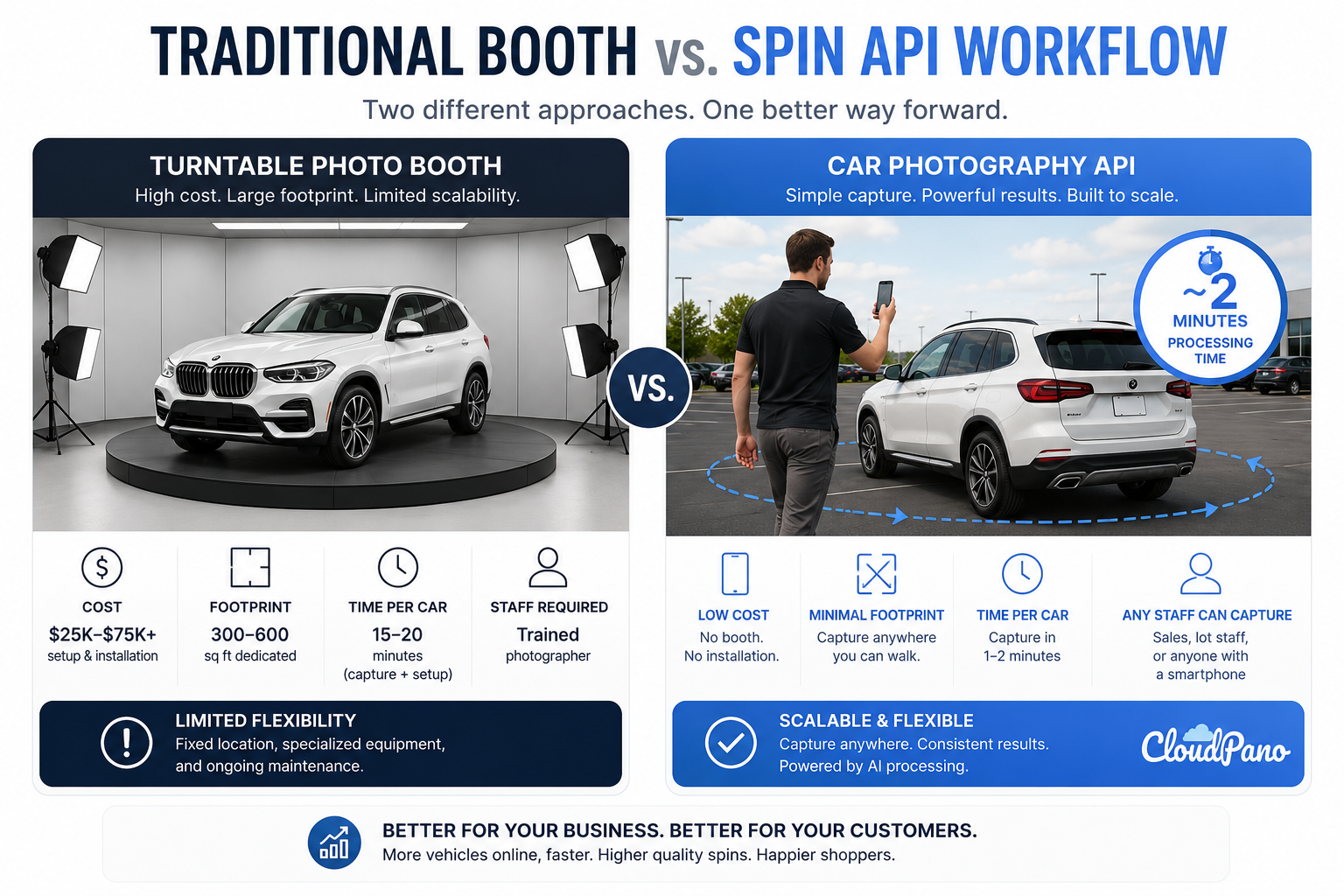
Every dealership trying to make its vehicle detail pages (VDPs) more competitive eventually runs into the same challenge: producing consistent, high-quality 360° vehicle spins takes time, equipment, space, or some combination of all three.
A traditional turntable booth can require a significant upfront investment, dedicated floor space, specialized lighting, and trained staff. A manual photo workflow avoids the turntable but replaces the hardware investment with labor. Someone still needs to capture dozens of carefully spaced photos around each vehicle and process them afterward.
Neither approach scales particularly easily when you're dealing with hundreds of vehicles, multiple locations, and changing staff.
A car photography API changes the shape of that problem.
Instead of relying on a fixed booth, specialized rig, or manual stitching workflow, a photographer, lot porter, or salesperson can walk around the vehicle with a phone and submit the footage for processing.
The result can include a polished vehicle spin, hosted 360° experience, and individual frames that can be used in a vehicle detail page or another automotive platform.
Developers can find the technical details, capture requirements, parameters, and response structure in the CloudPano Spin API documentation.
For dealerships, the more interesting question is how this approach compares with a traditional turntable booth or manual photography workflow.
To make the comparison fair, it helps to look at what a booth or manual photography workflow actually requires — not just in equipment, but in the ongoing work needed to produce spins for new inventory.
A turntable booth typically involves:
Even a relatively modest booth can become a significant facilities investment before the first vehicle is photographed.
A manual multi-photo workflow avoids the turntable but trades some of that hardware cost for labor.
Someone needs to move around the vehicle in a consistent pattern, capture images from evenly spaced angles, maintain a similar camera height and horizon line, and then process the resulting images into a usable spin.
When a dealership is adding large amounts of inventory every day, that process can quickly become a dedicated job rather than something employees squeeze in between other responsibilities.
The premise behind the Spin API is that some of the difficult parts of creating a consistent vehicle spin don't necessarily have to happen during capture.
They can happen during processing.
Instead of requiring the person holding the camera to create perfectly spaced angles while keeping the vehicle precisely positioned in every frame, the processing workflow can help standardize the finished output.
Depending on the selected options, this can include:
The practical difference is significant.
A booth-based workflow brings the vehicle to a controlled photography environment.
An API-based workflow allows the capture process to happen where the vehicle already is.
Instead of a turntable and dedicated photography bay, the starting point can simply be a phone and a vehicle walk-around.
The technical implementation is handled through the API, but the dealership-side workflow is relatively straightforward.
First, someone records a complete walk-around video of the vehicle.
The footage is then submitted through the Spin API along with any relevant vehicle information, such as a VIN or stock number.
Processing happens in the background while the connected system monitors the status of the vehicle spin.
Once processing is complete, the resulting media can be retrieved and connected to the appropriate vehicle listing.
Developers who need the exact request format and currently supported parameters can refer to the Spin API reference rather than hard-coding implementation details from a marketing article.
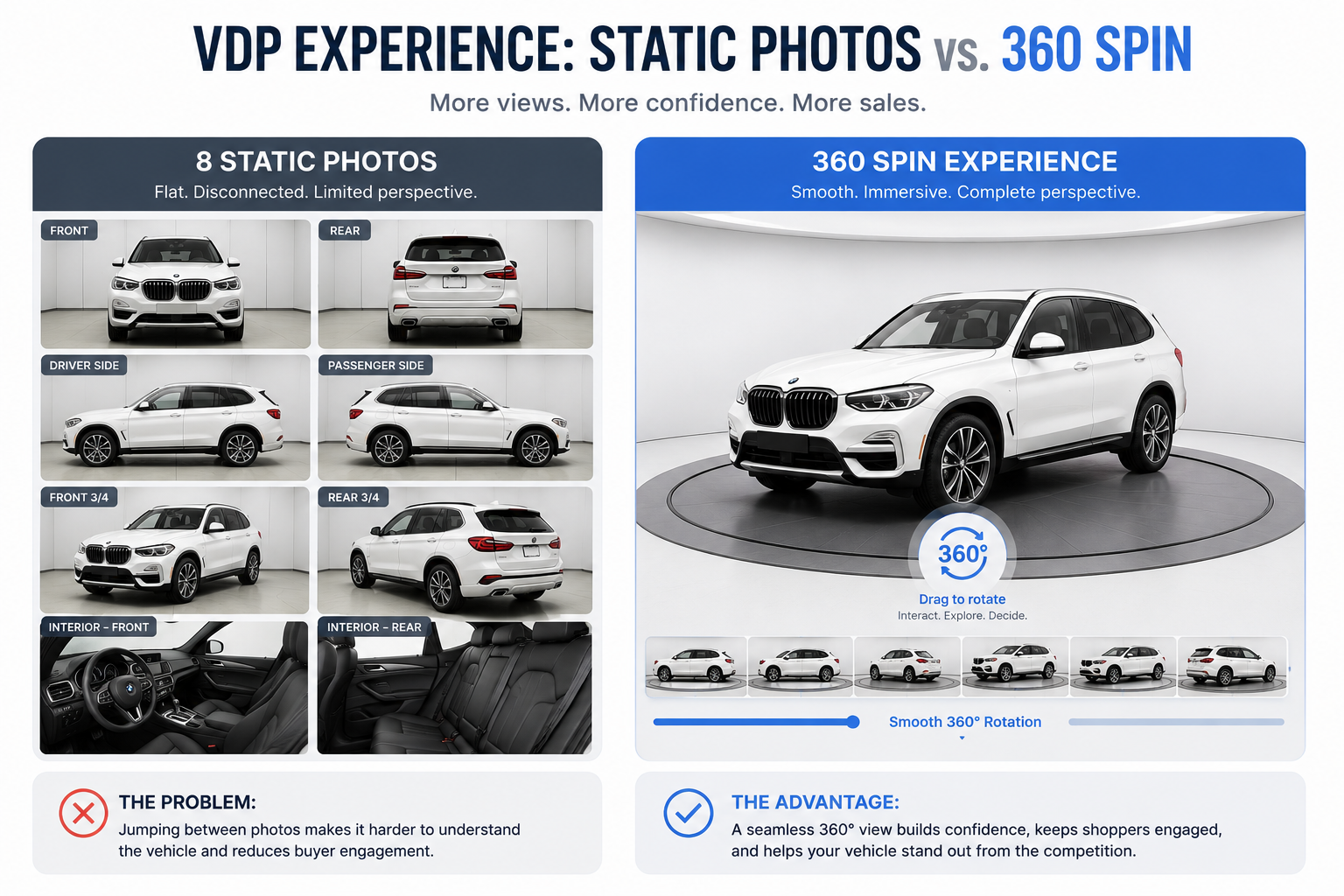
Once processing finishes successfully, the resulting assets can support several different automotive workflows.
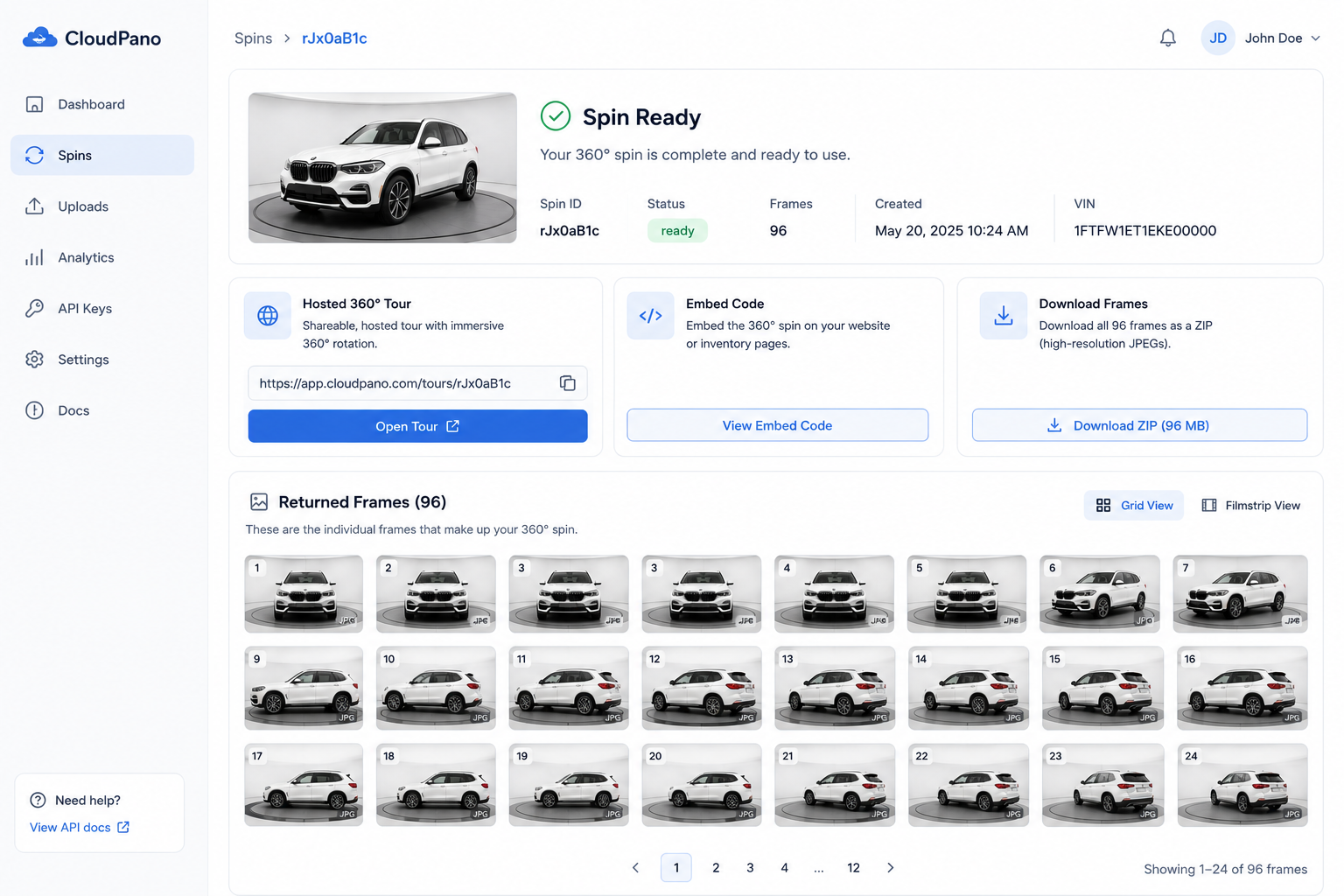
The finished vehicle spin can include individually hosted images representing different viewing angles around the vehicle.
These frames can be used in a compatible custom spin viewer and displayed directly on a VDP.
Because the images have already gone through the spin-processing workflow, the vehicle can appear more consistently positioned from one angle to the next.
A vehicle spin may contain dozens of images, which can create unnecessary loading overhead if every frame has to be requested individually.
Optimized assets can help make the interactive experience more efficient for web-based viewers.
A hosted version of the finished vehicle experience can provide dealerships with another way to review or share the spin.
This can be useful for internal approval, direct sharing, or workflows that don't require a custom viewer.
Vehicle identifiers submitted during the workflow can remain associated with the resulting media.
That makes it easier for an inventory system to connect a finished spin with the correct VIN or stock number without introducing another manual tagging step.
The API reduces the need for specialized photography equipment, but it doesn't eliminate the need for usable source footage.
The person capturing the vehicle still needs to record a reasonably complete walk-around.
The recording should cover a complete circle around the vehicle.
Processing can help normalize an imperfect walk-around, but it can't recreate an angle that was never captured.
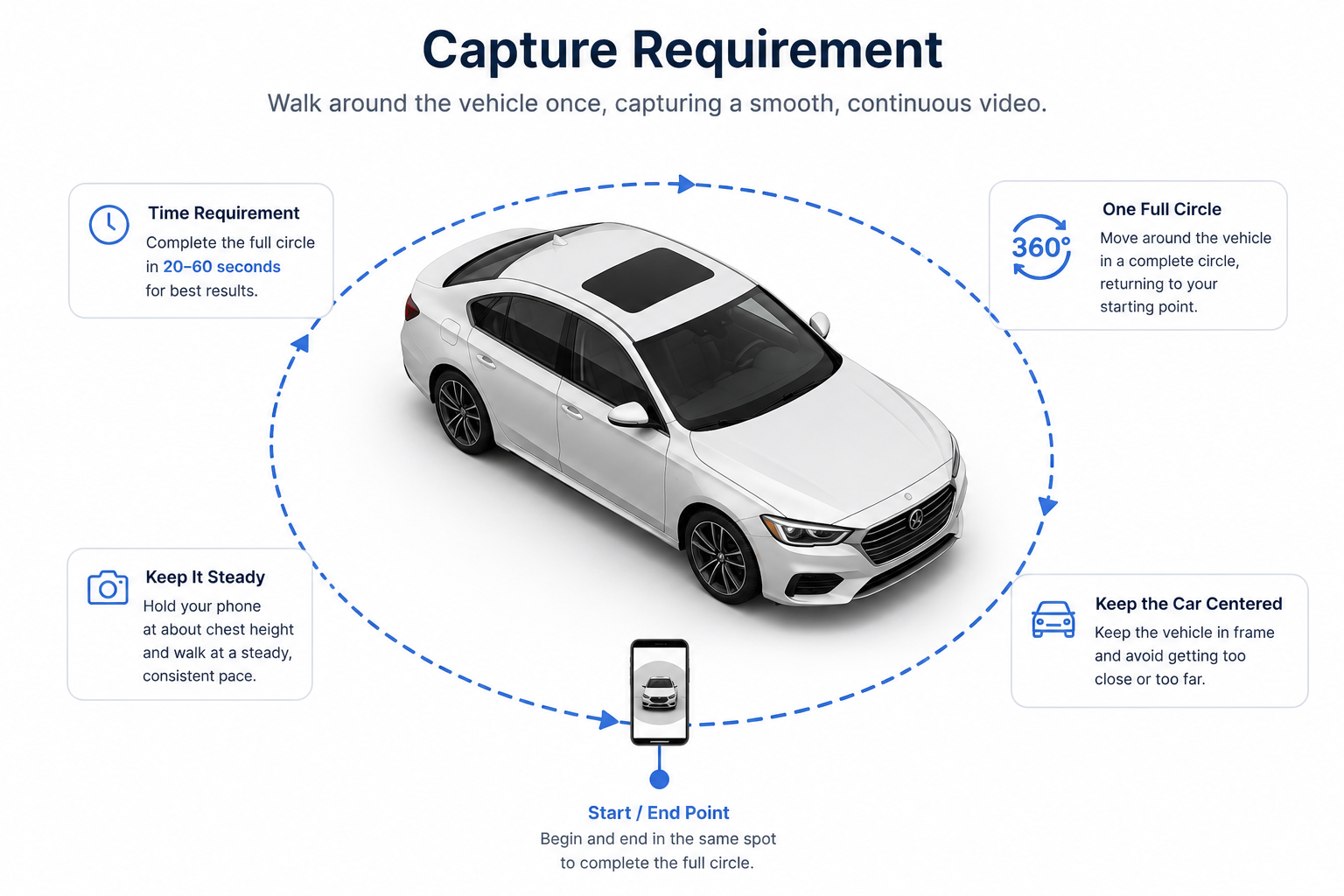
Try to keep the vehicle clearly visible throughout the recording.
Large obstructions, incomplete footage, or sudden changes in camera position can make processing more difficult.
Higher-quality footage gives the processing system more visual information to work with.
Resolution, orientation, supported file formats, video length, and file-size requirements should be checked against the current Spin API capture requirements before establishing a dealership-wide capture process.
Not every piece of footage will necessarily result in a usable vehicle spin.
An integrated workflow should account for unsuccessful processing and make it clear when a vehicle needs to be captured again.
That's preferable to allowing a poor-quality spin to reach a live VDP unnoticed.
For larger dealership groups, API access also needs to be managed securely.
Different stores, applications, or environments may need separate credentials rather than having an entire organization share a single API key.
Development teams should establish a sensible process for creating, storing, and rotating credentials as part of the integration.
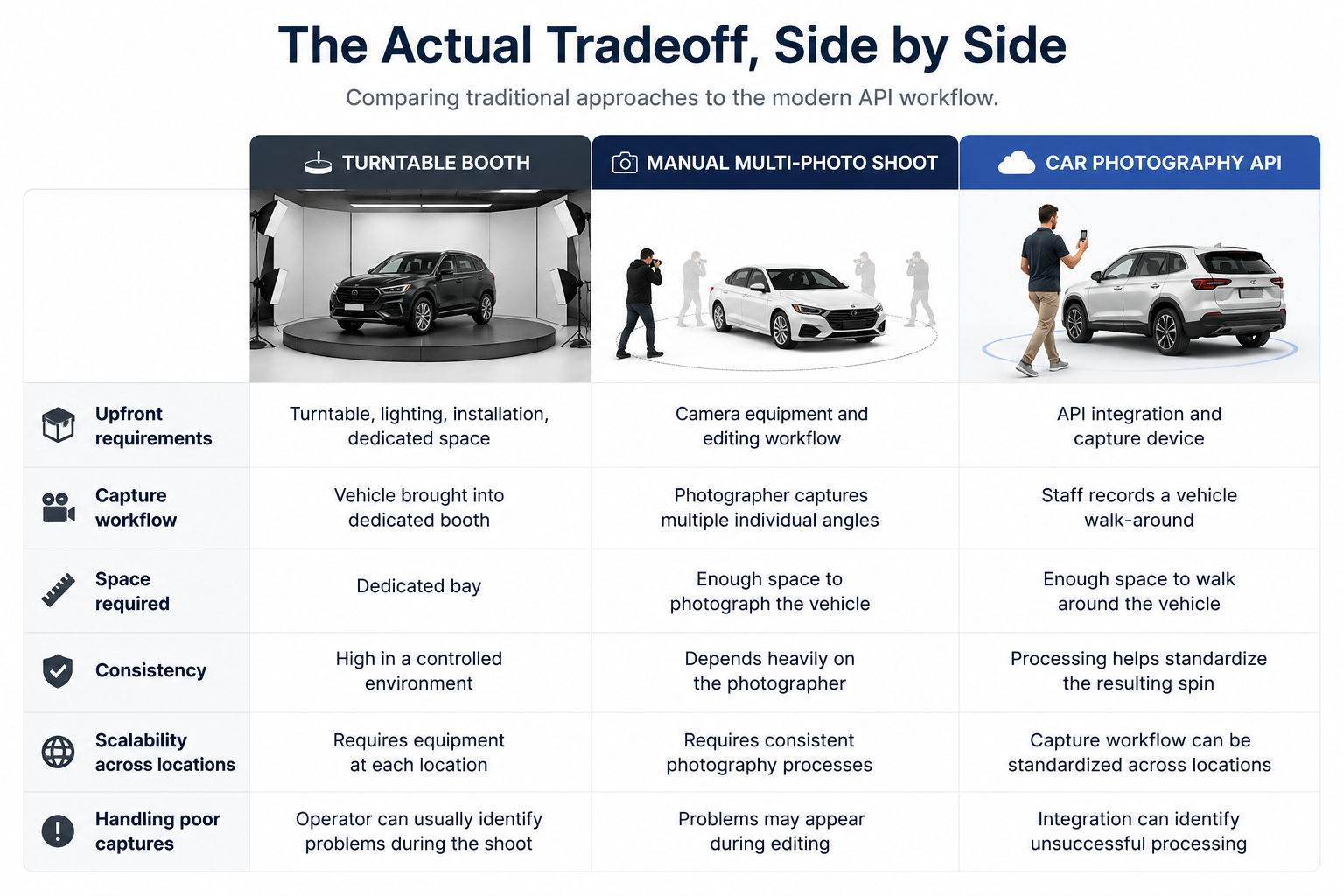
None of these approaches is inherently wrong.
A high-volume, single-location operation with the space and budget for a dedicated booth can achieve excellent consistency and throughput once the system is running.
The calculation changes for dealership groups with multiple locations.
Installing and maintaining a dedicated photography setup at every dealership may not be practical. A workflow built around capturing a vehicle where it already sits can be much easier to replicate across multiple stores.
That's the fundamental tradeoff.
A turntable booth standardizes vehicle photography through hardware and environment.
A car photography API attempts to standardize the finished result through software and processing.
A turntable booth may make sense when a dealership has:
An API-driven workflow becomes particularly interesting when a business has:
For some organizations, the answer may even be a combination of approaches.
The important question isn't whether one technology is universally better.
It's which workflow makes the most sense for the volume, locations, staffing, infrastructure, and customer experience you're trying to support.
The clearest way to evaluate a car photography API against a booth or manual photography workflow is to test it on vehicles already sitting on your lot.
Capture several representative vehicles, process the footage, and compare the resulting spins with what's currently appearing on your VDPs.
Look at consistency.
Look at how much effort capture requires.
Look at how easily different employees can repeat the process.
And, if you're operating multiple locations, consider whether the same workflow could realistically be followed at every store.
Developers can review the complete parameter list, response structure, and current capture guidance in the CloudPano Spin API documentation.
Ultimately, that's the real comparison: not simply API versus turntable, but which approach gives your dealership a repeatable way to create consistent vehicle spins at the scale your inventory demands.


Compact, ready to go anywhere
Interchangeable lens that’s upgradeable
Dual 1-inch sensors for improved clarity and low light performance
Dynamic range and 6K 360° capture
360° photo resolution at 21MP

8K 360° video recording for ultra-detailed visuals.
4K single-lens mode for traditional wide-angle shots.
Invisible selfie stick effect for drone-like perspectives.
2.5-inch touchscreen with Gorilla Glass protection.
Waterproof up to 33ft for underwater shooting.

360° photo resolution in 23MP
Slim design at 24 mm thick
Built-in image stabilization for smooth video capture.
Internal 19GB storage for photo and video storage.
Wireless connectivity for remote control and sharing.

60MP 360° still images for high-resolution photography.
5.7K 360° video recording at 30fps.
2.25-inch touchscreen for intuitive control.
USB Type-C port for fast charging and data transfer.
MicroSD card slot for expandable storage.
.png)

.png)

Try it free. No credit card required. Instant set-up.







.svg)


.svg)