Best Virtual Tour Platforms for Real Estate: Side-by-Side Comparison

Cloudpano
August 11, 2025
5 min read
Share this post

🏆 Best Virtual Tour Platforms for Real Estate: Side-by-Side Comparison

In the fast-paced world of real estate, first impressions happen online. Buyers expect to “walk through” a property before scheduling an in-person visit, and sellers know that immersive virtual tours help listings stand out, sell faster, and attract more qualified leads.

With so many virtual tour platforms out there — from Matterport to Kuula, EyeSpy360, and Zillow 3D Home — how do you choose the right one for your real estate business?

In this detailed guide, we’ll compare the top options side-by-side and reveal why CloudPano is the clear winner for agents, brokerages, and media companies.

📸 Why Virtual Tours Are Non-Negotiable in 2025

  • Increased Engagement — Listings with virtual tours get up to 87% more views.
  • Faster Sales — Buyers make decisions quicker when they can explore a property remotely.
  • Better Qualified Leads — Reduces “just curious” showings and saves you time.
  • Brand Authority — Professional tours position you as a market leader.

If you’re ready to elevate your marketing game, choosing the right platform is your first step.

🥇 The Top Virtual Tour Platforms for Real Estate

1. Matterport

Strengths:

  • Industry-recognized 3D scanning technology
  • High-end immersive experience
  • Strong brand reputation

Limitations:

  • Higher cost per tour
  • Requires proprietary camera hardware for best results
  • Limited customization for branding

Best for: Luxury listings, developers, and large teams with higher budgets.

2. Kuula

Strengths:

  • Easy-to-use editor
  • Affordable monthly plans
  • Works with most 360° cameras

Limitations:

  • Less robust floor plan integration
  • Limited lead capture options

Best for: Agents or small teams who want budget-friendly, simple tours without advanced integrations.

3. EyeSpy360

Strengths:

  • Built-in live video chat feature
  • 3D model and floor plan creation options
  • No hosting limits on certain plans

Limitations:

  • Interface feels less modern
  • Tour customization is limited compared to CloudPano

Best for: Agents who want remote live showings without additional software.

4. Zillow 3D Home

Strengths:

  • Free to use
  • Direct integration with Zillow listings
  • Mobile app-based creation

Limitations:

  • Tours only display on Zillow ecosystem
  • No advanced branding or customization
  • Not suitable for agents who want to market on multiple MLS platforms

Best for: Agents who focus mainly on Zillow exposure and don’t need cross-platform capabilities.

🚀 Why CloudPano Wins for Real Estate Professionals

CloudPano combines the professional-grade features of high-end platforms with affordable pricing and unmatched branding flexibility.

Key Advantages:

  • 🌐 White-label virtual tours — Add your own logo, colors, and custom domain
  • 💬 Live video chat inside tours — Perfect for remote open houses
  • 🏠 Easy MLS compliance — Works seamlessly with MLS-approved formats
  • 📊 Lead capture tools — Turn tour visitors into real inquiries instantly
  • 📱 Mobile-friendly tours — Look stunning on any device
  • 🖼 Unlimited panoramas per tour — No restrictive caps

With CloudPano, you get the polish of Matterport without being locked into expensive hardware or restrictive hosting contracts.
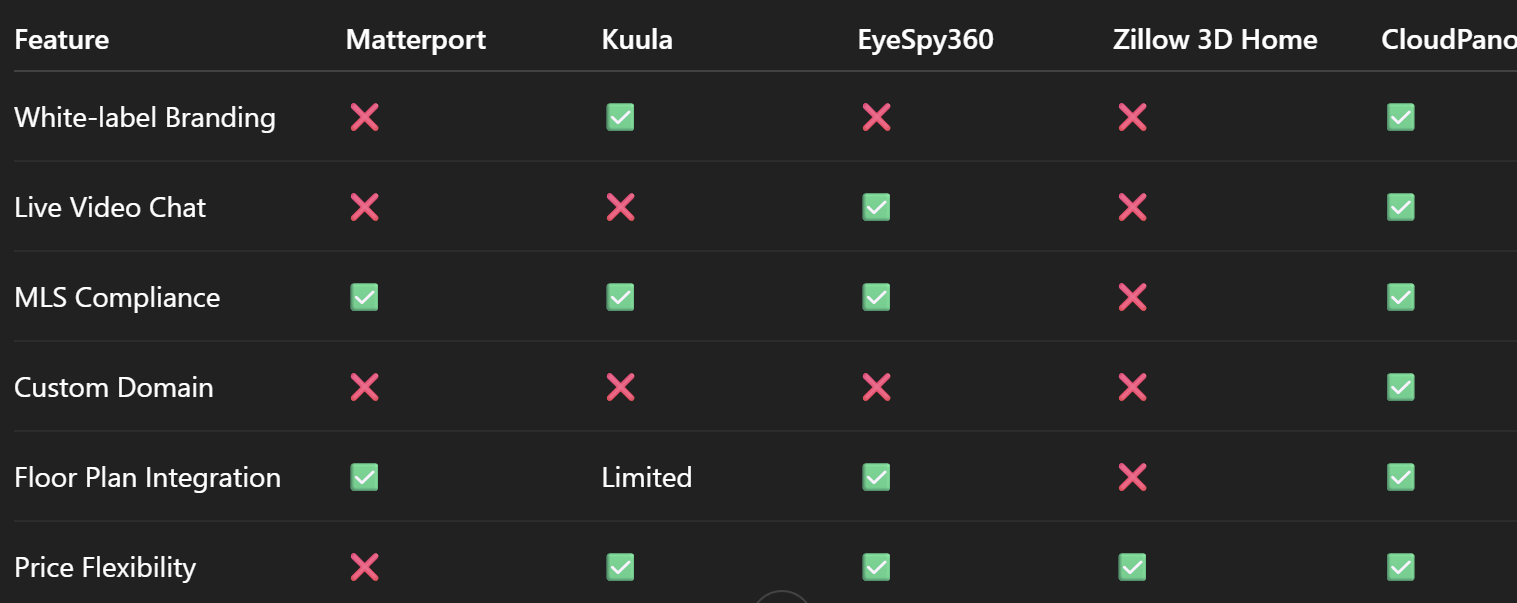
📊 Side-by-Side Feature Comparison

🧠 Linking to More In-Depth Comparisons

If you want to go deeper into how CloudPano stacks up, check out:

💡 Pro Tip for Agents and Teams

When choosing a virtual tour platform, think beyond the software. Consider how easy it is to train your team, how well it integrates with your marketing strategy, and whether it helps you stand out in your local market.

CloudPano checks all three boxes — while keeping costs reasonable and ROI high.

📣 Final Verdict: CloudPano is the Best All-Around Choice

For real estate agents, brokers, and media teams who want:

  • MLS-ready virtual tours
  • Complete branding control
  • Affordable, scalable pricing

CloudPano is the clear winner. You get cutting-edge features, flexible usage, and a platform that grows with your business.

🔥 Call to Action – Start Today with CloudPano!

Ready to transform your property marketing?
Here’s what you can do right now:

Don’t let another listing go live without a high-impact virtual tour.
With CloudPano, you can showcase properties like never before.

Share this post
Cloudpano

Choose The Right 360° Camera

Insta360 ONE RS 1-Inch 360 Edition

  • Compact, ready to go anywhere

  • Interchangeable lens that’s upgradeable

  • Dual 1-inch sensors for improved clarity and low light performance

  • Dynamic range and 6K 360° capture

  • 360° photo resolution at 21MP

Learn More

Insta360 X4

  • 8K 360° video recording for ultra-detailed visuals.

  • 4K single-lens mode for traditional wide-angle shots.

  • Invisible selfie stick effect for drone-like perspectives.

  • 2.5-inch touchscreen with Gorilla Glass protection.

  • Waterproof up to 33ft for underwater shooting.

Learn More

Ricoh Theta Z1

  • 360° photo resolution in 23MP

  • Slim design at 24 mm thick

  • Built-in image stabilization for smooth video capture.

  • Internal 19GB storage for photo and video storage.

  • Wireless connectivity for remote control and sharing.

Learn More

Ricoh Theta X

  • 60MP 360° still images for high-resolution photography.

  • 5.7K 360° video recording at 30fps.

  • 2.25-inch touchscreen for intuitive control.

  • USB Type-C port for fast charging and data transfer.

  • MicroSD card slot for expandable storage.

Learn More
Property Marketing
Allows potential buyers to explore properties in detail from anywhere, enhancing the real estate marketing process.
Automotive Spins
Create an interactive virtual showroom and engage affluent digital buyers with live 360º video calls, all through the CloudPano mobile app for a complete automotive sales solution.
Interactive Floor Plans
Create 2D and 3D floor plans with measurements in 4 minutes or less, all from your phone. Download the Floor Plan Scanner app and get your first scan free.

360 Virtual Tours With CloudPano.com. Get Started Today.

Try it free. No credit card required. Instant set-up.

Try it free
Latest posts

See our other posts

Interviews, tips, guides, industry best practices, and news.

Bracketing Photography for Beginners

This beginner-friendly bracketing photography tutorial explains how exposure bracketing works and why it’s essential for capturing detail in high-contrast scenes. Readers learn when to use bracketing, how to set it up on their camera, how many exposures to shoot, and why using a tripod improves results. The guide also covers common beginner mistakes and how bracketing supports HDR photography and better editing flexibility.
Read post

Manual vs Auto Bracketing: Which Is Better?

This guide compares manual vs auto bracketing to help photographers understand the strengths and limitations of each method. It explains how both techniques capture multiple exposures, when to use each, and how they affect speed, control, consistency, and HDR workflows. Readers learn which method is better for beginners, professionals, real estate photography, landscapes, and extreme lighting situations. The article provides practical advice for choosing the right bracketing approach based on shooting conditions.
Read post

How to Use Auto Exposure Bracketing (AEB)

This guide explains how to use auto exposure bracketing (AEB) to capture multiple exposures of the same scene for better dynamic range and HDR photography. Readers learn what AEB is, how it works, when to use it, and how to set it up for consistent results. The article covers EV spacing, tripod use, ideal camera settings, and common mistakes to avoid, making it a beginner-friendly yet practical resource for improving exposure in high-contrast lighting situations.
Read post



