
EyeSpy360 vs CloudPano: Which Virtual Tour Platform Wins?

Cloudpano
August 10, 2025
5 min read
Share this post

🏆 EyeSpy360 vs CloudPano: Which Virtual Tour Platform Wins?

When it comes to creating immersive, interactive virtual tours, two names often come up — EyeSpy360 and CloudPano. Both offer powerful features, but if you’re a real estate professional, photographer, or marketer looking for maximum value, flexibility, and ease of use… one platform clearly stands out.

In this comparison, we’ll break down the key differences, explore the pros and cons of each, and show you why CloudPano is the go-to choice for professionals worldwide.

🔍 Feature Overview: CloudPano vs EyeSpy360

Both platforms allow you to create and share 360° virtual tours, but their approach, flexibility, and target audience differ.
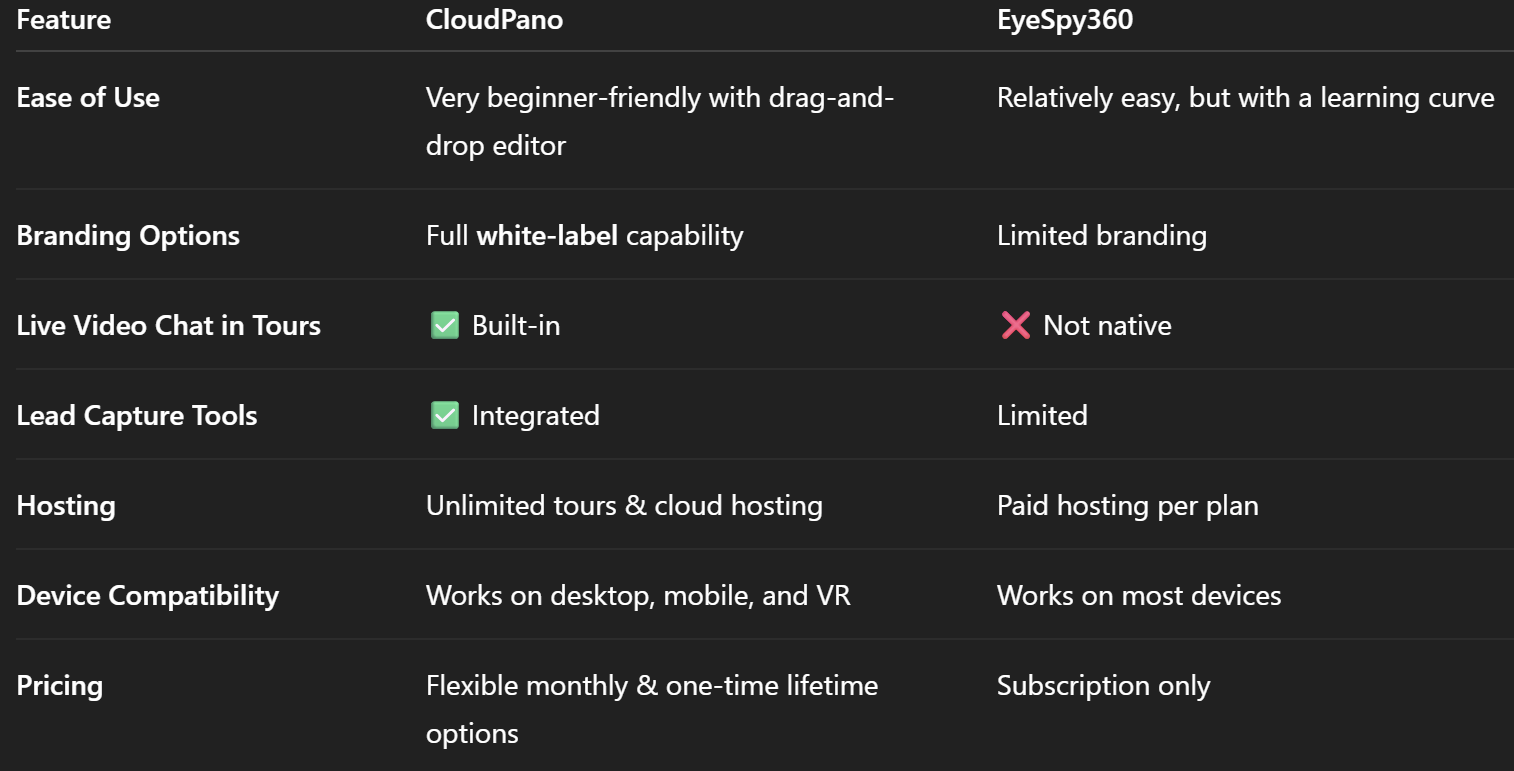
💡 Pro Tip: If you want to compare CloudPano to other market leaders like Matterport, check out our Matterport Alternatives guide for a deep dive into the best choices without expensive 360° cameras.

🏗 Ease of Setup and Tour Creation

EyeSpy360 offers an intuitive dashboard but requires more setup steps for adding hotspots, floor plans, and interactive elements.

CloudPano shines here — upload your 360° images, drag to arrange scenes, add interactive hotspots, embed videos, and publish instantly. Many users go from upload to live tour in under 10 minutes.

If you’re exploring multiple platforms, our Kuula Alternatives blog explains how CloudPano stacks up against creative-focused tools in the virtual tour market.

🎯 Branding and White-Label Options

For agencies, real estate teams, and photographers, branding is non-negotiable.

  • EyeSpy360: Basic branding — you can add your logo, but the platform’s branding remains visible.
  • CloudPano: 100% white-label mode lets you use your own custom domain, remove all CloudPano branding, and offer virtual tours as if it’s your own software.

This is a game-changer for those building a recurring revenue virtual tour business.

📞 Client Interaction and Lead Generation

A standout difference? CloudPano Live — an integrated video chat inside the virtual tour.

Imagine walking a client through a listing in real time, pointing out features, and answering questions without leaving the tour. EyeSpy360 does not offer this natively.

Plus, CloudPano lets you embed lead capture forms directly in your tours so you can collect inquiries 24/7.

💰 Pricing and Value for Money

EyeSpy360 works on a subscription model with set hosting limits per plan. While this may work for small-scale users, it can become costly if you’re scaling up.

CloudPano offers monthly, annual, and one-time lifetime pricing — making it more flexible and budget-friendly, especially for long-term business models.

For those just starting, the lifetime license can pay for itself with just one or two client projects.

🔄 Flexibility with Cameras and Media

One of the reasons CloudPano ranks high in Matterport alternative lists is its camera flexibility.

  • Works with any 360° camera, DSLR, or even smartphone panoramas.
  • EyeSpy360 is compatible with various cameras but works best with 360° formats.

This gives CloudPano the edge for versatility — no need to buy specific expensive hardware to get started.

📊 Pros & Cons Overview

CloudPano – Pros ✅

  • Full white-label mode
  • CloudPano Live for real-time tours
  • Flexible pricing including lifetime deals
  • Works with any 360° camera or images
  • Easy drag-and-drop editor
  • Built-in lead capture

CloudPano – Cons ❌

  • Some advanced customization may require minimal learning time

EyeSpy360 – Pros ✅

  • Good user interface
  • Decent feature set for smaller projects
  • Floor plan integrations available

EyeSpy360 – Cons ❌

  • Limited branding control
  • No built-in live chat
  • Less flexible pricing
  • Hosting restrictions per plan

🏁 The Verdict: Which Platform Wins?

While both tools can create quality virtual tours, CloudPano edges out EyeSpy360 in branding control, live client interaction, flexibility, and pricing options.

If your goal is to offer a premium, branded virtual tour experience to your clients — without being locked into rigid hosting limits — CloudPano is the clear winner.

📚 Related Reads

🚀 Ready to Upgrade Your Virtual Tour Game?

Get started with CloudPano today and unlock:

Share this post
Cloudpano

Choose The Right 360° Camera

Insta360 ONE RS 1-Inch 360 Edition

  • Compact, ready to go anywhere

  • Interchangeable lens that’s upgradeable

  • Dual 1-inch sensors for improved clarity and low light performance

  • Dynamic range and 6K 360° capture

  • 360° photo resolution at 21MP

Learn More

Insta360 X4

  • 8K 360° video recording for ultra-detailed visuals.

  • 4K single-lens mode for traditional wide-angle shots.

  • Invisible selfie stick effect for drone-like perspectives.

  • 2.5-inch touchscreen with Gorilla Glass protection.

  • Waterproof up to 33ft for underwater shooting.

Learn More

Ricoh Theta Z1

  • 360° photo resolution in 23MP

  • Slim design at 24 mm thick

  • Built-in image stabilization for smooth video capture.

  • Internal 19GB storage for photo and video storage.

  • Wireless connectivity for remote control and sharing.

Learn More

Ricoh Theta X

  • 60MP 360° still images for high-resolution photography.

  • 5.7K 360° video recording at 30fps.

  • 2.25-inch touchscreen for intuitive control.

  • USB Type-C port for fast charging and data transfer.

  • MicroSD card slot for expandable storage.

Learn More
Property Marketing
Allows potential buyers to explore properties in detail from anywhere, enhancing the real estate marketing process.
Automotive Spins
Create an interactive virtual showroom and engage affluent digital buyers with live 360º video calls, all through the CloudPano mobile app for a complete automotive sales solution.
Interactive Floor Plans
Create 2D and 3D floor plans with measurements in 4 minutes or less, all from your phone. Download the Floor Plan Scanner app and get your first scan free.

360 Virtual Tours With CloudPano.com. Get Started Today.

Try it free. No credit card required. Instant set-up.

Try it free
Latest posts

See our other posts

Interviews, tips, guides, industry best practices, and news.

Future-Proofing Your Business with MLS Safe AI Video for Listings

This high-authority guide focuses on long-term operational stability and the strategic advantages of leveraging artificial intelligence to bypass the industry-wide friction between high-impact marketing and regulatory compliance. Key Takeaways & Content Structure: The Reputation-Risk Factor: Explains the high cost of compliance errors, focusing on how a single technical oversight—such as a misplaced logo or branded watermark—can trigger a systemic board audit, leading to immediate listing suspension and lasting reputational damage with sellers. The Production Disconnect: Breaks down the "two-version" operational tax, where marketing teams suffer from repetitive rendering, file-management bloat, and the persistent danger of human error when manually managing branded vs. unbranded media assets. AI as a Compliance Engine: Defines how advanced AI media platforms move beyond mere aesthetics to function as regulatory safeguards. It illustrates the technical architecture where the AI engine isolates branding data from structural property data at the rendering level, effectively "forking" the output into two distinct, safe-to-use tracks. Operational Blueprint: Maps out a transparent, 6-step automation funnel that takes a listing from flat photograph ingestion to syndicate-ready, neutral-hosted media in minutes. Strategic Scalability: Demonstrates why centralizing production into a single SaaS platform is the only way for growing brokerages to maintain consistency, remove contractor-level liability, and recover significant administrative time. The PhotoAIVideo.com Edge: Concludes by positioning the platform as a purpose-built solution that combines high-definition parallax AI motion with an automated "compliance-first" export workflow, ensuring Realtors can generate professional, engaging video content that passes even the most stringent board audits on the first attempt.
Read post

Streamlining Your Workflow with a Specialized MLS Compliant Real Estate Media App

This article functions as a tactical operations guide for real estate marketers and brokerage leaders focused on reducing technical friction and human error in their media publishing pipeline. Key Takeaways & Content Structure: The "Stop-Work" Order: Addresses the high-stakes reality of MLS compliance flags, where automated rules block properties from IDX feeds due to accidental branding, causing immediate listing velocity loss. The Fragmented Workflow Problem: Identifies the "manual bottleneck"—the inefficiency of having field photographers deliver single assets that then require internal staff to manually strip, re-render, and verify separate branded and unbranded versions. Architecture of Dual-Path Rendering: Illustrates the technological shift toward programmatic asset management. It explains how a modern app processes a single source file into two isolated rendering tracks: a lead-gen-heavy marketing track and a strictly compliant, unbranded track for MLS syndication. Operational Workflow Mapping: Provides a clear, 6-step blueprint for moving from raw photography ingestion to compliant deployment, including automated motion application, metadata scrubbing, and neutral link hosting. Risk Mitigation for Brokerages: Highlights how centralized management dashboards eliminate the "wild west" of agent-led media creation, providing brokers with a single-pane-of-glass view to ensure compliance across all active listings. The PhotoAIVideo.com Advantage: Positions the platform as the ideal MLS compliant real estate media app that leverages AI to inject cinematic motion into flat listing photos, effectively automating the entire compliance-forking process and increasing overall production capacity by up to 94%.
Read post

Why Compliance Matters: Elevating Your Brand with MLS-Friendly Video Software for Realtors

This high-authority article reframes compliance from a dry, administrative chore into an essential brand-protection and market-reputation strategy for top-producing Realtors and team leaders.Key Takeaways & Content Structure:The Brand Reputation Threat: Examains the public-facing embarrassment and loss of client trust that occurs when an active listing's media gallery goes blank on consumer sites (Zillow, Realtor.com) due to a sudden, automated data-feed suspension.The Strategic Rationale for Anonymity: Breaks down the structural rules of local data exchanges, demonstrating how strict unbranded guidelines maintain cooperative neutrality. It highlights how minor errors, such as a transparent logo watermark or a promotional voiceover, trigger immediate compliance blocks.Structural Decoupling via Automation: Introduces the technical concept of processing digital assets through distinct, isolated rendering paths rather than manually slicing timelines. This process dynamically isolates brand identities while completely preserving raw spatial property records.The 6-Step Automated Video Pipeline: Maps out an efficient production flow: Ingesting flat photos $\rightarrow$ applying AI-driven camera motion $\rightarrow$ dual-track rendering $\rightarrow$ metadata scraping $\rightarrow$ neutral hosting $\rightarrow$ immediate data syndication.Enterprise Control Dashboard: Addresses the operational challenges of high-volume brokerages. By centralizing management oversight and lock-configuring compliance settings, brokerages can completely eliminate human error, increase listing velocity, and speed up listing-to-live times by up to 95%.The PhotoAIVideo.com Advantage: Positions the platform as a purpose-built solution that allows agents to turn flat listing photos into high-definition, cinematic parallax tours while automatically managing the separation between branded marketing assets and unbranded, compliance-cleared listing links.
Read post



