


.png)


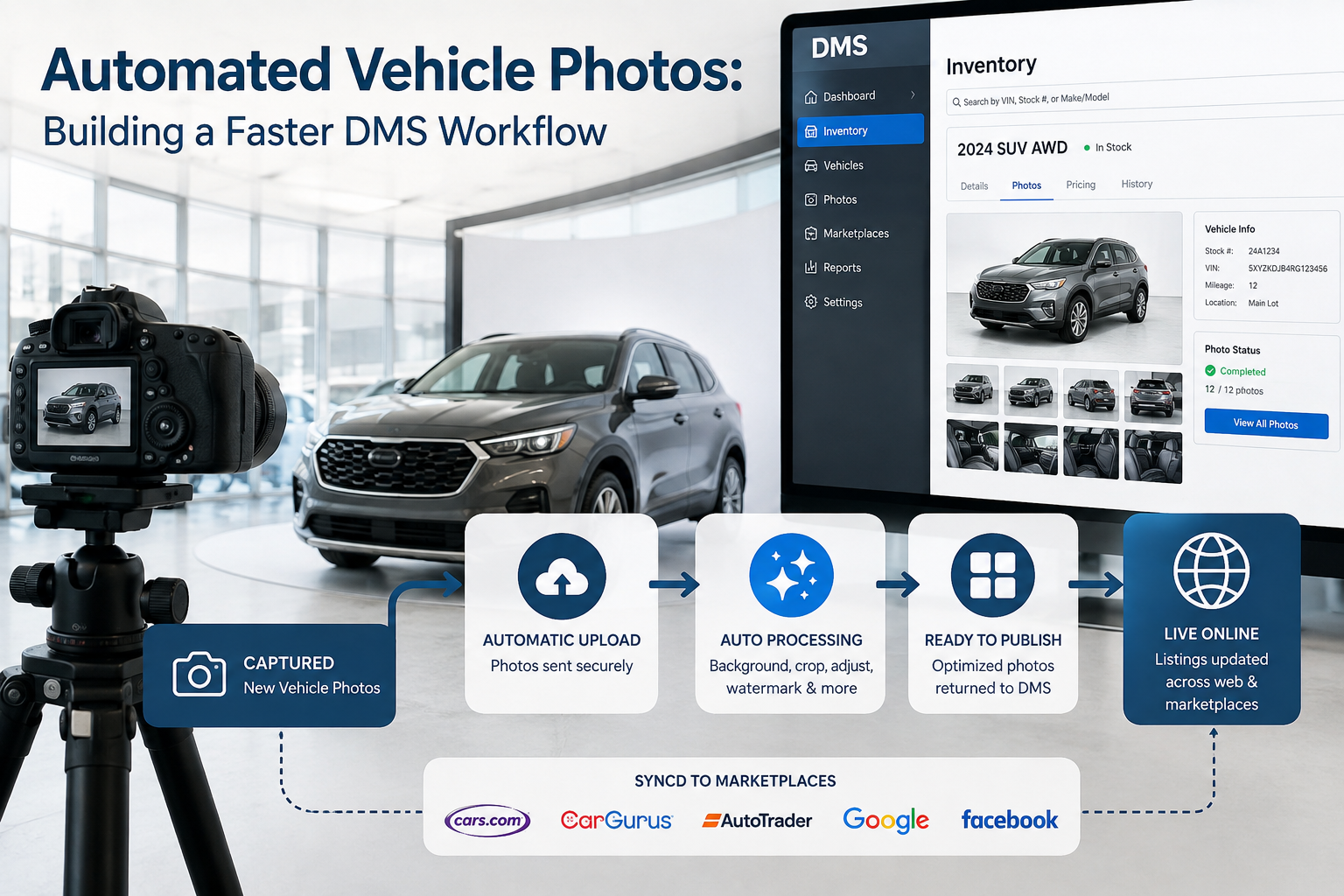
For most dealerships, vehicle photography is not an isolated marketing task. It sits directly inside the inventory lifecycle.
A vehicle arrives. It is entered into the dealership management system (DMS) or inventory platform. Photos are captured. Those images may need backgrounds removed, lighting corrected, dealership branding applied, license plates blurred, or images resized before they can appear on the dealer website and third-party marketplaces.
When those tasks rely heavily on manual downloading, editing, renaming, and uploading, a dealership can create an unnecessary delay between acquiring a vehicle and getting it fully merchandised online.
That is where dealership inventory photo automation can make a meaningful difference.
By connecting image-processing technology with the systems dealerships already use, photos can move automatically from capture to processing to inventory listings with far less manual intervention. The goal is not simply faster photo editing. It is creating a connected inventory workflow where photography becomes another automated part of vehicle merchandising.
Modern vehicle shoppers often begin their buying journey online. Before speaking with a salesperson or visiting a dealership, they may compare dozens of listings across dealership websites, manufacturer sites, marketplaces, and automotive shopping platforms.
Listings without complete photography are at a disadvantage.
A vehicle may technically be available for sale, but if its listing contains only a placeholder image or a small number of unfinished photos, shoppers may overlook it.
The problem is often not photography itself. The bottleneck is everything that happens after the photographer presses the shutter.
Images may need to be transferred from a camera or mobile device, processed through editing software, organized into the correct vehicle folder, matched to a VIN or stock number, and uploaded to an inventory system.
At a dealership processing hundreds or thousands of images each week, even a few minutes of manual work per vehicle adds up quickly.
Automation reduces those repetitive handoffs.
A dealership management system typically acts as one of the central sources of vehicle information.
Depending on the dealership and technology stack, the DMS or connected inventory management platform may contain information such as:
Photography systems can use those identifiers to determine exactly which images belong to which vehicle.
Instead of treating a folder of vehicle photos as unrelated image files, an automated system can associate those photos with existing inventory records.
This connection is one of the foundations of dealership inventory photo automation.
When inventory data and photography data communicate with each other, dealerships can reduce the number of manual decisions required to prepare a vehicle for online merchandising.
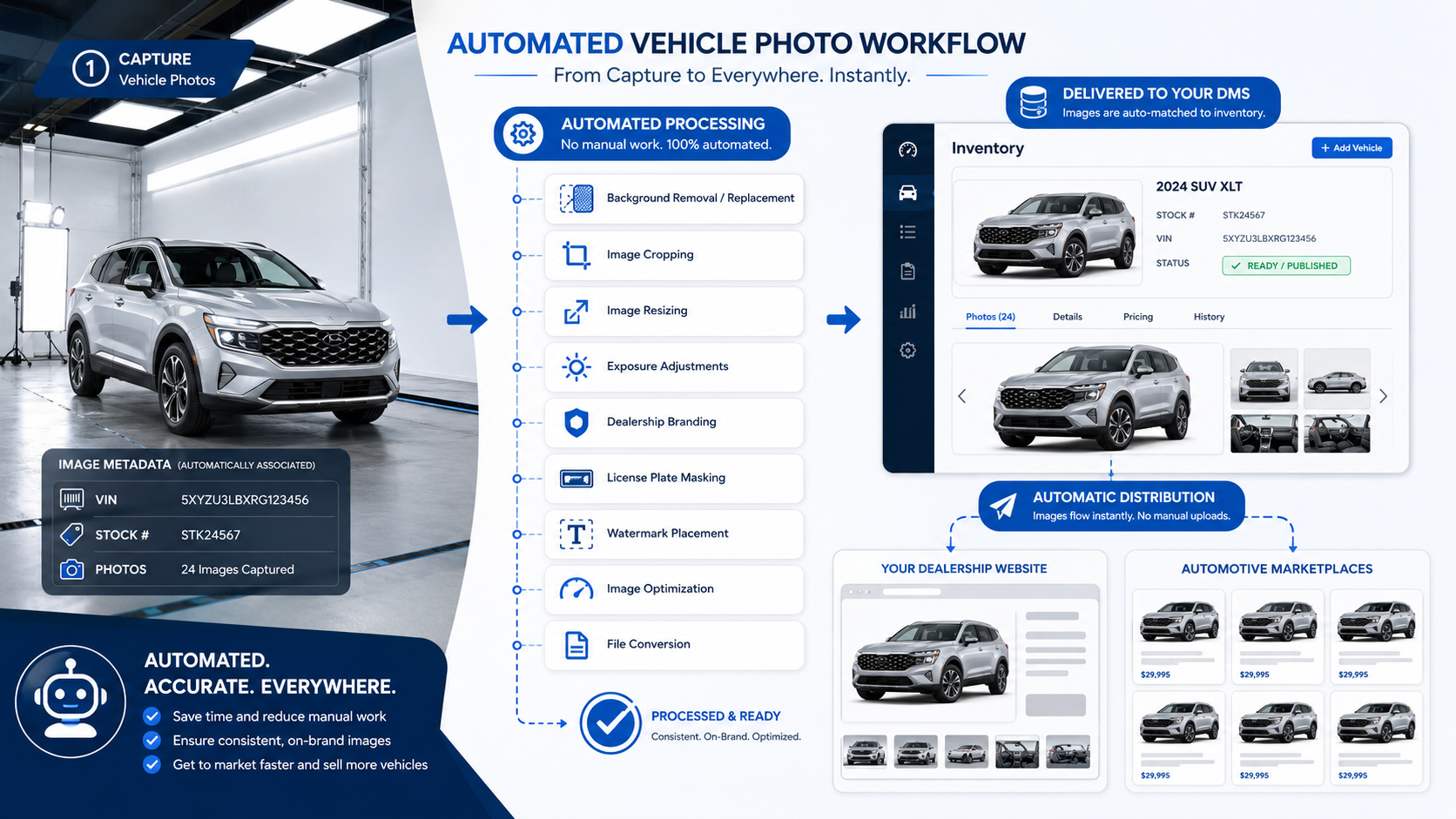
The exact architecture varies depending on the dealership's DMS, inventory provider, photo-processing platform, and website provider.
However, the underlying concept is usually similar.
Vehicle data enters the dealership's inventory environment. Photos are captured and associated with a VIN, stock number, or another unique identifier. An integration sends the photos to an automated image-processing service.
The processing platform can perform tasks such as:
Once processing is complete, the finished files can automatically return to the dealership's inventory system, media repository, or another platform responsible for distributing the listing.
The images may then flow to the dealer website and supported automotive marketplaces through the dealership's existing inventory feeds.
The important distinction is that employees are no longer manually moving every image between systems.
There are several ways dealerships and software providers can connect image automation to existing infrastructure.
An application programming interface, or API, allows two software platforms to exchange data automatically.
For example, an inventory platform could detect that new photos have been attached to stock number A12345 and send those files to an image-processing API.
Once the images are processed, the API can return the finished versions along with information about whether processing succeeded.
APIs are particularly useful for dealership groups, inventory software companies, automotive marketplaces, and technology vendors that need scalable automation.
Webhooks are commonly used to notify another system when a particular event occurs.
A webhook might be triggered when:
Instead of repeatedly checking whether something has changed, one system can notify another immediately.
That can help make dealership inventory photo automation faster and more responsive.
Not every dealership platform offers modern APIs or webhook support.
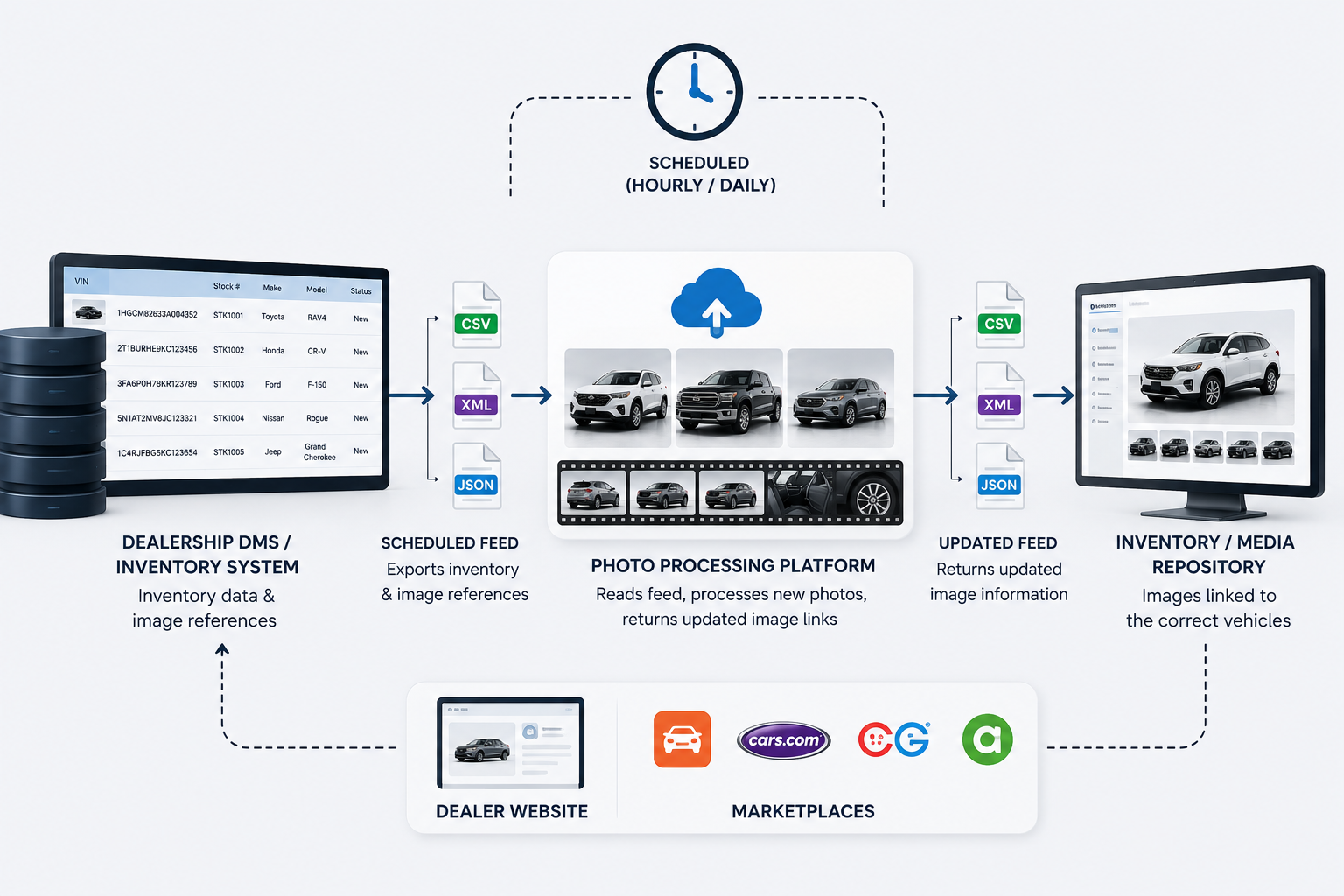
In those situations, scheduled feeds can still support significant automation.
Vehicle inventory data and image references may be exported periodically using formats such as CSV, XML, JSON, or another structured feed.
The photo-processing platform can read those feeds, identify newly added inventory, process associated photography, and return updated image information during the next synchronization.
Scheduled feeds may not always operate in real time, but they can still eliminate substantial manual work.
One of the most important parts of an automated vehicle photography workflow is accurate vehicle matching.
Photos must reliably connect to the correct inventory record.
VINs are particularly useful because they provide a unique identifier for individual vehicles. Stock numbers can also work well when dealership systems use them consistently.
File naming conventions can simplify this process.
For example, vehicle photography might use filenames structured around:
VIN_photo01.jpg
or:
StockNumber_01.jpg
A processing platform can use that information to associate each image with the correct inventory record.
This reduces the risk of employees manually choosing vehicles from dropdown menus or dragging photos into the wrong listings.
At scale, reliable matching is just as important as image quality.
One of the biggest opportunities for dealerships is connecting photography automation directly to vehicle intake.
Imagine a vehicle arriving at the dealership in the morning.
The inventory record is created, the vehicle is photographed, and those images automatically move into a processing queue.
Backgrounds are cleaned up, image dimensions are standardized, branding is applied, and finished photos are returned to the inventory platform.
The dealership's existing syndication system can then distribute the completed listing.
Instead of asking employees to remember whether a particular vehicle still needs editing or uploading, the workflow itself manages the movement of the images.
That can shorten the time between vehicle arrival and a complete online listing.
Automation can help dealerships publish complete vehicle listings sooner.
For high-turnover inventory, reducing merchandising delays by even several hours can be valuable.
Automated processing can apply the same background, dimensions, cropping rules, and branding across an entire inventory.
That creates a more professional and recognizable visual presentation.
Employees no longer need to spend as much time downloading files, moving folders, applying repetitive edits, and re-uploading completed images.
Instead, staff can focus on tasks requiring human judgment.
A workflow that works automatically for 50 vehicles is far easier to expand to 500 vehicles than a workflow requiring employees to manually process every image.
This is especially important for multi-location dealer groups.
Automated systems can record processing status for each image.
Dealerships can know which photos were successfully processed, which are waiting, and which need attention.
Automation is powerful, but it is not completely hands-off.
Connecting a DMS, inventory platform, photo system, and image-processing service may require technical development.
The difficulty depends heavily on which APIs and data feeds are available.
Automation cannot completely compensate for poor photography.
Extreme reflections, obstructed vehicles, unusual lighting, or badly framed images may still produce inconsistent results.
Some DMS or inventory systems offer excellent integration capabilities, while others provide limited access.
Dealerships may need to work through an inventory provider, website company, or middleware platform.
Not every image will process perfectly.
A reliable system still needs a method for identifying failed images and sending unusual cases for manual review.
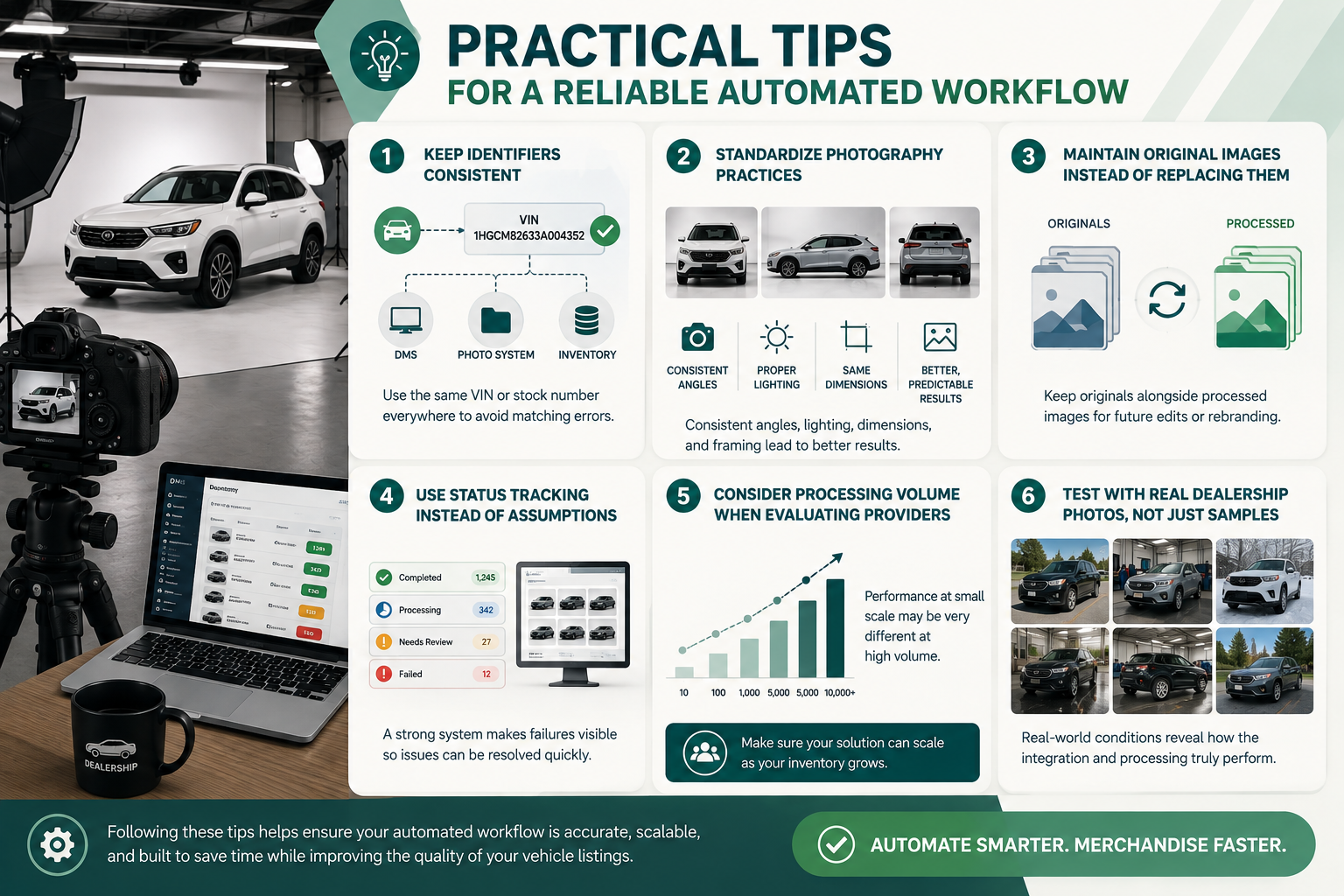
Keep your vehicle identifiers consistent across every platform. If one system uses the VIN while another relies on a manually created folder name, matching errors become much more likely.
Standardize photography practices whenever possible. Similar camera angles, image dimensions, lighting conditions, and framing help automated processing generate more predictable results.
Maintain original images rather than replacing them permanently. Processed images should usually exist alongside the originals so they can be regenerated if branding or editing requirements change.
Use status tracking rather than assuming that every image processed successfully. A strong dealership inventory photo automation system should make failures visible rather than silently skipping them.
Consider processing volume when evaluating providers. A solution that works well for ten images may behave differently when hundreds of vehicles and thousands of images enter the system simultaneously.
Finally, test integrations using real dealership photography rather than only polished sample images. Real-world inventory includes difficult lighting, reflections, crowded backgrounds, snow, rain, indoor service bays, and vehicles photographed from unusual angles.
Automation does not mean eliminating quality assurance.
It means using people where their judgment creates the most value.
Instead of manually inspecting every single image, dealerships can use structured spot-checking.
For example, staff might review a sample from each batch while automatically flagging images that produce unusual processing results.
The system handles predictable work while employees focus on exceptions.
This hybrid approach is often more scalable than either fully manual processing or completely unchecked automation.
Yes. If the inventory platform, DMS, website provider, or connected system supports the appropriate API or feed integration, processed images can automatically be associated with the correct vehicle and sent into the existing listing workflow.
Usually not. The purpose of an integration is typically to connect with the dealership's existing technology rather than replace it.
VINs and stock numbers are commonly used. File naming conventions, folder structures, API metadata, or inventory records can all help identify the appropriate vehicle.
Yes. A well-designed architecture can separate inventory by dealership, rooftop, dealer group, or inventory source while using the same underlying processing system.
A reliable workflow should identify the failure and place the image into a retry or manual-review process instead of allowing it to disappear from the workflow.
Vehicle photography becomes much more powerful when it stops operating as a separate task.
The real opportunity is connecting photography directly to the systems already responsible for dealership inventory.
When vehicles arrive, their information enters the DMS or inventory platform. Photography is captured and automatically associated with the correct vehicle. Image-processing technology prepares those photos for online merchandising, and the finished images move back into the dealership's publishing workflow.
That is the value of dealership inventory photo automation: not simply editing photos faster, but reducing the friction between vehicle acquisition and a complete online listing.
For dealerships, dealer groups, DMS providers, and automotive software companies managing growing image volumes, the next improvement may not be hiring more people to process photographs.
It may be building a workflow where the software handles the repetitive work automatically.
Ready to automate vehicle photo processing inside your existing inventory workflow? Explore an automotive image-processing API or integration that can connect directly with your dealership systems and start turning newly photographed vehicles into listing-ready inventory faster.


Compact, ready to go anywhere
Interchangeable lens that’s upgradeable
Dual 1-inch sensors for improved clarity and low light performance
Dynamic range and 6K 360° capture
360° photo resolution at 21MP

8K 360° video recording for ultra-detailed visuals.
4K single-lens mode for traditional wide-angle shots.
Invisible selfie stick effect for drone-like perspectives.
2.5-inch touchscreen with Gorilla Glass protection.
Waterproof up to 33ft for underwater shooting.

360° photo resolution in 23MP
Slim design at 24 mm thick
Built-in image stabilization for smooth video capture.
Internal 19GB storage for photo and video storage.
Wireless connectivity for remote control and sharing.

60MP 360° still images for high-resolution photography.
5.7K 360° video recording at 30fps.
2.25-inch touchscreen for intuitive control.
USB Type-C port for fast charging and data transfer.
MicroSD card slot for expandable storage.
.png)

.png)

Try it free. No credit card required. Instant set-up.







.svg)


.svg)