AI Video Automation for Coaches and Course Creators

June 29, 2025
5 min read
Share this post

AI Video Automation for Coaches and Course Creators (2025 Guide)

If you're a coach, course creator, or educator, video is the backbone of your business.

✅ It builds trust
✅ Converts leads
✅ Delivers content at scale
✅ Positions you as the expert

But creating high-quality video content—consistently—can feel overwhelming. Between scripting, filming, editing, and uploading, it’s easy to burn out or fall behind.

That’s where AI video automation steps in.

In this guide, you’ll discover how coaches and digital educators are scaling their businesses using automated video creation systems powered by AI—no editing skills or big team required.

Why Coaches Are Turning to AI Video in 2025

You no longer need a full production team to create video that converts.

With the right AI tools, you can:

✅ Write scripts in your tone
✅ Clone your voice for narration
✅ Auto-generate short-form Reels
✅ Build video landing pages and funnels
✅ Deliver value at scale without repeating yourself

🡆 Related: AI Video Automation Blueprint: 2025 Guide to Scale Your Business

Use Case #1: Automate Your Weekly Content System

Weekly content builds authority and attracts clients.

Using AI, you can:

  • Generate a 2–5 minute teaching video script
  • Narrate it with your cloned voice
  • Add captions, branding, and CTAs
  • Export for YouTube, IG, LinkedIn, and email

Tools:

  • ChatGPT – Script generation
  • ElevenLabs / Descript – Voice narration
  • Pictory / PropertyEdits.ai – Visual editing + creation
  • CapCut – Captions and formatting
  • Metricool – Schedule and publish

🡆 Related: The Weekly AI Video Content Plan (Template + Tools)

Use Case #2: Build a Course Without Recording Yourself

Camera-shy? No problem.

You can now build entire courses using:

✅ Slides or stock footage
✅ AI voice narration
✅ Scripted modules
✅ Branded visual templates

Tools:

  • Tella / Pictory – Record or animate slide-based lessons
  • ChatGPT – Module outlines + quiz questions
  • Descript – Edit by editing text
  • Loom – Personal welcome/intros (if desired)

🡆 Related: From Script to Screen: The Ultimate AI Video Content Stack

Use Case #3: Automate Lead Magnet Funnels With Video

Want to grow your email list with zero editing?

Here’s how:

  1. Create a 60–90 second lead magnet promo video
  2. Add a free checklist or training link
  3. Embed on a landing page
  4. Connect to your email platform
  5. Use Reels to drive traffic

Tools:

  • PropertyEdits.ai – Create branded video + voice
  • Carrd / Framer – Fast mobile-friendly landing page
  • MailerLite / Beehiiv – Collect and nurture leads

🡆 Related: AI Video Landing Pages: How to Convert Viewers Into Clients

Use Case #4: Turn Longform Content Into 10+ Reels

Already have webinars, podcast episodes, or coaching calls?

Turn them into weeks of content using AI clipping tools:

Tools:

  • Opus Clip – Detect highlights and cut short-form clips
  • Descript – Edit audio and video via transcript
  • CapCut – Add captions, titles, music
  • Submagic – Stylized subtitles with emojis

🡆 Related: Turn One Video Into 10 Pieces of Content

Use Case #5: Create Personalized Client Welcome Videos

Set yourself apart with personalized onboarding, using:

✅ AI-generated voiceover with client names
✅ Custom templates with their logo
✅ Quick 1-minute “welcome to the program” clips

Tools:

  • ElevenLabs – Upload variable data for name personalization
  • ChatGPT – Generate script templates
  • Pictory / Runway ML – Add visuals and CTAs
  • PropertyEdits.ai – Fast, branded delivery portals

🡆 Related: How to Build a Scalable Client Portal for Your Video Services (With AI)

Workflow Example: AI Video System for Coaches

Coach: Sarah – Life and Business Coach

Weekly Workflow:
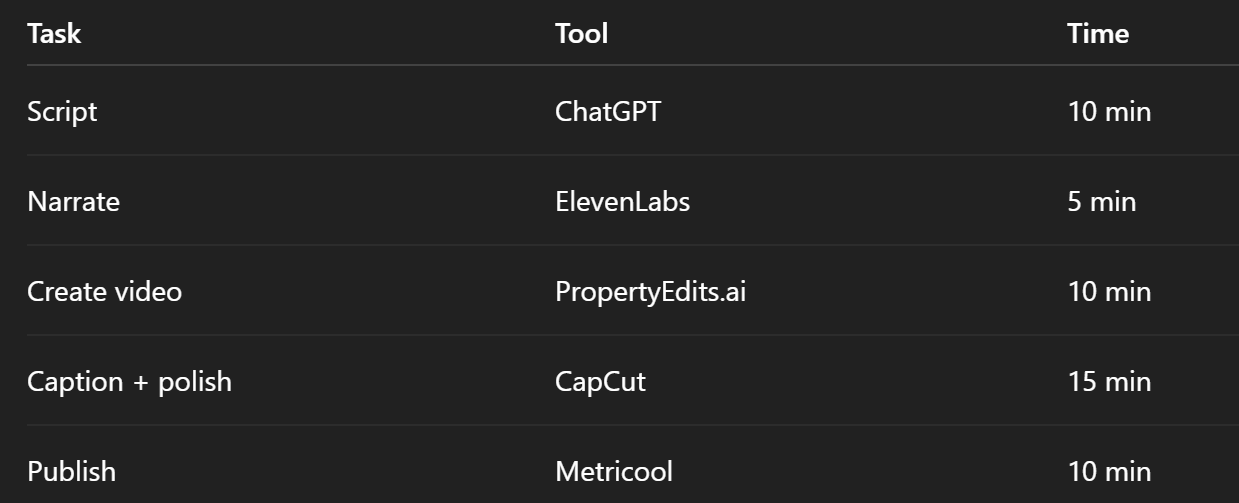
Output:

  • 1 YouTube video
  • 2 Reels
  • 1 newsletter embed
  • 1 lead magnet funnel video

🡆 Related: The Fastest Way to Create 30+ Videos a Month With AI

Bonus: Build Recurring Revenue With Video Templates

Once you’ve built your AI system, repurpose it into:

  • 🛠️ Done-for-you video bundles
  • 🎥 Branded client welcome videos
  • 📈 Monthly Reels packages
  • 💼 Course module templates
  • 📹 Affiliate or white-label video content

This lets you scale your offer AND help other creators do the same.

🡆 Related: How to Package AI Video Services for Clients (and Charge More)

Tips to Make AI Video Work for Coaches

✅ Keep scripts short and direct
✅ Use personal stories, even if AI-voiced
✅ Brand your visuals consistently
✅ Link every video to your funnel
✅ Batch record and schedule ahead

🡆 Related: AI Video Funnels: How to Automate Lead Gen With Short-Form Content

Final Thoughts: Let AI Do the Heavy Lifting

As a coach or course creator, your value is your voice, ideas, and frameworks—not your video editing skills.

With AI video automation, you can:

✅ Save 10+ hours a week
✅ Grow your reach without burning out
✅ Deliver scalable digital products
✅ Convert more viewers into clients

🡆 Try photoaivideo for Free – Create Your First Coaching Video in Minutes

Share this post

Choose The Right 360° Camera

Insta360 ONE RS 1-Inch 360 Edition

  • Compact, ready to go anywhere

  • Interchangeable lens that’s upgradeable

  • Dual 1-inch sensors for improved clarity and low light performance

  • Dynamic range and 6K 360° capture

  • 360° photo resolution at 21MP

Learn More

Insta360 X4

  • 8K 360° video recording for ultra-detailed visuals.

  • 4K single-lens mode for traditional wide-angle shots.

  • Invisible selfie stick effect for drone-like perspectives.

  • 2.5-inch touchscreen with Gorilla Glass protection.

  • Waterproof up to 33ft for underwater shooting.

Learn More

Ricoh Theta Z1

  • 360° photo resolution in 23MP

  • Slim design at 24 mm thick

  • Built-in image stabilization for smooth video capture.

  • Internal 19GB storage for photo and video storage.

  • Wireless connectivity for remote control and sharing.

Learn More

Ricoh Theta X

  • 60MP 360° still images for high-resolution photography.

  • 5.7K 360° video recording at 30fps.

  • 2.25-inch touchscreen for intuitive control.

  • USB Type-C port for fast charging and data transfer.

  • MicroSD card slot for expandable storage.

Learn More
Property Marketing
Allows potential buyers to explore properties in detail from anywhere, enhancing the real estate marketing process.
Automotive Spins
Create an interactive virtual showroom and engage affluent digital buyers with live 360º video calls, all through the CloudPano mobile app for a complete automotive sales solution.
Interactive Floor Plans
Create 2D and 3D floor plans with measurements in 4 minutes or less, all from your phone. Download the Floor Plan Scanner app and get your first scan free.

360 Virtual Tours With CloudPano.com. Get Started Today.

Try it free. No credit card required. Instant set-up.

Try it free
Latest posts

See our other posts

Interviews, tips, guides, industry best practices, and news.

Turn Car Photos into Video: Best Practices for Your Car Listing Video Maker

This high-authority guide outlines the essential creative and technical standards for dealerships looking to turn car photos into video. It moves beyond basic automation to explore professional best practices, such as "Golden Hour" lighting, 360-degree spatial markers, and the integration of neural AI narration. The article demonstrates how utilizing a car listing video maker can lead to a 3.2x lift in lead intent by providing the visual transparency modern buyers demand. Additionally, it provides a technical roadmap for creating videos from car photos that are optimized for Webflow performance, ensuring rapid "Time to Web" and healthy Core Web Vitals.
Read post

5 Ways a Car Listing Video Maker Increases Lead Quality

This authoritative guide explores the shift from lead quantity to lead quality in the automotive sector. It details five specific ways a car listing video maker improves lead "temperature," including establishing unmatched transparency, increasing VDP dwell time, and pre-answering buyer objections. By leveraging auto inventory marketing tools, dealerships can filter out low-intent browsers and focus sales resources on high-intent shoppers who have already been "pre-sold" through an automated video walkaround generator for cars. The article includes data-backed evidence showing that video-led inquiries result in significantly higher appointment-set rates and overall close ratios.
Read post

A Step-by-Step Guide to Using a Car Listing Video Maker

This high-authority instructional guide demystifies the process of automated vehicle merchandising. It provides a detailed, four-step workflow for dealerships to create videos from car photos, moving from asset capture to multi-channel syndication. The article explains the technical benefits of using a car listing video maker, including neural AI narration and seamless DMS integration, while emphasizing the impact on VDP dwell time and consumer trust. Specifically optimized for Webflow users, the guide ensures that dealers can turn car photos into video without compromising site speed or technical SEO performance.
Read post



