


.png)


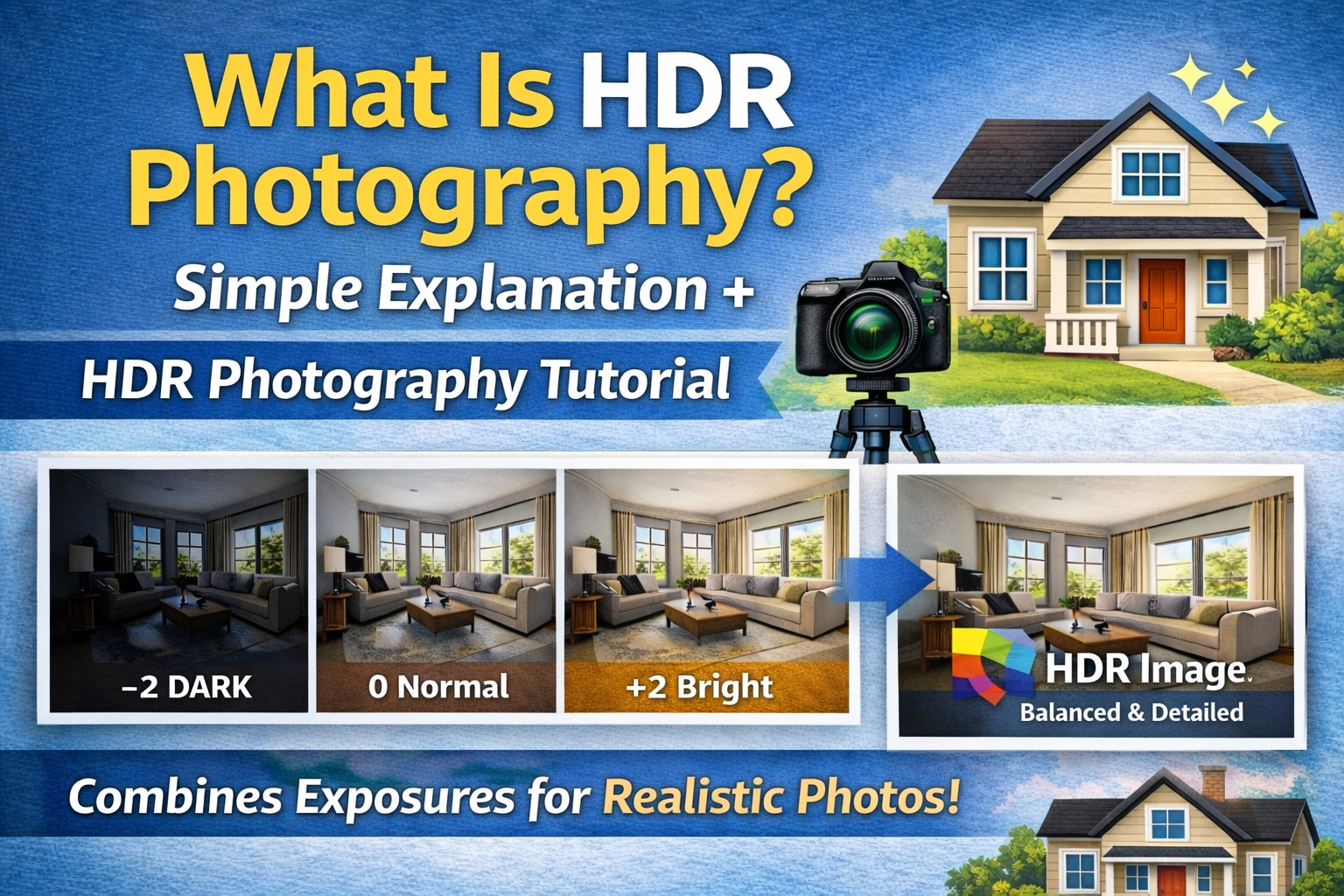
A Beginner-Friendly HDR Photography Tutorial
If you’ve ever taken a photo and thought, “Why does this look darker than real life?” — you’ve already bumped into the limits of your camera’s dynamic range.
That’s exactly where HDR photography comes in.
In this guide, we’ll break down what is HDR photography, explain the HDR photo meaning in simple terms, and walk through a practical HDR photography tutorial so you can start using it right away.
Whether you shoot real estate, landscapes, interiors, or travel, HDR can help your photos look closer to what your eyes actually see. Let’s dive in. 🚀
HDR photography stands for High Dynamic Range photography.
Dynamic range refers to the difference between the brightest and darkest parts of a scene. Your eyes can see a huge range of light — from bright sunlight to deep shadows — at the same time. Cameras, however, struggle with this.
So when you ask, what is HDR photography, the simple answer is:
👉 It’s a technique that combines multiple photos at different brightness levels into one well-balanced image.
Instead of choosing between blown-out highlights or dark shadows, HDR photography lets you keep detail in both.
The HDR photo meaning is all about balance.
Imagine you’re photographing a living room with big windows on a sunny day.
If you expose for the room:
🪟 The windows turn pure white.
If you expose for the windows:
🛋 The room becomes dark and gloomy.
An HDR photo blends multiple exposures so:
✔ The room looks bright and inviting
✔ The window view is still visible
✔ The image feels natural
So the true HDR photo meaning is capturing a scene the way your eyes experience it — not how a single camera exposure limits it.
HDR photography uses a process called exposure bracketing.
Here’s how it works:
📷 You take several photos of the same scene
📷 Each photo has a different exposure
📷 Software combines them into one final image
Typically, photographers take:
Then, using editing software, they merge those images into a single HDR photo.
That’s the core idea behind every HDR photography tutorial.

Your eyes constantly adjust to changing light levels. Cameras don’t.
When you walk into a bright room with windows, your brain automatically balances the light. You see detail outside and inside at the same time.
Cameras have a smaller dynamic range. Without HDR, they must choose:
❌ Show outside detail but lose interior lighting
❌ Show interior lighting but blow out windows
HDR photography solves this by combining exposures to expand the camera’s dynamic range artificially.
Once you understand what is HDR photography, you’ll notice it’s useful almost everywhere.
HDR is widely used to make interiors look bright and natural while keeping window views visible.
Sunrises and sunsets have huge contrast. HDR helps preserve sky colors and shadow details.
Buildings often include bright skies and shaded areas. HDR balances both.
HDR keeps rooms well-lit and true to life.
Let’s walk through a beginner-friendly HDR photography tutorial.
HDR requires multiple images of the same scene. A tripod keeps your camera perfectly still so the photos align correctly.
Most cameras have a bracketing setting. It automatically takes multiple shots at different brightness levels.
Start with 3 exposures:
📸 Dark
📸 Normal
📸 Bright
To get clean HDR results:
Import your images into HDR software and use the merge feature. The software blends the exposures into one image with improved detail in highlights and shadows.
After merging:
✨ Adjust contrast
✨ Correct colors
✨ Fine-tune brightness
The goal is a realistic image — not an overprocessed one.
Good HDR photography looks:
✔ Natural
✔ Evenly lit
✔ Detailed in both highlights and shadows
✔ True to real-life colors
If people can tell immediately that your photo is HDR because it looks surreal or glowing, it’s probably overdone.
Subtle HDR is usually the most professional.
Understanding the HDR photo meaning also means knowing what NOT to do.
Too much tone mapping can make photos look fake.
Poor blending can create glowing outlines around windows or buildings.
HDR should still have contrast and depth.
Mixed lighting can cause strange colors if not corrected.
A good HDR photography tutorial always emphasizes realism.
You might wonder: why not just edit one photo?
A single exposure has limited data. Once highlights are blown out or shadows are too dark, detail is gone.
HDR photography captures more information, giving you more flexibility during editing.
That’s why HDR is popular in high-contrast environments like homes and landscapes.
Not at all.
Modern cameras and smartphones often include HDR modes automatically. Even beginners can create HDR photos with just a few taps.
As you grow, learning manual HDR techniques gives you more control and better quality results.
That’s why understanding what is HDR photography is useful for every skill level.
In real estate, first impressions matter. HDR helps by:
✨ Making rooms look brighter
🪟 Showing clear outdoor views
📸 Creating inviting images
Listings with well-lit HDR images tend to attract more attention online.
This is one reason HDR has become a standard in property photography.
HDR tools are becoming smarter and more automated.
Modern software can:
🤖 Detect edges better
🎨 Produce more natural colors
⚡ Process images faster
But the fundamentals of HDR photo meaning remain the same: balance light and preserve detail.
So, what is HDR photography?
It’s a way to combine multiple exposures so your final image shows detail in both bright and dark areas — just like your eyes see.
The HDR photo meaning is all about natural balance, not dramatic effects.
By following a simple HDR photography tutorial:
📷 Capture bracketed exposures
🖥 Merge them with software
🎨 Make subtle adjustments
You can create photos that feel bright, realistic, and professional.
HDR photography isn’t about flashy edits — it’s about capturing the full beauty of a scene. And once you understand it, you’ll start seeing the world in dynamic range everywhere you look. 🌎📸✨


Compact, ready to go anywhere
Interchangeable lens that’s upgradeable
Dual 1-inch sensors for improved clarity and low light performance
Dynamic range and 6K 360° capture
360° photo resolution at 21MP

8K 360° video recording for ultra-detailed visuals.
4K single-lens mode for traditional wide-angle shots.
Invisible selfie stick effect for drone-like perspectives.
2.5-inch touchscreen with Gorilla Glass protection.
Waterproof up to 33ft for underwater shooting.

360° photo resolution in 23MP
Slim design at 24 mm thick
Built-in image stabilization for smooth video capture.
Internal 19GB storage for photo and video storage.
Wireless connectivity for remote control and sharing.

60MP 360° still images for high-resolution photography.
5.7K 360° video recording at 30fps.
2.25-inch touchscreen for intuitive control.
USB Type-C port for fast charging and data transfer.
MicroSD card slot for expandable storage.
.png)

.png)

Try it free. No credit card required. Instant set-up.







.svg)


.svg)