The Future of Real Estate Media: AI Automation Mode for Instant Video Content

Cloudpano
December 10, 2025
‱
5 min read
Share this post

The Future of Real Estate Media: AI Automation Mode for Instant Video Content

🚀 The world of real estate marketing is evolving fast, and at the center of this transformation is AI-powered automation. Imagine uploading your listing photos, clicking one button, and within minutes having a polished real estate video ready to share. That’s exactly what Automation Mode delivers.

In this step-by-step guide, we’ll explore how real estate agents, photographers, and busy media creators can harness AI automation to save hours, boost efficiency, and close more deals.

đŸ“ș Watch the full walkthrough here: Automation Mode Explained

Why Automation Mode is a Game-Changer ⚡

Traditional real estate video creation is time-consuming:

  • Selecting movements for each photo
  • Adding music
  • Editing transitions
  • Rendering final reels

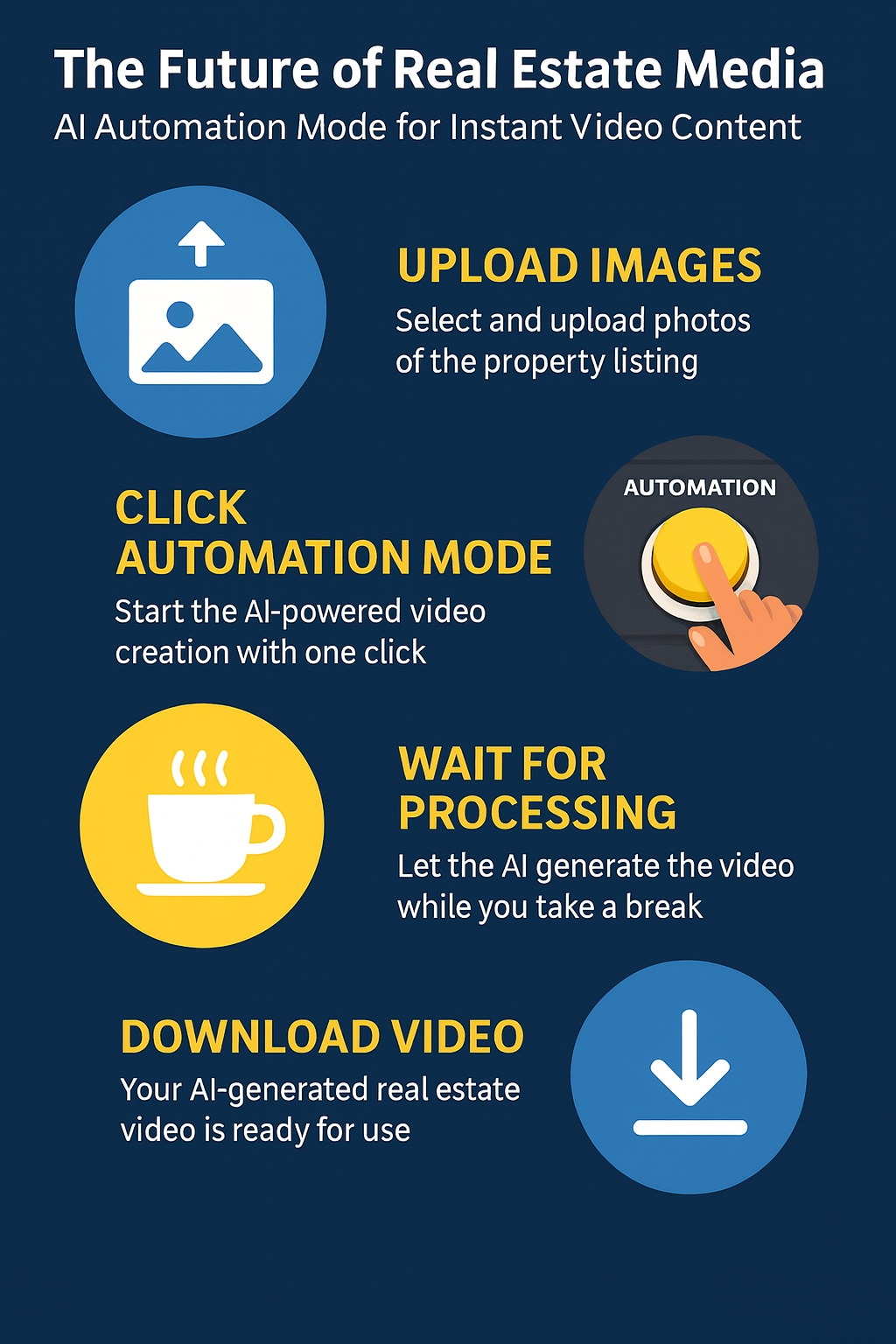
With AI Automation Mode, all of this happens automatically:
✅ Upload photos
✅ Choose video style (landscape/vertical)
✅ Pick background music
✅ Hit Start Automation

Minutes later, your video is ready for download đŸŽ„.

This means more listings covered, more content shared, and more clients impressed—without the burnout.

Step 1: Upload High-Quality Photos 📾

The foundation of every great real estate video is strong imagery.

  • Upload 12 photos = 1 minute video
  • Use only your best shots (interior + exterior)
  • Ensure good lighting and angles

👉 Pro Tip: PhotoAIVideo.com automates video creation from photos, giving your visuals professional cinematic motion instantly.

Step 2: Choose Your Automation Settings đŸŽ›ïž

Inside your dashboard, select Automation Mode.
You’ll see quick options for:

  • 🎬 Video format: landscape, square, or vertical
  • đŸŽ¶ Background music (choose from multiple themes)
  • 🏡 Project type (residential, luxury, vacation rental, etc.)

Once saved, you never have to repeat these settings—just one click and done.

Step 3: Let AI Do the Heavy Lifting đŸ€–

Here’s where the magic happens:

  • AI automatically assigns movements to each photo
  • Transitions are intelligently added
  • Music syncs seamlessly with image pacing

All of this happens while you grab a coffee ☕.

Step 4: Review, Edit, & Customize ✍

Automation Mode doesn’t lock you in—you can:

  • Reorder images
  • Swap background music
  • Regenerate specific clips
  • Export multiple versions (landscape + vertical)

This ensures every video matches your client’s brand and listing style.
Why Real Estate Pros Love Automation Mode ❀

  • Speed: From photos to video in minutes
  • Scalability: Handle multiple listings daily without extra staff
  • Affordability: Just a few dollars per video
  • Flexibility: Unlimited edits and versions

Agents who use automation close listings 2x faster because they can promote properties across MLS, YouTube, Instagram, and TikTok at lightning speed 🚀.

The Future of Real Estate Media is AI 🌐

The days of manual editing are numbered. With automation tools like PhotoAIVideo, real estate professionals can:

  • Offer video on every listing
  • Create consistent branding across platforms
  • Free up time for client relationships (not editing timelines)

👉 Want to stay ahead?

Final Thoughts 💡

The future of real estate media is fast, affordable, and AI-powered. By adopting Automation Mode, you’re not just keeping up—you’re staying ahead of your competition. Whether you’re a solo agent, a photographer, or running a media team, automation gives you the ability to scale your business without scaling your workload.

‍

Share this post
Cloudpano

Choose The Right 360° Camera

Insta360 ONE RS 1-Inch 360 Edition

  • Compact, ready to go anywhere

  • Interchangeable lens that’s upgradeable

  • Dual 1-inch sensors for improved clarity and low light performance

  • Dynamic range and 6K 360° capture

  • 360° photo resolution at 21MP

Learn More

Insta360 X4

  • 8K 360° video recording for ultra-detailed visuals.

  • 4K single-lens mode for traditional wide-angle shots.

  • Invisible selfie stick effect for drone-like perspectives.

  • 2.5-inch touchscreen with Gorilla Glass protection.

  • Waterproof up to 33ft for underwater shooting.

Learn More

Ricoh Theta Z1

  • 360° photo resolution in 23MP

  • Slim design at 24 mm thick

  • Built-in image stabilization for smooth video capture.

  • Internal 19GB storage for photo and video storage.

  • Wireless connectivity for remote control and sharing.

Learn More

Ricoh Theta X

  • 60MP 360° still images for high-resolution photography.

  • 5.7K 360° video recording at 30fps.

  • 2.25-inch touchscreen for intuitive control.

  • USB Type-C port for fast charging and data transfer.

  • MicroSD card slot for expandable storage.

Learn More
Property Marketing
Allows potential buyers to explore properties in detail from anywhere, enhancing the real estate marketing process.
Automotive Spins
Create an interactive virtual showroom and engage affluent digital buyers with live 360Âș video calls, all through the CloudPano mobile app for a complete automotive sales solution.
Interactive Floor Plans
Create 2D and 3D floor plans with measurements in 4 minutes or less, all from your phone. Download the Floor Plan Scanner app and get your first scan free.

360 Virtual Tours With CloudPano.com. Get Started Today.

Try it free. No credit card required. Instant set-up.

Try it free
Latest posts

See our other posts

Interviews, tips, guides, industry best practices, and news.

Best Angles for Car Photos That Drive More Clicks

This blog post breaks down the best angles for car photos that help vehicle listings generate more clicks, trust, and leads. It explains the most important exterior “hero shots,” essential walkaround angles, high-converting closeups, and must-have interior photos. It also covers common angle mistakes that reduce listing performance and shows how dealerships can standardize angles for consistent inventory photography at scale.
Read post

Photography Checklist for Car Dealership Inventory

This blog post provides a complete car dealership photography checklist for capturing clean, consistent, high-converting inventory photos. It covers vehicle prep, choosing the right photo zone and lighting, standard exterior/interior shot lists, feature/condition photos, quality control steps, and optional editing/background consistency workflows so dealerships can publish better listings faster and generate more leads.
Read post

How to Make Used Car Photos Look Professional

This blog post explains how to create professional used car photos that build trust, increase clicks, and generate more leads. It covers vehicle prep and cleaning, choosing the right location and lighting, using consistent angles, taking complete interior and condition photos, and using light editing/background cleanup to make used car listings look polished and dealership-level professional.
Read post



