Step-by-Step: How to Use AI Automation Mode for Real Estate Video Creation

Cloudpano
December 10, 2025
5 min read
Share this post

Step-by-Step: How to Use AI Automation Mode for Real Estate Video Creation 🏡🎥

Introduction

Speed and efficiency are everything in the real estate marketing world. Whether you’re a real estate agent, a property photographer, or a media entrepreneur, producing video content from property photos can make or break your listing engagement.

Enter Automation Mode — a powerful feature from PhotoAIVideo that lets you convert property photos into polished real estate videos in just a few clicks. No more hours of manual editing or worrying about missing deadlines. Just upload, click, and download. 🚀

In this guide, we’ll go step by step through how Automation Mode works, why it’s a game-changer for busy real estate professionals, and how you can use it to close more deals faster.

📺 Check out the full walkthrough in this video: How Automation Mode Works

Why Real Estate Videos Matter 🎬

Property videos aren’t just “nice to have” anymore—they’re essential. Buyers expect to see high-quality listing videos on the MLS, social media, and real estate websites. Videos boost:

Engagement – Listings with videos get more views and shares.
Trust – Professional video makes you look credible and reliable.
Conversions – More showings, more calls, more offers.

But here’s the challenge: creating professional videos takes time. That’s where AI Automation Mode comes in.

What Is Automation Mode? ⚡

Automation Mode is a one-click AI tool built into PhotoAIVideo that automatically turns your property photos into a fully-edited, ready-to-download real estate video.

Instead of choosing animations, timing, and transitions manually, the AI handles it for you. Just upload your photos, choose a video style, and let Automation Mode do the rest.

Think of it as your personal video editor on autopilot.

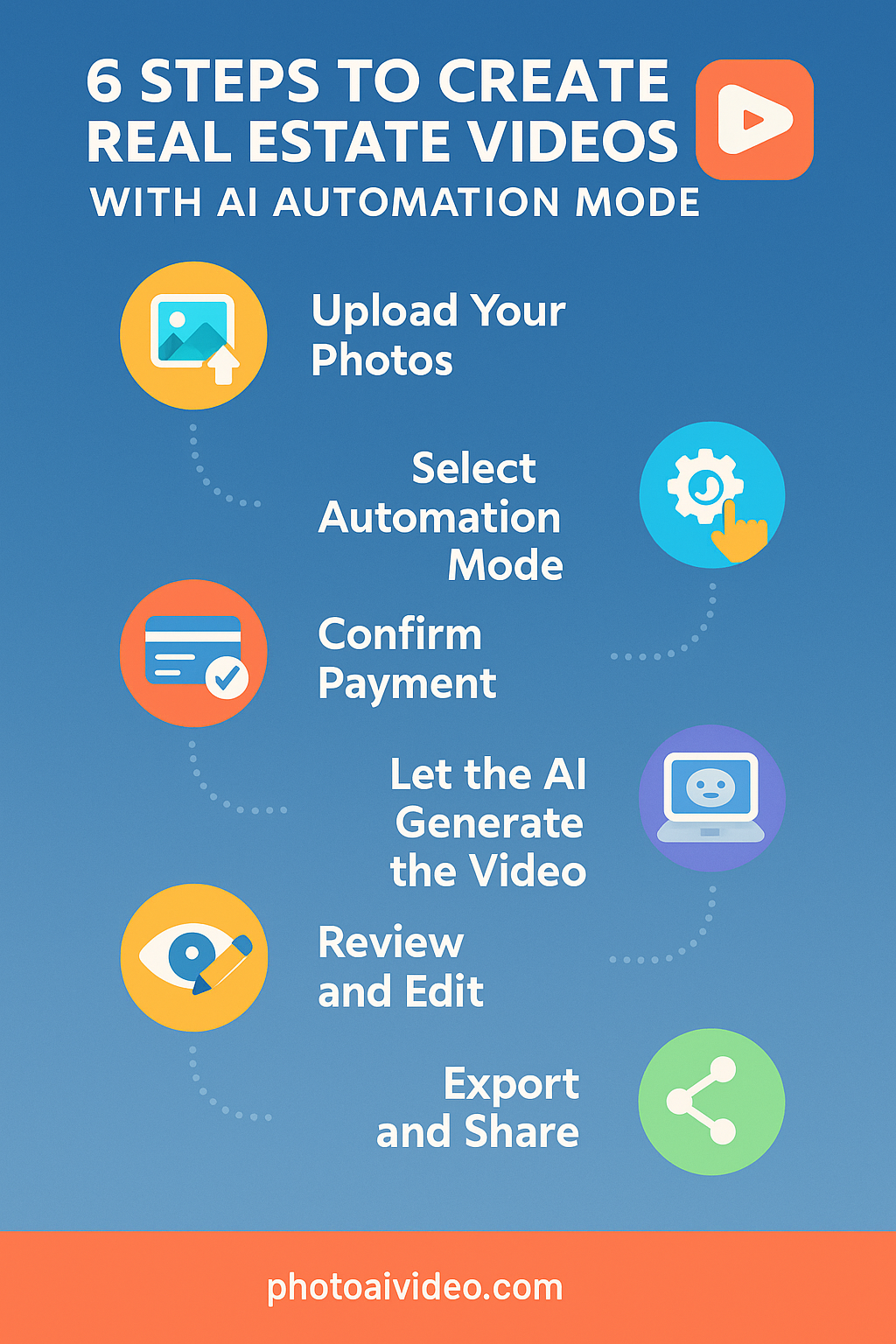
Step-by-Step Guide: Creating Real Estate Videos with Automation Mode 🛠️

1. Upload Your Best Property Photos 📸

Start by logging into your PhotoAIVideo dashboard. Create a new project and upload your photos.
👉 Pro Tip: Use only your favorite listing images. Remember, 12 photos = about 1 minute of video.

2. Choose Automation Mode ⚙️

Normally, you’d have to select camera movements and transitions for every photo. But with Automation Mode, all you need to do is click:

➡️ “Automation Mode” → Select Style & Music → Start Automatic Reel

The AI will automatically:

  • Apply smooth transitions 🎞️
  • Choose engaging movements (zoom, pan, fade)
  • Sync visuals with background music 🎶

3. Confirm Payment 💳

Automation Mode is a premium feature. You’ll be prompted to confirm your payment. If you’re a frequent user, check the box to save payment info — this makes future one-click automation even faster.

For just a small fee, you’ll save hours of editing time ⏱️ — and deliver professional videos to your clients instantly.

4. Let AI Do the Work 🤖

Here’s the magic: Automation Mode goes photo by photo, generating each AI-powered movement. Then, it stitches everything together into a seamless real estate video.

No extra input. No manual edits. Just sit back, grab a coffee ☕, and wait a few minutes while your video is created.

5. Review and Edit If Needed ✏️

Once the video is generated, you can:

  • Download immediately ⬇️
  • Preview and reorder slides 🔄
  • Change music 🎵
  • Regenerate movements if you’d like a different look.

You get full control to tweak or leave it as is.

6. Export & Share Everywhere 🌍

Your real estate video is now ready to:

  • Upload to MLS listings 🏘️
  • Share on Facebook, Instagram, TikTok, YouTube 📲
  • Send directly to your clients
  • Embed in property websites or landing pages

Videos created in Automation Mode are optimized for social media and look professional across devices.
Why Use Automation Mode for Real Estate Videos? 🏆

Here’s why real estate professionals love it:

  • Speed: Create a video in minutes, not hours.
  • 🎯 Consistency: Every video looks polished and on-brand.
  • 📈 Scalability: Perfect for high-volume real estate photographers or agencies.
  • 💰 Affordability: Professional video production without hiring an editor.

It’s especially powerful for agents managing multiple listings or photographers handling large client loads.

Real-World Example: Busy Agents & Media Teams 👩‍💼👨‍💻

Imagine you’re a real estate photographer with 10 shoots in a week. Normally, video editing would eat up hours of your time.

With Automation Mode, you can:

  • Upload property photos
  • Click once
  • Deliver 10 property reels in a single afternoon 🎉

Now, instead of editing, you can spend more time getting clients and closing deals.

Tips to Get the Most Out of Automation Mode ✨

  1. Always upload high-quality images – Blurry photos = blurry videos.
  2. Keep your branding consistent – Use similar music, logos, and layouts for all videos.
  3. Leverage vertical video – Automation Mode can also generate vertical formats for TikTok & Instagram Reels.
  4. Experiment with styles – Change background tracks and movements for variety.
  5. Promote your videos – Don’t just create them, share them widely.

The Future of Real Estate Marketing 🚀

Automation Mode is more than just a convenience tool — it’s a future-proof strategy. As AI becomes a standard in marketing, agents and media creators who adopt these tools early will stand out.

Instead of worrying about edits, you can focus on:

  • Growing your client base
  • Building a strong brand identity
  • Scaling your real estate media business

Automation Mode puts video creation on autopilot so you can stay ahead of the competition.

Conclusion: Create Real Estate Videos the Smart Way 📊

If you’re tired of wasting time editing property videos, it’s time to let AI do the heavy lifting.

With Automation Mode from PhotoAIVideo, you can:

  • Upload photos in seconds
  • Get professional real estate videos instantly
  • Deliver polished marketing content that drives results

💡Get Started!

Share this post
Cloudpano

Choose The Right 360° Camera

Insta360 ONE RS 1-Inch 360 Edition

  • Compact, ready to go anywhere

  • Interchangeable lens that’s upgradeable

  • Dual 1-inch sensors for improved clarity and low light performance

  • Dynamic range and 6K 360° capture

  • 360° photo resolution at 21MP

Learn More

Insta360 X4

  • 8K 360° video recording for ultra-detailed visuals.

  • 4K single-lens mode for traditional wide-angle shots.

  • Invisible selfie stick effect for drone-like perspectives.

  • 2.5-inch touchscreen with Gorilla Glass protection.

  • Waterproof up to 33ft for underwater shooting.

Learn More

Ricoh Theta Z1

  • 360° photo resolution in 23MP

  • Slim design at 24 mm thick

  • Built-in image stabilization for smooth video capture.

  • Internal 19GB storage for photo and video storage.

  • Wireless connectivity for remote control and sharing.

Learn More

Ricoh Theta X

  • 60MP 360° still images for high-resolution photography.

  • 5.7K 360° video recording at 30fps.

  • 2.25-inch touchscreen for intuitive control.

  • USB Type-C port for fast charging and data transfer.

  • MicroSD card slot for expandable storage.

Learn More
Property Marketing
Allows potential buyers to explore properties in detail from anywhere, enhancing the real estate marketing process.
Automotive Spins
Create an interactive virtual showroom and engage affluent digital buyers with live 360º video calls, all through the CloudPano mobile app for a complete automotive sales solution.
Interactive Floor Plans
Create 2D and 3D floor plans with measurements in 4 minutes or less, all from your phone. Download the Floor Plan Scanner app and get your first scan free.

360 Virtual Tours With CloudPano.com. Get Started Today.

Try it free. No credit card required. Instant set-up.

Try it free
Latest posts

See our other posts

Interviews, tips, guides, industry best practices, and news.

How Photographers Can Sell AI Listing Videos to Their Agent Clients

AI technology is transforming real estate media — and photographers who adapt early have a major competitive advantage. This in-depth guide explains how to sell AI listing videos to agent clients by positioning them as a premium marketing upgrade rather than a technical novelty. The article walks through practical sales strategies, pricing models, subscription opportunities, and common objections, while showing how AI-powered talking head videos can increase average order value and create recurring revenue. Readers will learn how to package AI listing videos into photo bundles, monthly content plans, and brokerage-wide solutions that elevate their services from simple media delivery to full marketing automation. If you’re a photographer looking to future-proof your business and increase profitability, this guide provides a clear roadmap to selling AI listing videos effectively.
Read post

How to Build a Recurring Revenue Stream Using AI Avatar Videos

AI avatar videos are transforming how real estate media professionals build stable, scalable businesses. In this comprehensive guide, we break down how to turn one-off video projects into a predictable recurring revenue real estate media model using AI-powered talking head technology. Instead of selling per-listing shoots, you’ll learn how to package automated listing videos, market updates, and branded content into monthly subscription offers that increase client retention and lifetime value. The article explores practical use cases, pricing strategies, workflow automation, competitive advantages, and common objections — all designed to help photographers, videographers, and marketing agencies shift from transactional income to recurring revenue. If you’re ready to move from freelancer to scalable media platform, this guide outlines a clear roadmap for building consistent monthly income in real estate marketing.
Read post

How to Create an AI Avatar Listing Video From One Headshot (Step-by-Step)

Learn how to create an AI avatar listing video from a single professional headshot using simple, step-by-step software tools. This guide walks real estate agents, brokers, and photographers through the exact process of turning one static image into a talking AI avatar that delivers listing presentations automatically. Discover how AI avatar listing videos save time, boost engagement, improve consistency across marketing channels, and help agents scale their video content without recording new footage. Perfect for anyone looking to modernize their real estate marketing with AI-powered automation.
Read post



