
How to Use 360° Imagery Documentation to Support Property Insurance Claims

Cloudpano
August 5, 2025
5 min read
Share this post

🏠 How to Use 360° Imagery Documentation to Support Property Insurance Claims

Insurance claims hinge on accurate documentation, but traditional methods often fall short. 360° imagery documentation unlocks new levels of clarity and trust—helping adjusters and insurers capture immersive evidence from any property, any time.

In this guide, we’ll walk through how you can use 360° tours to support property insurance claims—reducing friction, accelerating approvals, and improving communication across stakeholders. 🧾🌐

📷 What Is 360° Imagery Documentation?

360° imagery captures full panoramic views of a space—creating an immersive, interactive experience that replaces fragmented photo files or basic notes. When paired with modern documentation software, this becomes a powerful tool for insurance workflows.

These tours are time-stamped, geolocated, and easily shared—creating a visual audit trail that’s tamper-evident and inspector-ready.

Learn more in How Virtual Tours and 360 Documentation Are Transforming Insurance Claims.

✅ Why 360° Imagery Is Essential for Property Claims

1. Capture the Entire Scene in One Go

Every angle, every detail—captured in one seamless walkthrough. No more missing corners.

2. Improve Dispute Resolution

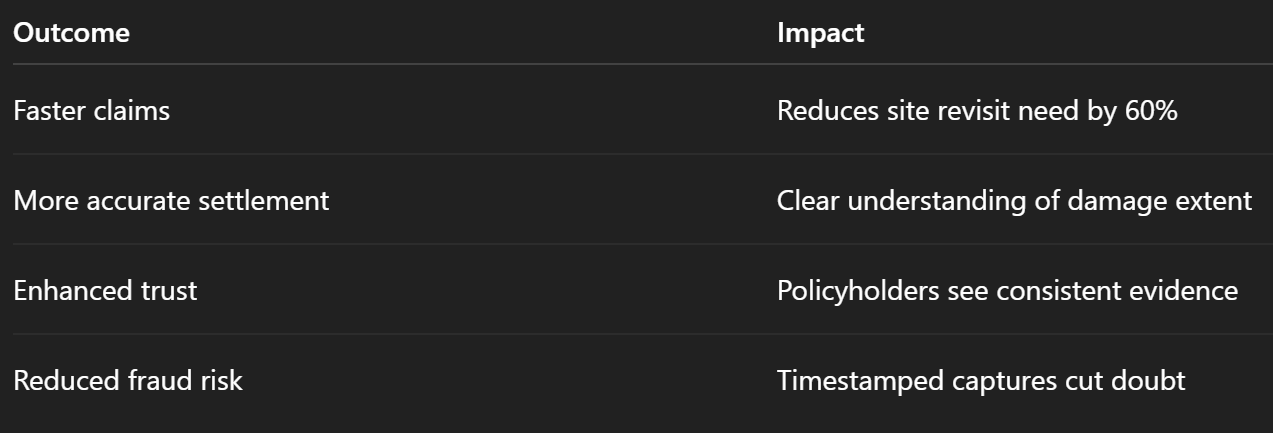
With AI‑annotated hotspots and detailed views, insurers can verify damage without revisits.

3. Enable Remote Assessment

Adjusters and underwriters can review damage from any location with full context.

Explore how this streamlines operations in Faster Insurance Approvals with 360 Documentation Software.

4. Provide Audit-Ready Visual Records

Every capture is timestamped and stored, making your documentation defensible and clear.

🛠️ How Insurance Teams Leverage 360° Imagery

Workflow example after property damage:

  1. Assess & Capture: Adjuster visits site, documents damage with a 360° camera.
  2. Generate Tour: Upload to software, which builds a navigable walkthrough.
  3. Annotate & Share: Add notes, labels, and share with policyholders or vendors.
  4. Review & Resolve: Underwriters inspect the tour to finalize claim.

This process aligns well with tips from The Role of 360° Virtual Tours in Insurance Inspections and Claims.

🏢 Real-World Applications

  • Fire or smoke damage in homes and condos
  • Flood or water intrusion in basements
  • Structural cracks or roof collapse
  • Vandalism or theft damage
  • Renovation disputes and scope documentation

🔍 Integrating Visual Tours into Your Claims Software

These tools seamlessly integrate with digital claims platforms:
  • Embed tour links into claim files
  • Sync annotations with adjustment spreadsheets
  • Auto-generate PDFs for reports
  • Archive tours for legal documentation

📈 Results You Can Expect

Adjusters using this method report faster resolution and improved customer satisfaction.

🧩 Feature Highlight: Why This Works

🌐 Geotag & Timestamp

Every tour is locked to a time and place, ensuring authenticity.

🔎 Interactive Annotations

Drop hotspots to detail damage zones, share snippets, or embed repair estimates.

☁️ Cloud Access & Collaboration

View tours on desktop or mobile—no special software required.

📁 Documentation Audit Trail

Save each tour permanently, simplifying future claims or audits.

🎯 Pro Tips for Insurance Field Teams

  • Capture immediately after discovery to avoid changes
  • Use consistent framing for comparability
  • Label tours by policy number or claim file for easy retrieval
  • Upload while on site if connectivity allows
  • Provide secure link-based sharing instead of bulk file uploads

Each of these posts dives deeper into strategy, tools, and best practices.

🚀 Take Action: Tools to Empower Your Workflow

Share this post
Cloudpano

Choose The Right 360° Camera

Insta360 ONE RS 1-Inch 360 Edition

  • Compact, ready to go anywhere

  • Interchangeable lens that’s upgradeable

  • Dual 1-inch sensors for improved clarity and low light performance

  • Dynamic range and 6K 360° capture

  • 360° photo resolution at 21MP

Learn More

Insta360 X4

  • 8K 360° video recording for ultra-detailed visuals.

  • 4K single-lens mode for traditional wide-angle shots.

  • Invisible selfie stick effect for drone-like perspectives.

  • 2.5-inch touchscreen with Gorilla Glass protection.

  • Waterproof up to 33ft for underwater shooting.

Learn More

Ricoh Theta Z1

  • 360° photo resolution in 23MP

  • Slim design at 24 mm thick

  • Built-in image stabilization for smooth video capture.

  • Internal 19GB storage for photo and video storage.

  • Wireless connectivity for remote control and sharing.

Learn More

Ricoh Theta X

  • 60MP 360° still images for high-resolution photography.

  • 5.7K 360° video recording at 30fps.

  • 2.25-inch touchscreen for intuitive control.

  • USB Type-C port for fast charging and data transfer.

  • MicroSD card slot for expandable storage.

Learn More
Property Marketing
Allows potential buyers to explore properties in detail from anywhere, enhancing the real estate marketing process.
Automotive Spins
Create an interactive virtual showroom and engage affluent digital buyers with live 360º video calls, all through the CloudPano mobile app for a complete automotive sales solution.
Interactive Floor Plans
Create 2D and 3D floor plans with measurements in 4 minutes or less, all from your phone. Download the Floor Plan Scanner app and get your first scan free.

360 Virtual Tours With CloudPano.com. Get Started Today.

Try it free. No credit card required. Instant set-up.

Try it free
Latest posts

See our other posts

Interviews, tips, guides, industry best practices, and news.

Drone Photography Video Marketing: Turn Aerial Photos Into Revenue

This guide explains how drone photographers can turn aerial photos into high-converting marketing videos to increase engagement and revenue. It covers why video outperforms photos alone, how photo-to-video automation works, where to distribute drone videos for maximum impact, and how photographers can scale services and monetize video without additional filming or editing.
Read post

How Drone Photographers Can Turn Aerial Photos Into Videos Automatically

This guide explains how drone photographers can automatically turn aerial photos into professional videos using photo-to-video automation and AI tools. It covers why video outperforms photos alone, how automated workflows work, where to use aerial videos for maximum impact, and how photographers can scale services and increase revenue without additional filming or editing time.
Read post

The Ultimate Guide to Real Estate Photo-to-Video Automation

This guide explains how real estate professionals use photo-to-video automation to create high-impact listing videos without filming or manual editing. It covers how AI transforms listing photos into engaging videos, where to distribute them for maximum exposure, and how agents and teams scale video marketing efficiently. Perfect for agents, brokers, and marketers looking to modernize real estate marketing with automation.
Read post



