How to Repurpose Listing Photos Into Video Content Automatically

Cloudpano
January 1, 2026
5 min read
Share this post

How to Repurpose Listing Photos Into Video Content Automatically 🎥🏡

Real estate marketing has entered a new era. Today’s buyers expect video—but most listings still start with photos. The good news? You don’t need to reshoot, re-edit, or learn complex video software to compete.

With modern AI video tools for real estate, you can repurpose real estate photos into engaging videos automatically. This shift from listing photo to video content is changing how agents market properties, increase engagement, and scale their efforts without adding more work.

In this guide, you’ll learn how automatic video creation for real estate works, why it’s so effective, and how to use it as part of a smart real estate video marketing strategy. A real estate video app helps realtors showcase properties with immersive video content buyers expect to see today.

Why Repurposing Listing Photos Into Video Matters 🚀

Most real estate marketing already starts with photos. They’re fast, familiar, and required for every listing. But photos alone often fall short in a video-first world.

Video helps buyers:

  • Understand layout and flow
  • Feel the scale of rooms
  • Build emotional connection
  • Stay engaged longer

By turning photos into video automatically, you get the best of both worlds:

  • No extra shoots
  • No editing bottlenecks
  • No added production cost

This is why repurposing real estate photos has become one of the fastest ways to upgrade marketing without reinventing workflows.
What Is Automatic Video Creation in Real Estate? 🤖

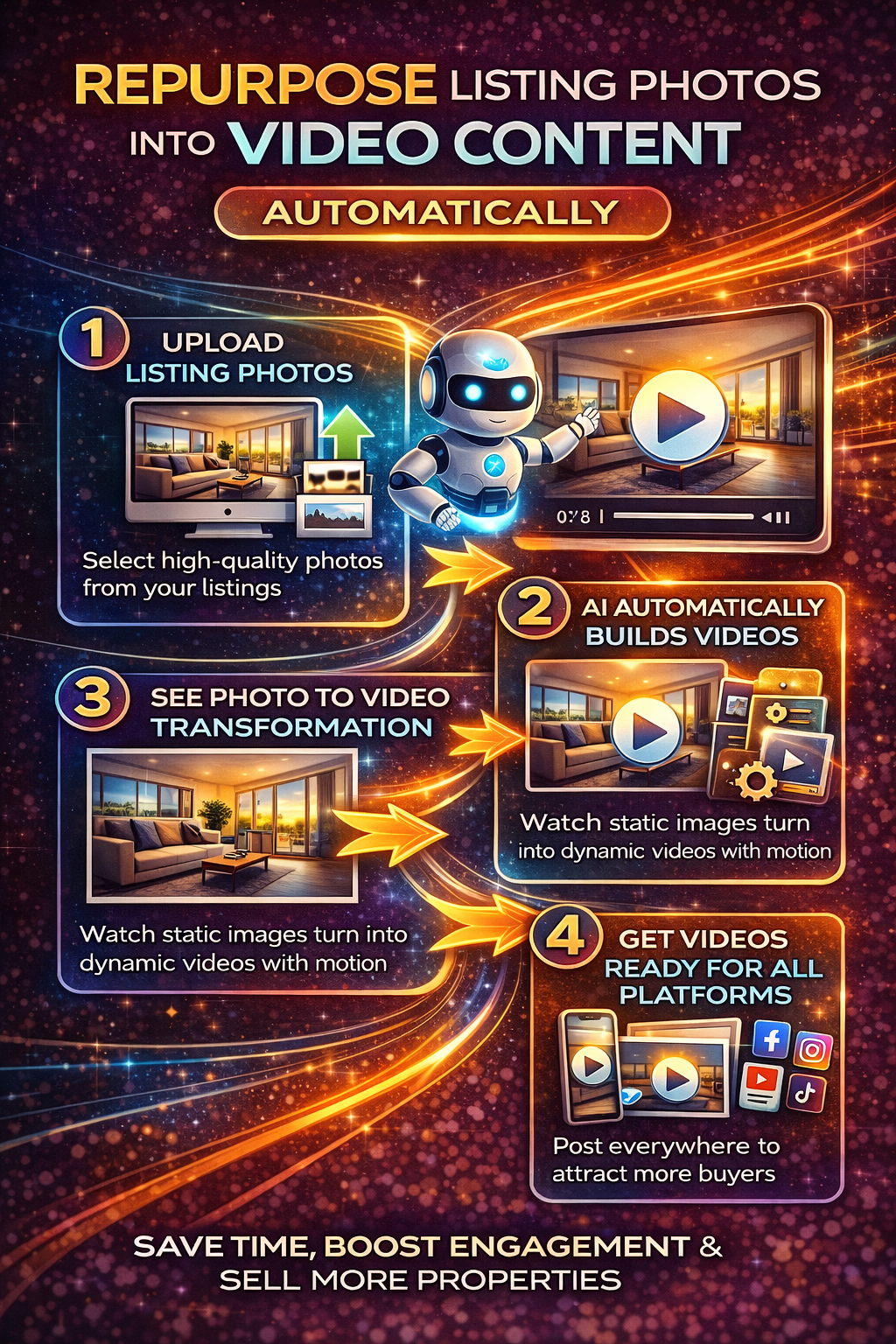
Automatic video creation real estate tools use AI to transform still photos into dynamic videos by applying motion, sequencing, transitions, and pacing—without manual editing.

These tools typically:

  • Analyze listing photos
  • Arrange them in a logical visual order
  • Add subtle motion (pan, zoom, transitions)
  • Format videos for different platforms
  • Output ready-to-publish video files

The result is professional-looking listing photo to video content created in minutes instead of hours.

Why Photo-to-Video Works So Well for Listings 🧠

The power of photo-to-video lies in psychology.

Video:

  • Holds attention longer than static images
  • Tells a visual story
  • Feels more immersive
  • Signals higher production quality

Even subtle motion makes a difference. When buyers see movement, their brains process the content as more engaging and memorable.

That’s why real estate video marketing consistently outperforms photo-only listings in engagement metrics.

Step 1: Start With High-Quality Listing Photos 📸

AI video tools work best when the source photos are strong.

Before converting photos to video:

  • Use bright, well-lit images
  • Declutter rooms
  • Maintain consistent angles
  • Avoid extreme wide-angle distortion

AI can enhance presentation—but it can’t fix poor photography. Clean inputs lead to better video outputs.

Step 2: Choose the Right AI Video Tools for Real Estate 🛠️

Not all video tools are designed for real estate workflows.

Look for AI video tools for real estate that:

  • Accept bulk photo uploads
  • Automatically sequence rooms logically
  • Create multiple video formats
  • Support vertical, square, and horizontal layouts
  • Require minimal setup

The right tool should feel like an extension of your listing process—not a separate editing job.

Step 3: Let AI Handle the Structure and Flow 🧭

One of the biggest advantages of automatic video creation is structure.

AI tools typically:

  • Start with exterior or hero shots
  • Move through main living spaces
  • Highlight kitchens and bedrooms
  • End with outdoor or lifestyle shots

This logical flow helps buyers understand the property better—something static photos struggle to do on their own.

Good structure turns photos into a story.

Step 4: Add Subtle Motion for a Premium Feel ✨

Motion doesn’t need to be dramatic to be effective.

AI video tools use:

  • Gentle zooms
  • Slow pans
  • Smooth transitions

These small movements:

  • Increase watch time
  • Add depth
  • Make listings feel more cinematic

When done right, motion feels natural—not distracting.

Step 5: Optimize Videos for Every Platform 📱💻

One of the biggest benefits of automatic video creation real estate tools is multi-platform output.

From a single photo set, AI can generate:

  • Vertical videos for Instagram and Reels
  • Square videos for social feeds
  • Horizontal videos for websites and listings

This flexibility allows you to deploy listing photo to video content everywhere buyers are—without extra work.

Step 6: Use Captions and Text Overlays Strategically 📝

Most video is watched without sound.

That’s why captions matter.

AI tools can automatically:

  • Add simple text overlays
  • Highlight key features
  • Reinforce messaging visually

Effective overlays improve accessibility and ensure your video communicates clearly—even on mute.

Step 7: Use Photo-to-Video as a Core Marketing Asset 🔁

One AI-generated video can power multiple campaigns.

You can use the same video for:

  • MLS listings
  • Property websites
  • Email marketing
  • Social media posts
  • Ads and promotions

This makes repurposing real estate photos incredibly efficient. One input fuels many outputs.

Step 8: Maintain Brand Consistency Across Videos 🎨

Consistency builds trust.

AI video tools allow you to:

  • Use the same color palette
  • Apply consistent pacing
  • Maintain a recognizable visual style
  • Keep branding uniform across listings

For teams and brokerages, this consistency elevates professionalism and strengthens brand recognition.

Step 9: Improve Engagement Without Increasing Workload ⚡

Traditional video creation takes time:

  • Editing
  • Rendering
  • Revisions
  • Platform formatting

With AI video tools for real estate, most of that disappears.

That’s how teams:

  • Increase output
  • Improve quality
  • Reduce turnaround time
  • Avoid burnout

Automatic video creation scales marketing without scaling effort.

Step 10: Use Photo-to-Video to Pre-Qualify Buyers ✅

Clear visualization helps buyers self-select.

When buyers can see:

  • Layout
  • Flow
  • Room relationships

They’re more confident before reaching out. This leads to:

  • Fewer wasted showings
  • Better-qualified inquiries
  • Smoother transactions

Video doesn’t just attract attention—it filters it.

Common Mistakes to Avoid ⚠️

When repurposing listing photos into video, avoid:

  • Overusing flashy effects
  • Adding too much text
  • Misrepresenting space or scale
  • Using the same cut everywhere without optimization
  • Publishing without reviewing accuracy

AI speeds things up—but human oversight still matters.

How Photo-to-Video Fits Into Modern Real Estate Video Marketing 📈

Video is no longer optional.

Listings without video feel incomplete—especially on social platforms. By converting photos into video automatically, you ensure every listing has video coverage.

This strengthens:

  • Online presence
  • Engagement metrics
  • Buyer perception
  • Competitive positioning

Real estate video marketing works best when it’s systematic—not sporadic.

The Future of Automatic Video Creation in Real Estate 🔮

AI video tools are evolving quickly.

Expect improvements in:

  • Smarter room sequencing
  • Personalized video variations
  • Faster rendering
  • Deeper platform integrations
  • More adaptive storytelling

Agents who adopt photo-to-video workflows now will be better positioned as video becomes the default expectation.

Don’t Miss These Articles:

Final Thoughts: Work Smarter, Not Harder 🎯

You already have the assets—your listing photos.

By learning how to repurpose real estate photos into video automatically, you unlock:

  • Faster content creation
  • Higher engagement
  • Better buyer understanding
  • Scalable marketing

With the right AI video tools for real estate, turning a listing photo to video is no longer a luxury—it’s a smart, efficient standard.

The future of real estate marketing belongs to those who can move faster, look better, and do more with less. 🚀

The Complete Virtual Experience Stack Starts Here:

Share this post
Cloudpano

Choose The Right 360° Camera

Insta360 ONE RS 1-Inch 360 Edition

  • Compact, ready to go anywhere

  • Interchangeable lens that’s upgradeable

  • Dual 1-inch sensors for improved clarity and low light performance

  • Dynamic range and 6K 360° capture

  • 360° photo resolution at 21MP

Learn More

Insta360 X4

  • 8K 360° video recording for ultra-detailed visuals.

  • 4K single-lens mode for traditional wide-angle shots.

  • Invisible selfie stick effect for drone-like perspectives.

  • 2.5-inch touchscreen with Gorilla Glass protection.

  • Waterproof up to 33ft for underwater shooting.

Learn More

Ricoh Theta Z1

  • 360° photo resolution in 23MP

  • Slim design at 24 mm thick

  • Built-in image stabilization for smooth video capture.

  • Internal 19GB storage for photo and video storage.

  • Wireless connectivity for remote control and sharing.

Learn More

Ricoh Theta X

  • 60MP 360° still images for high-resolution photography.

  • 5.7K 360° video recording at 30fps.

  • 2.25-inch touchscreen for intuitive control.

  • USB Type-C port for fast charging and data transfer.

  • MicroSD card slot for expandable storage.

Learn More
Property Marketing
Allows potential buyers to explore properties in detail from anywhere, enhancing the real estate marketing process.
Automotive Spins
Create an interactive virtual showroom and engage affluent digital buyers with live 360º video calls, all through the CloudPano mobile app for a complete automotive sales solution.
Interactive Floor Plans
Create 2D and 3D floor plans with measurements in 4 minutes or less, all from your phone. Download the Floor Plan Scanner app and get your first scan free.

360 Virtual Tours With CloudPano.com. Get Started Today.

Try it free. No credit card required. Instant set-up.

Try it free
Latest posts

See our other posts

Interviews, tips, guides, industry best practices, and news.

Creating a Repeatable System for AI Video Ads for Car Dealers to Drive Continuous Traffic

This 1,500-word deep dive shifts the automotive marketing narrative from temporary "campaigns" to a permanent "Traffic Engine." It outlines how to build an infrastructure where video content scales automatically with inventory. Key Pillars Covered: The Consistency Gap: Addressing why manual ad production fails to maintain local market presence and how automation creates a "perpetual showroom." Data-Driven Pillars: Utilizing the Inventory Management System (IMS) to trigger real-time, VIN-specific video renders. Technical SEO Deep-Linking: The importance of sending users from a video ad directly to the specific VDP, increasing dwell time and Google E-E-A-T signals. Creative Fatigue Solution: How the system prevents "ad blindness" by dynamically refreshing creative every time the lot inventory or pricing changes.
Read post

Why Car Dealership Video Automation is Essential for Dominating Local Market Share

This 1,500-word authority guide positions car dealership video automation not just as a tool for efficiency, but as an essential weapon for competitive local dominance. It explains how to move from a passive digital presence to an "omnipresent" regional authority. Key Pillars Covered: The Psychological Edge: How automated video tours build immediate rapport and "proof of life," outperforming competitors who rely on static imagery. Content Density & SEO: The technical correlation between video-enabled VDPs and increased "dwell time," which serves as a major signal for Google’s local Map Pack rankings. Precision Targeting: Using AI video ads for car dealers to move away from broad, wasteful spending toward high-intent, VIN-specific local targeting. The Sinker Strategy: Using personalized automated video responses to close the "trust gap" the moment a lead is captured.
Read post

Integrating CRM Data with an AI Video Generator for Inventory Listings for Seamless Operations

This 1,500-word technical authority piece explains how to break down the silos between customer data and creative production. It positions integrating CRM data with an AI video generator for inventory listings as the definitive move toward hyper-personalized automotive retail. Key Pillars Covered: Intent-Based Creation: How CRM data (like specific feature interests) can dictate the content of an automatically generated vehicle video. Technical Connectivity: A breakdown of API-first architectures, webhooks, and native CRM applications to achieve a "zero-click" workflow. Operational Flow: A look at the 5-step journey from a lead submitting a form to receiving a personalized video and tracking their engagement. Trust & E-E-A-T: Using data-driven video to provide verified, real-time transparency that builds dealership authority and user trust.
Read post



