How to Make Your Inventory Stand Out on Car Marketplace Sites

Cloudpano
January 21, 2026
5 min read
Share this post

How to Make Your Inventory Stand Out on Car Marketplace Sites 🚗🔥

(Evergreen SEO Guide + Proven Photo & Listing System for More Clicks, Leads, and Calls)

If you sell vehicles online, you already know the truth:

Buyers don’t “shop”—they scroll. 👀
And on every major marketplace, the winners aren’t always the cheapest listings…

They’re the listings that look the most trustworthy, clean, and professional.

That’s why learning how to stand out on car marketplace sites is one of the highest-ROI improvements a dealership, wholesaler, or independent seller can make—without changing inventory, pricing strategy, or ad spend.

In this evergreen guide, you’ll learn exactly how to make your inventory stand out on car marketplace sites using a repeatable listing system that works year-round.

Why “Standing Out” on Car Marketplace Sites Matters 📈

Marketplace shoppers move fast. They compare dozens of listings in minutes.

They’ll see:

  • thumbnails
  • price
  • mileage
  • trim
  • seller rating
  • distance

And then they decide what to click.

If your listing doesn’t grab attention in the thumbnail grid, it doesn’t matter how good your vehicle is. The buyer never gets far enough to notice.

So the real goal is this:

Win the scroll → ✅ Get the click → ✅ Earn trust → ✅ Convert to lead

How Buyers Actually Shop Cars Online 👀

Most sellers assume buyers follow this path:

  1. Read details
  2. Compare features
  3. Analyze pricing
  4. Make a logical decision

But the real buyer behavior is usually:

  1. Scroll results fast
  2. Click what looks best visually
  3. Skim photos
  4. Decide if the dealership feels legit
  5. Then check price/mileage
  6. Send a message or call 📞

Your presentation determines whether they ever reach Step 5.

That’s why learning to stand out on car marketplace platforms starts with visibility and trust.

The 3 Pillars of a High-Converting Marketplace Listing 🏆

To stand out, your listings must deliver:

1) Visual clarity (clean thumbnails & photos)
2) Consistency (inventory looks like a catalog)
3) Confidence (proof photos + structured details)

If you implement those 3 consistently, you’ll increase:

📈 clicks
📝 leads
📞 calls
📆 appointments
🚗 sales

🔥 The Marketplace Stand-Out Scorecard

Use this as your internal checklist for every vehicle.

Step 1: Win the Thumbnail Grid (The #1 Marketplace Hack) 🚀

If you want to stand out on car marketplace sites, focus on your thumbnails first.

Why? Because buyers don’t see your full photo set at first.

They see a grid.

✅ Best performing thumbnail angle:
📸 Front 3/4 (Driver or Passenger)

Make sure the hero photo is:

  • bright
  • clean background
  • properly framed
  • crisp
  • centered

What kills thumbnails ❌

  • busy lot clutter
  • cars behind the vehicle
  • poles behind roofline
  • harsh shadows
  • cropped mirrors / bumpers

If the thumbnail feels chaotic, the buyer scrolls.

Step 2: Make Your Photos Look Like a Catalog 📸✨

The best marketplace listings don’t look random.

They look like a catalog.

That catalog-feel creates:
✅ professionalism
✅ stability
✅ trust

Even if your dealership is small, consistent photos make you feel like a major dealer group.

This is a huge advantage on marketplaces.

Step 3: Use a Standard Shot List Every Time ✅

Most listings don’t lose because of price.

They lose because the buyer thinks:

“They didn’t show enough… what are they hiding?”

A standard shot list removes doubt.

Marketplace-Proven Shot List 📷

Exterior

  • Front 3/4 (left)
  • Front 3/4 (right)
  • Side profile
  • Rear 3/4 (left)
  • Rear 3/4 (right)

Interior

  • Driver seat / steering wheel
  • Dashboard
  • Infotainment screen
  • Center console
  • Rear seats

Proof

  • Odometer
  • Cargo/trunk
  • Engine bay (optional)
  • Tires/wheels (optional)

This is one of the easiest ways to stand out on car marketplace platforms because the listing feels complete.

Step 4: Clean Backgrounds = Clean Trust 🧼

One of the fastest ways to increase clicks is improving backgrounds.

Because messy backgrounds create subconscious signals like:
❌ low effort
❌ disorganized store
❌ questionable quality

Clean backgrounds create:
✅ professional perception
✅ premium feel
✅ vehicle becomes the hero

Even if you don’t use background replacement tools, just choosing a consistent photo area can massively upgrade perception.

Step 5: Lighting Strategy (Without Expensive Equipment) ☀️

You don’t need a photo booth.

You need better timing.

Best lighting conditions ✅

🌥️ bright overcast
🌅 morning
🌇 late afternoon

Worst lighting conditions ❌

☀️ noon sun (harsh shadows)
🌑 night / low light (grainy photos)

Pro tip: If you can’t control time, control placement. Park so sunlight hits the vehicle evenly—never head-on.

Step 6: Make Your Titles Easy to Click 📝

Marketplace shoppers scan titles quickly.

Use this evergreen formula:

Title Formula ✅

Year + Make + Model + Trim + 1 Key Feature

Examples:

  • 2020 Toyota Camry SE – Backup Cam + Bluetooth
  • 2019 Ford F-150 XLT – 4x4 + Crew Cab
  • 2021 Honda CR-V EX – Heated Seats + Sunroof

Good titles help you stand out on car marketplace pages because they reduce friction.

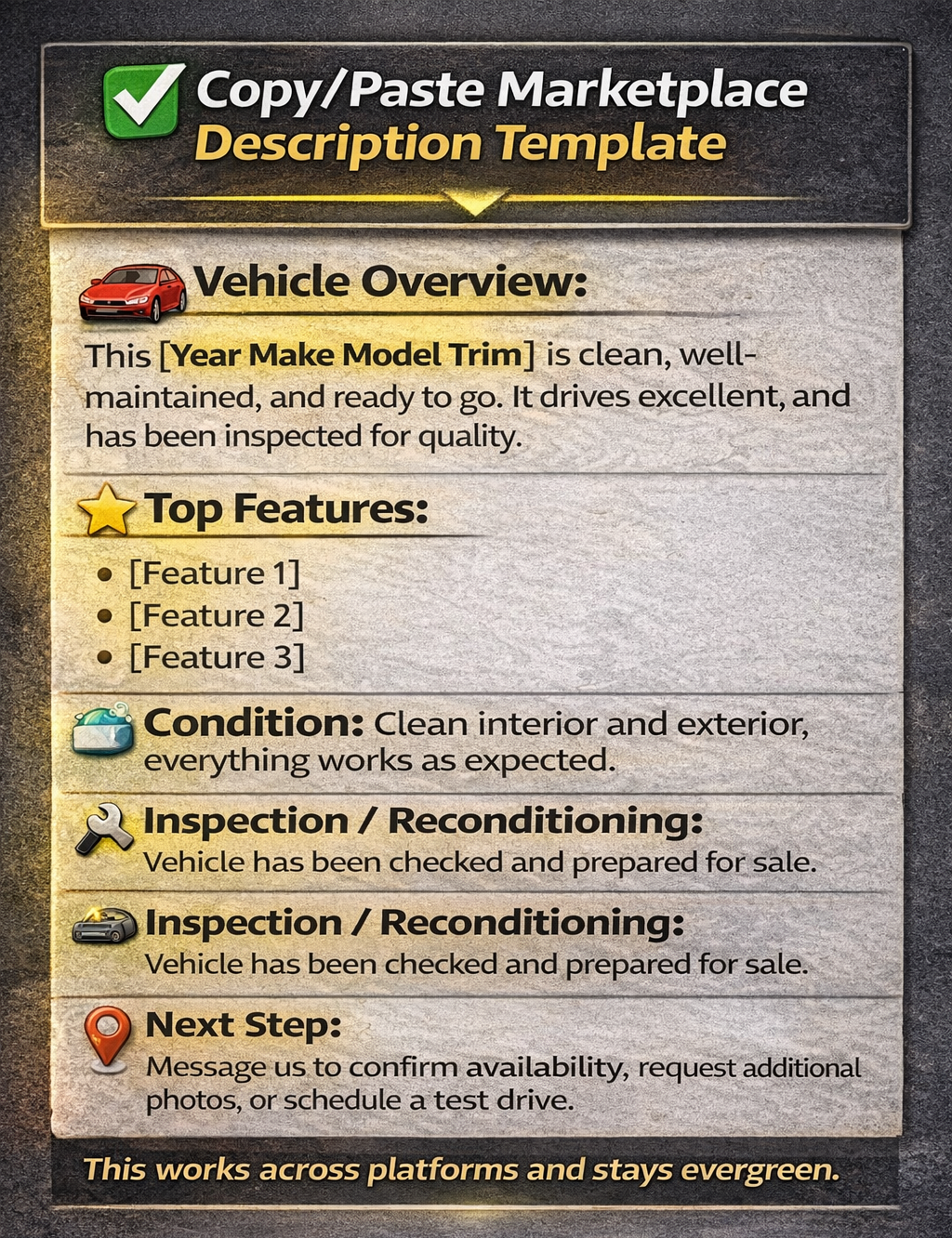
Step 7: Use Descriptions That Build Trust (Not Fluff) 🧠

Avoid weak descriptions like:
“Runs great. Clean. Call today.”

That does not differentiate your inventory.

Instead, use a consistent format that signals:
✅ transparency
✅ professionalism
✅ confidence
Step 8: Proof Photos = Higher Conversions 📈

Want a simple upgrade that increases trust instantly?

Add these proof shots every time:
✅ odometer
✅ trunk/cargo
✅ infotainment screen
✅ keys (optional)

Proof photos lower buyer uncertainty.

Lower uncertainty = more leads.

Step 9: Upgrade the “Lot to Listing” Workflow 🏁

A great listing isn’t about talent.

It’s about process.

Here’s a scalable workflow:

  1. Vehicle recon completed
  2. Quick clean + staging 🧼
  3. Standard photo set captured 📸
  4. Upload photos
  5. Enhance/edit for consistency
  6. Publish with correct order
  7. Respond fast to leads 📞

Speed matters. Fresh listings get more attention.

Common Mistakes That Prevent You From Standing Out ❌

Avoid these and your results will jump quickly:

❌ inconsistent angles
❌ dark interior photos
❌ no odometer shot
❌ messy backgrounds
❌ cropped mirrors/bumper
❌ random photo order
❌ vague descriptions
❌ no clear CTA

Final Thoughts: Better Presentation Wins the Scroll 🏆

If you want to consistently stand out on car marketplace sites, focus on the compounding advantage:

✅ cleaner photos
✅ consistent backgrounds
✅ standard shot lists
✅ better titles
✅ proof shots
✅ structured descriptions

Because in digital vehicle sales…

📸 Your photos ARE your showroom.
And the best-looking showroom gets the clicks, leads, and sales. 🚗💥

🚀 Your All-In-One Virtual Experience Stack Starts Here

Share this post
Cloudpano

Choose The Right 360° Camera

Insta360 ONE RS 1-Inch 360 Edition

  • Compact, ready to go anywhere

  • Interchangeable lens that’s upgradeable

  • Dual 1-inch sensors for improved clarity and low light performance

  • Dynamic range and 6K 360° capture

  • 360° photo resolution at 21MP

Learn More

Insta360 X4

  • 8K 360° video recording for ultra-detailed visuals.

  • 4K single-lens mode for traditional wide-angle shots.

  • Invisible selfie stick effect for drone-like perspectives.

  • 2.5-inch touchscreen with Gorilla Glass protection.

  • Waterproof up to 33ft for underwater shooting.

Learn More

Ricoh Theta Z1

  • 360° photo resolution in 23MP

  • Slim design at 24 mm thick

  • Built-in image stabilization for smooth video capture.

  • Internal 19GB storage for photo and video storage.

  • Wireless connectivity for remote control and sharing.

Learn More

Ricoh Theta X

  • 60MP 360° still images for high-resolution photography.

  • 5.7K 360° video recording at 30fps.

  • 2.25-inch touchscreen for intuitive control.

  • USB Type-C port for fast charging and data transfer.

  • MicroSD card slot for expandable storage.

Learn More
Property Marketing
Allows potential buyers to explore properties in detail from anywhere, enhancing the real estate marketing process.
Automotive Spins
Create an interactive virtual showroom and engage affluent digital buyers with live 360º video calls, all through the CloudPano mobile app for a complete automotive sales solution.
Interactive Floor Plans
Create 2D and 3D floor plans with measurements in 4 minutes or less, all from your phone. Download the Floor Plan Scanner app and get your first scan free.

360 Virtual Tours With CloudPano.com. Get Started Today.

Try it free. No credit card required. Instant set-up.

Try it free
Latest posts

See our other posts

Interviews, tips, guides, industry best practices, and news.

Property Manager Video Hub: Scaling Rental Visibility with AI Photo-to-Video Workflows

This article explains how property managers can use PhotoAIVideo to build a property manager video hub: a repeatable system for turning rental photos, amenity images, floor plans, exterior shots, and neighborhood visuals into reusable rental marketing videos. The main idea is that property managers do not just need more listing exposure. They need clearer visual answers that help renters decide whether to schedule a tour. PhotoAIVideo is positioned as a practical tool for creating: Unit availability videos Amenity highlight videos Neighborhood videos Tour reminder clips Leasing follow-up videos Owner marketing proof videos Social media rental teasers Application or availability reminder videos Key takeaways: Property managers already have the media they need; the challenge is organizing it and turning it into reusable video assets. A video hub helps teams create consistent videos across units, floor plans, amenities, communities, and owner updates. Rental videos can reduce friction by answering renter questions about layout, condition, amenities, parking, pet features, and community feel. One rental photo set can become multiple video outputs for listings, social media, email, text follow-up, tour reminders, and owner reporting. Photographers can sell AI rental video packages to property managers as an upsell. Brokerages with property management divisions can use the same workflow to standardize leasing content. The article ends with a step-by-step process, video hub framework, mistakes to avoid, visual recommendations, FAQs, and a CTA encouraging readers to use PhotoAIVideo to turn rental photos into a scalable video system for rental visibility.
Read post

YouTube Shorts Listing Teasers: The 3-Scene Structure for Higher Property Clicks

This article explains how real estate agents, photographers, brokerages, and property managers can use YouTube Shorts listing teasers to drive more property clicks and showing requests. The main idea is that a YouTube Short should not try to show the entire house. Instead, it should use a simple 3-scene structure: Scene 1: Hook — stop the scroll with the strongest property feature. Scene 2: Proof — show the visuals that support the hook. Scene 3: Click Path — tell the viewer what to do next. The article positions PhotoAIVideo as a practical tool for turning listing photos into short vertical videos for YouTube Shorts, Reels, open house promotion, and listing campaigns. Key takeaways: YouTube Shorts should create curiosity, not replace the full listing video. The strongest property feature should appear first, not necessarily the front exterior. Agents should build each Short around one click reason, such as backyard, kitchen, layout, neighborhood, open house, or price point. One listing can become multiple Shorts instead of one generic video. Photographers can offer YouTube Shorts teaser packs as a video upsell. Brokerages can standardize the 3-scene structure across agents. Property managers can use the same structure to promote rentals and tours. The article ends with practical scripts, visual recommendations, FAQs, a visual placement guide, and a CTA encouraging readers to use PhotoAIVideo to create YouTube Shorts listing teasers from property photos.
Read post

Video Retargeting for Listings: Turning Photo-Based AI Videos into Appointment Follow-Up

This article explains how Realtors, photographers, brokerages, and property managers can use photo-based AI videos as follow-up assets after someone shows interest in a listing. The main idea is that most real estate marketing focuses on getting the first click, but many buyers and sellers need multiple touchpoints before booking a showing or appointment. Video retargeting helps agents re-engage people who already clicked a listing, watched a Reel, opened an email, attended an open house, asked about a property, or went quiet after showing interest. PhotoAIVideo is positioned as a practical tool for turning listing photos into short follow-up videos, including: Feature reminder videos Layout explainer videos Neighborhood fit videos Open house recap videos Price update videos Seller proof videos Showing request videos Rental tour recovery videos Key takeaways: A first-touch listing video introduces the property, while a retargeting video answers the next likely question. Follow-up videos should be short, usually 10–30 seconds, and focused on one action. Agents should send different videos based on behavior, such as email clicks, open house attendance, listing views, or showing interest. A good video follow-up feels helpful, not pushy. Photographers can package retargeting video clips as an upsell. Brokerages can standardize video retargeting workflows across agents. Property managers can use the same strategy to recover rental leads and book tours. The article ends with a simple retargeting sequence, visual recommendations, FAQs, and a CTA encouraging readers to use PhotoAIVideo to turn listing photos into appointment-driving follow-up videos.
Read post


