
EyeSpy360 vs CloudPano: Pros and Cons You Need to Know

Cloudpano
August 10, 2025
5 min read
Share this post

🏡 EyeSpy360 vs CloudPano: Pros and Cons You Need to Know

When it comes to creating professional, immersive virtual tours, EyeSpy360 and CloudPano are two platforms you’ll hear about often. Both offer powerful features, but they’re designed for different types of creators — and knowing their strengths and weaknesses will help you make the right choice for your business.

In this guide, we’ll break down EyeSpy360 vs CloudPano, highlight their pros and cons, and explain why CloudPano is often the better pick for real estate professionals, photographers, and agencies.

🔍 Quick Overview

Before diving deep, here’s the short version:

  • EyeSpy360 is known for affordability and simplicity but has limitations in branding control and advanced marketing features.
  • CloudPano delivers a full suite of tools for 360 virtual tours, interactive floor plans, Google Street View publishing, live video chat, and white-label branding — making it a stronger long-term business asset.

If you’re also considering other platforms, check out our Kuula alternatives guide and Matterport alternatives comparison for a broader perspective.
✅ EyeSpy360 Pros

  1. Affordable Entry Point 💰 – Lower starting costs compared to some competitors.
  2. Basic Virtual Tour Creation 📸 – Easy for beginners to get started without heavy learning curves.
  3. Built-In Floor Plan Support 📐 – Allows simple integration of static floor plans into tours.
  4. No Expensive Camera Requirement 📱 – Works with consumer-level 360 cameras or even stitched panoramic photos.

❌ EyeSpy360 Cons

  1. Limited Branding Control 🚫 – Your tours carry EyeSpy360’s look and feel, which can reduce perceived professionalism for agencies.
  2. Fewer Marketing Features 📉 – Lacks integrated tools like lead capture forms, call-to-action buttons, or custom domains.
  3. No Live Video Tour Hosting 🎥 – Misses out on interactive, real-time client walkthroughs that can close deals faster.
  4. Restricted API & Integration Options 🔌 – Less developer flexibility for advanced workflows.

✅ CloudPano Pros

  1. Fully Branded, White-Label Tours 🏷 – Deliver tours under your own logo, URL, and brand identity.
  2. Live Video Chat Inside Tours 📞 – Instantly walk buyers through properties in real time, increasing engagement and conversions.
  3. Google Street View Publishing 🌍 – Ideal for real estate, commercial properties, and local businesses wanting better visibility.
  4. Interactive Floor Plans 📐 – Give viewers a clear property layout alongside immersive panoramas.
  5. Flexible Camera Support 📸 – Works with DSLR, Ricoh Theta, Insta360, GoPro Max, and even high-end 3D capture systems.
  6. Scalable for Agencies 📈 – Manage multiple clients and projects from one account with multi-user permissions.

❌ CloudPano Cons

  1. More Features to Learn 📚 – With great power comes a slightly steeper learning curve.
  2. Monthly or Annual Pricing 💳 – While competitive, you’ll want to choose an annual plan for the best value.

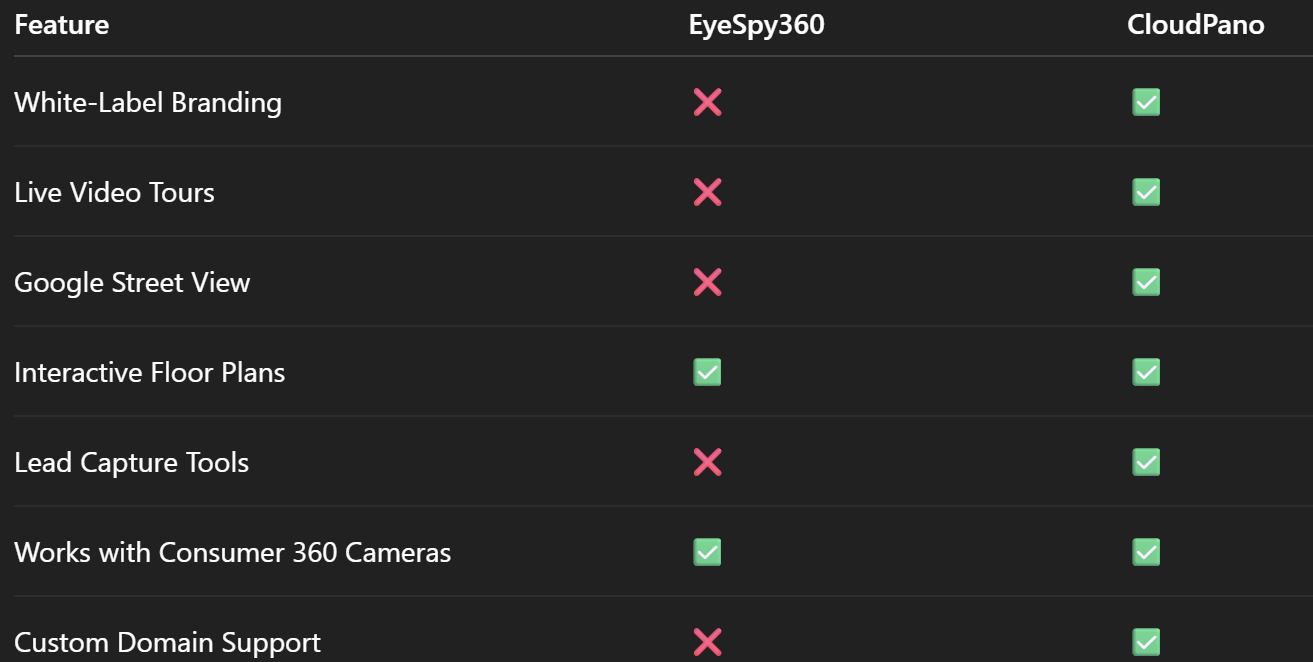
📊 Feature Comparison Table

🎯 Why CloudPano Wins for Real Estate Pros

For real estate agents and brokers, presentation and branding are everything. CloudPano gives you total control over how your tours look and feel, plus the live video chat feature transforms a simple 360 tour into an active sales tool.

Pair that with Google Street View publishing, interactive floor plans, and white-label branding, and you have a platform designed not just to show properties — but to sell them faster.

🔗 Related Articles to Explore

If you’re evaluating multiple platforms, these resources will help:

💡 Pro Tip: Start With CloudPano’s Free Trial

If you’re unsure, the best way to decide is to test. CloudPano offers a free trial so you can create a branded, interactive tour and experience the workflow first-hand.

📌 Final Verdict

EyeSpy360 is a decent starter tool, but for professionals looking to build a scalable virtual tour business, CloudPano delivers the better long-term ROI. Its blend of branding control, marketing tools, real-time client engagement, and Google integration makes it a serious business growth platform — not just a tour creator.

🚀 Call-to-Action (CTA) Block

Share this post
Cloudpano

Choose The Right 360° Camera

Insta360 ONE RS 1-Inch 360 Edition

  • Compact, ready to go anywhere

  • Interchangeable lens that’s upgradeable

  • Dual 1-inch sensors for improved clarity and low light performance

  • Dynamic range and 6K 360° capture

  • 360° photo resolution at 21MP

Learn More

Insta360 X4

  • 8K 360° video recording for ultra-detailed visuals.

  • 4K single-lens mode for traditional wide-angle shots.

  • Invisible selfie stick effect for drone-like perspectives.

  • 2.5-inch touchscreen with Gorilla Glass protection.

  • Waterproof up to 33ft for underwater shooting.

Learn More

Ricoh Theta Z1

  • 360° photo resolution in 23MP

  • Slim design at 24 mm thick

  • Built-in image stabilization for smooth video capture.

  • Internal 19GB storage for photo and video storage.

  • Wireless connectivity for remote control and sharing.

Learn More

Ricoh Theta X

  • 60MP 360° still images for high-resolution photography.

  • 5.7K 360° video recording at 30fps.

  • 2.25-inch touchscreen for intuitive control.

  • USB Type-C port for fast charging and data transfer.

  • MicroSD card slot for expandable storage.

Learn More
Property Marketing
Allows potential buyers to explore properties in detail from anywhere, enhancing the real estate marketing process.
Automotive Spins
Create an interactive virtual showroom and engage affluent digital buyers with live 360º video calls, all through the CloudPano mobile app for a complete automotive sales solution.
Interactive Floor Plans
Create 2D and 3D floor plans with measurements in 4 minutes or less, all from your phone. Download the Floor Plan Scanner app and get your first scan free.

360 Virtual Tours With CloudPano.com. Get Started Today.

Try it free. No credit card required. Instant set-up.

Try it free
Latest posts

See our other posts

Interviews, tips, guides, industry best practices, and news.

How Photographers Can Sell AI Listing Videos to Their Agent Clients

AI technology is transforming real estate media — and photographers who adapt early have a major competitive advantage. This in-depth guide explains how to sell AI listing videos to agent clients by positioning them as a premium marketing upgrade rather than a technical novelty. The article walks through practical sales strategies, pricing models, subscription opportunities, and common objections, while showing how AI-powered talking head videos can increase average order value and create recurring revenue. Readers will learn how to package AI listing videos into photo bundles, monthly content plans, and brokerage-wide solutions that elevate their services from simple media delivery to full marketing automation. If you’re a photographer looking to future-proof your business and increase profitability, this guide provides a clear roadmap to selling AI listing videos effectively.
Read post

How to Build a Recurring Revenue Stream Using AI Avatar Videos

AI avatar videos are transforming how real estate media professionals build stable, scalable businesses. In this comprehensive guide, we break down how to turn one-off video projects into a predictable recurring revenue real estate media model using AI-powered talking head technology. Instead of selling per-listing shoots, you’ll learn how to package automated listing videos, market updates, and branded content into monthly subscription offers that increase client retention and lifetime value. The article explores practical use cases, pricing strategies, workflow automation, competitive advantages, and common objections — all designed to help photographers, videographers, and marketing agencies shift from transactional income to recurring revenue. If you’re ready to move from freelancer to scalable media platform, this guide outlines a clear roadmap for building consistent monthly income in real estate marketing.
Read post

How to Create an AI Avatar Listing Video From One Headshot (Step-by-Step)

Learn how to create an AI avatar listing video from a single professional headshot using simple, step-by-step software tools. This guide walks real estate agents, brokers, and photographers through the exact process of turning one static image into a talking AI avatar that delivers listing presentations automatically. Discover how AI avatar listing videos save time, boost engagement, improve consistency across marketing channels, and help agents scale their video content without recording new footage. Perfect for anyone looking to modernize their real estate marketing with AI-powered automation.
Read post



