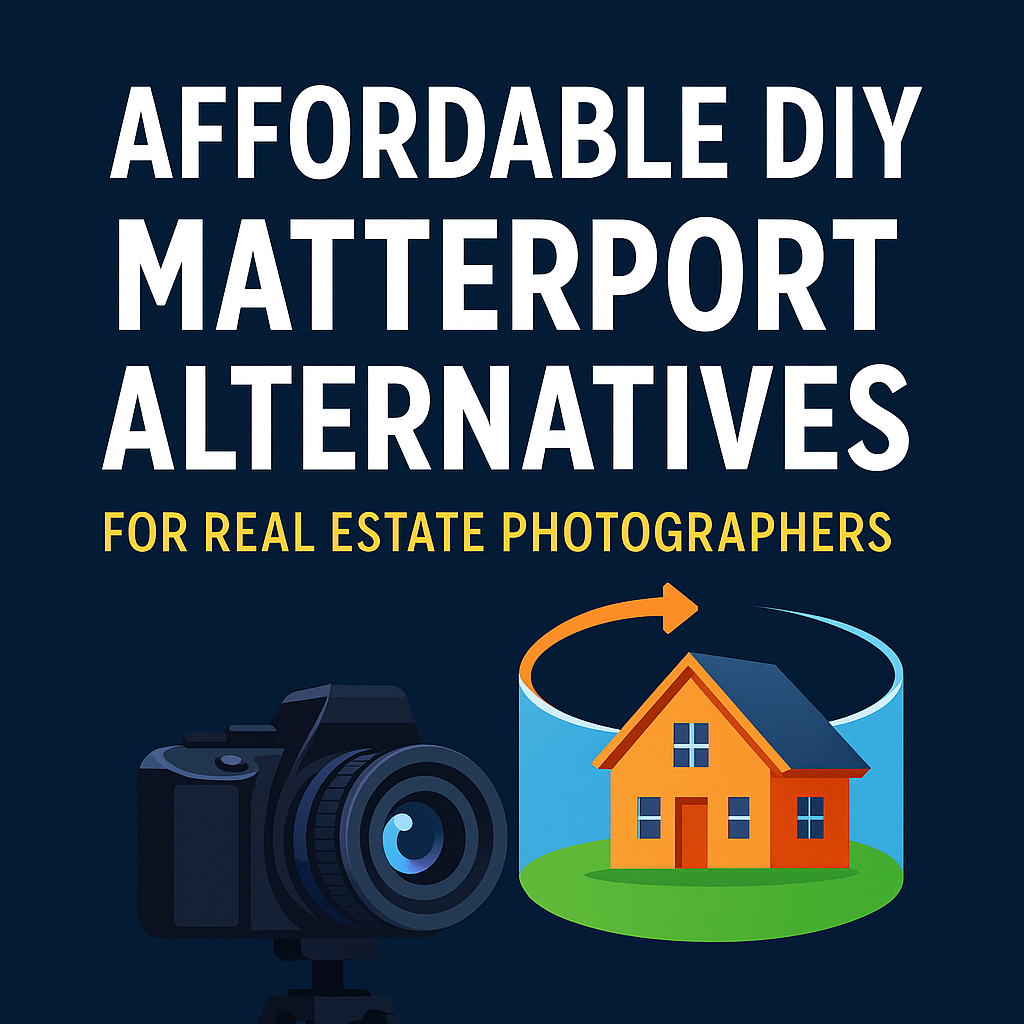
Affordable DIY Matterport Alternatives for Real Estate Photography Pros

Cloudpano
August 8, 2025
5 min read
Share this post

Affordable DIY Matterport Alternatives for Real Estate Photography Pros 🏡📸

Why CloudPano is the Smart Choice for Cost-Conscious Professionals

Introduction: The Problem with Matterport’s Price Tag 💸

If you’re a real estate photographer, you’ve probably heard of Matterport. It’s a household name in the 3D virtual tour space—but here’s the catch:

  • Monthly subscriptions can quickly add up.
  • The hardware investment is steep.
  • You’re often locked into a proprietary ecosystem.

For many real estate photography pros—especially those building their client base—these costs can eat into profit margins fast. That’s why it’s worth exploring DIY Matterport alternatives that give you pro-level results without breaking the bank.

Enter CloudPano—a platform designed to deliver stunning 360° virtual tours, Google Street View uploads, and property marketing tools at a fraction of the cost.

Why Go DIY? 🛠️

DIY virtual tour creation puts control, flexibility, and cost savings in your hands. Instead of being tied to high licensing fees or expensive cameras, you can:

✅ Use your own DSLR, mirrorless, or even affordable 360° cameras.
✅ Deliver fast turnarounds without waiting for external processing.
✅ Brand your tours and websites to your business—not your software provider.

With CloudPano, you can upload, edit, and publish 360° tours in minutes—all from your browser.
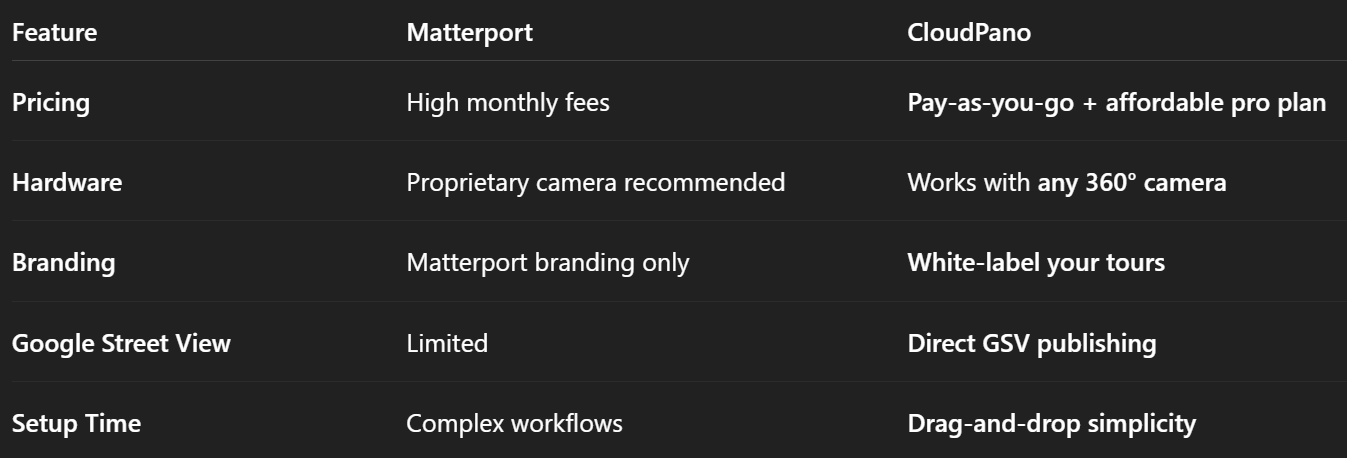
CloudPano vs Matterport: The Key Differences 🔍

This flexibility is exactly why photographers are choosing CloudPano as the top DIY Matterport alternative.

How Real Estate Photographers Use CloudPano 📷🏠

1. Fast 360° Virtual Tours

Shoot with a Ricoh Theta, Insta360, or DSLR + panoramic head, upload to CloudPano, and you’re live in minutes.

2. Custom Branding

Add your logo, colors, and contact details to every tour so your clients see your business front and center.

3. Lead Capture Forms

Turn your tours into lead generation tools with built-in form integration.

4. Google Street View Uploads

Offer GSV services to commercial real estate and local businesses—an extra revenue stream without extra software.

Why CloudPano Wins for Affordability 💰

Unlike Matterport, CloudPano doesn’t force you into a high subscription tier just to unlock basic features.

  • Free Starter Plan to test the waters.
  • One-time purchase options for single tours.
  • Affordable Pro Plus plan for unlimited tours and premium features.

For real estate photographers, that means lower overhead, higher profits.

Tips for Success with a DIY Matterport Alternative 🚀

  1. Invest in a Good 360° Camera – The Ricoh Theta Z1 or Insta360 X4 are photographer favorites.
  2. Build a Branded Portfolio – Use CloudPano’s white-label tools to stand out.
  3. Upsell Virtual Tour Add-Ons – Offer floor plans, GSV uploads, and video tours.
  4. Streamline Your Workflow – With CloudPano, you can create, edit, and publish in the same session.

📌 Related Article: Best Matterport Alternative for Virtual Staging and Tours

Real-World Example 📊

A freelance real estate photographer switched from Matterport to CloudPano and:

  • Cut monthly software costs by 70%.
  • Increased upsells with branded virtual tour add-ons.
  • Landed two new broker clients by offering GSV uploads as part of a listing package.

Conclusion: The DIY Advantage with CloudPano 🏆

If you want to deliver high-quality, immersive 3D tours without high subscription costs, CloudPano is the clear choice. It’s flexible, affordable, and built for professionals who want full control over their virtual tour business.

🚀 Ready to Try CloudPano?

Here’s how to get started today:

Share this post
Cloudpano

Choose The Right 360° Camera

Insta360 ONE RS 1-Inch 360 Edition

  • Compact, ready to go anywhere

  • Interchangeable lens that’s upgradeable

  • Dual 1-inch sensors for improved clarity and low light performance

  • Dynamic range and 6K 360° capture

  • 360° photo resolution at 21MP

Learn More

Insta360 X4

  • 8K 360° video recording for ultra-detailed visuals.

  • 4K single-lens mode for traditional wide-angle shots.

  • Invisible selfie stick effect for drone-like perspectives.

  • 2.5-inch touchscreen with Gorilla Glass protection.

  • Waterproof up to 33ft for underwater shooting.

Learn More

Ricoh Theta Z1

  • 360° photo resolution in 23MP

  • Slim design at 24 mm thick

  • Built-in image stabilization for smooth video capture.

  • Internal 19GB storage for photo and video storage.

  • Wireless connectivity for remote control and sharing.

Learn More

Ricoh Theta X

  • 60MP 360° still images for high-resolution photography.

  • 5.7K 360° video recording at 30fps.

  • 2.25-inch touchscreen for intuitive control.

  • USB Type-C port for fast charging and data transfer.

  • MicroSD card slot for expandable storage.

Learn More
Property Marketing
Allows potential buyers to explore properties in detail from anywhere, enhancing the real estate marketing process.
Automotive Spins
Create an interactive virtual showroom and engage affluent digital buyers with live 360º video calls, all through the CloudPano mobile app for a complete automotive sales solution.
Interactive Floor Plans
Create 2D and 3D floor plans with measurements in 4 minutes or less, all from your phone. Download the Floor Plan Scanner app and get your first scan free.

360 Virtual Tours With CloudPano.com. Get Started Today.

Try it free. No credit card required. Instant set-up.
Try it free
Latest posts

See our other posts

Interviews, tips, guides, industry best practices, and news.

Choosing ADA Compliant Walkthrough Software: What to Look For

Not all walkthrough software is built with accessibility in mind, and choosing the wrong platform can quietly exclude a meaningful portion of your audience. This guide breaks down exactly what to look for when evaluating ADA compliant walkthrough software — from keyboard navigation and screen reader support to alt text and caption features — plus the key questions to ask vendors before you commit.
Read post

Should Your Virtual Tour Be ADA Compliant, Even If It's Not Required?

Not every business is legally required to make its virtual tours ADA compliant—but accessibility is still worth considering. This article explores why accessible virtual tours can help businesses reach more people, improve user experience, support inclusive digital experiences, and demonstrate a commitment to accessibility. Discover practical ways to make your virtual tours more accessible and why doing so can be a smart business decision.
Read post

Why the Difference Between ADA Compliant and Non-Compliant Virtual Tours Matters for Your Business

ADA compliance can make a significant difference in how customers experience your virtual tours and interact with your business. This article explains the key differences between ADA compliant and non-compliant virtual tours, including accessibility features such as keyboard navigation, screen reader support, alt text, color contrast, and video captions. Discover how creating more accessible virtual tours can improve the customer experience, support inclusive marketing, reduce accessibility risks, and help your business serve a wider audience.
Read post